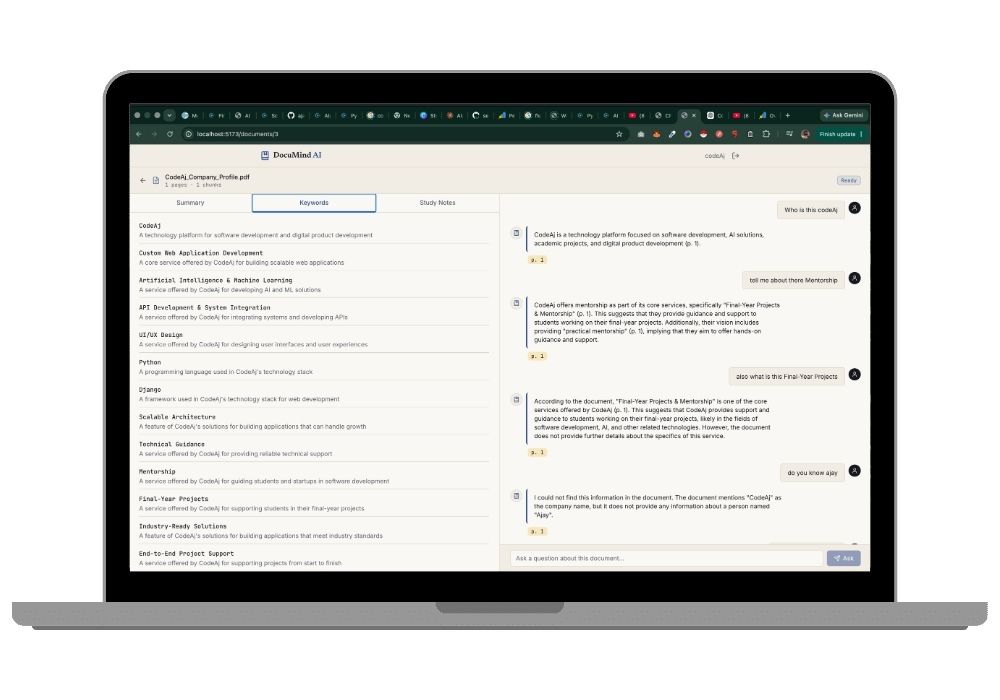
DocuMind AI — Chat With Any PDF | RAG-Based Python Final Year Project With Source Code
Upload a PDF, ask it anything, get answers that cite the exact page. A working RAG system built with Flask, Chroma and Groq — full source code, report support, no OCR guesswork.
Technology Used
Python 3.11 | Flask 3 | React 18 + Vite | Chroma Cloud | Groq API | PyMuPDF | SQLite | Tailwind CSS


What This Project Actually Does
You upload a PDF. Then you ask it questions like you'd ask a friend who already read the thing. "What's the penalty clause in this contract?" "Summarise chapter 4." And DocuMind answers — but here's the part that matters for your viva — every answer comes with a page citation like p. 14, pulled from the actual document.
It doesn't make things up. That's the whole point.
Under the hood it's a Retrieval-Augmented Generation system. Plain English version: an LLM has never seen the PDF you just uploaded, so instead of asking it to magically know, the app chops the document into 250-word chunks with 50-word overlap, converts each chunk into a vector, stores them in a Chroma collection, and when you ask something it fetches the 5 most relevant chunks and hands them to the model as context. The model answers from those chunks only. That's grounding, and that's the difference between an AI that helps and an AI that lies confidently.
On top of the Q&A, there are three one-click tools: a document summary, a glossary of key terms with definitions, and structured study notes. All cached after first generation so you're not burning API calls every time you click.
Key Features
Page-cited answers, not vibes
PyMuPDF extracts text page-by-page, so every chunk carries a [Page N] prefix into the prompt. When Groq answers, the frontend renders those citations as small monospace pills next to the response. Your examiner can literally open the PDF and verify.
Scanned PDFs get rejected up front, not silently
If extraction pulls fewer than 200 characters out of the file, the app knows it's an image-only scan with no text layer and refuses the upload with a clear message. No mysterious empty answers ten minutes later.
Non-blocking ingestion
Upload returns instantly. A background threading.Thread handles extraction, chunking and embedding while the frontend polls GET /api/documents/:id every 2 seconds until status flips to ready. Nice progress UX, no Celery, no Redis.
Three AI tools beyond chat
POST /api/tools/:id/summary, /keywords, and /notes — each generates once, then serves from the Artifact table. Fast on repeat clicks.
Proper JWT auth with real scoping
Flask-JWT-Extended handles tokens; axios interceptors inject them automatically. And if you try to fetch someone else's document, you get a 404, not a 403 — because a 403 tells an attacker the resource exists.
Conversation memory
The last 4 messages ride along with every query, so follow-ups like "explain that in simpler terms" actually work.
Clean deletes
DELETE /api/documents/:id removes the Chroma collection, the file on disk, and every related row — chats, artifacts, all of it. No orphaned vectors quietly costing you quota.
Real-World Applications
Law firms use exactly this pattern to query hundred-page contracts. Insurance teams run it over policy documents. Hospitals point it at clinical guideline PDFs so a doctor doesn't scroll through 200 pages at 3 AM.
Closer to home: research scholars dumping twelve papers in and asking "which of these used a transformer architecture," or a student loading the entire Operating Systems textbook and generating study notes per chapter the night before an exam. Compliance teams, HR policy lookups, technical documentation search — same architecture, different PDF.
You can pitch any of these in your presentation and it'll hold up, because the system genuinely does that.
Who Should Buy This
If you're a BCA or MCA student in your final semester and your guide keeps saying "do something in AI, not another CRUD app" — this is that. It's an actual RAG pipeline, not an OpenAI API wrapper with a chat box slapped on top.
Also good for BTech CSE students who want a project that survives cross-questioning. There's a vector database, an embedding model, a chunking strategy with a defensible overlap value, and a retrieval step you can draw on a whiteboard. Examiners love that.
Honest bit: if you've never touched Python before and your submission is in three days, this will be tight. Doable, but tight. The setup itself takes about 20 minutes; understanding it well enough to defend takes an evening. If that's your situation, our project setup session exists exactly for this.
What's genuinely hard: explaining why 250-word chunks with 50-word overlap and not 500 with none. (Answer: smaller chunks mean tighter retrieval; the overlap stops a sentence getting sliced in half across a boundary and losing meaning. Remember that one, it comes up.)
What's easier than it looks: the whole thing runs on two free-tier services and a SQLite file. No Docker. No Postgres. No Kubernetes tutorial rabbit hole at midnight. Two terminals, one laptop, done.
Why CodeAj
You get the complete codebase — every route file, every service module, chunker.py, vector_store.py, ingestion.py, the Tailwind config with the Margin Note tokens, all of it. Nothing stripped out. Alongside that there's a college-format project report with the architecture diagram, module descriptions, and the RAG methodology written up properly, plus setup support if the Chroma tenant config or a Groq model deprecation trips you up. We've dealt with both. If you're browsing similar builds, the AI and ML final year projects section has more in this family, and the Flask projects with source code collection covers the backend patterns used here.
Frequently Asked Questions
Extra Add-Ons Available – Elevate Your Project
Add any of these professional upgrades to save time and impress your evaluators.
Live 1-on-1 Mentorship
Personal session with an expert developer
Project Setup
We'll install and configure the project on your PC via remote session (Google Meet, Zoom, or AnyDesk).
Source Code Explanation
1-hour live session to explain logic, flow, database design, and key features.
Want to know exactly how the setup works? Review our detailed step-by-step process before scheduling your session.
₹999
Custom Documents (College-Tailored)
- Custom Project Report: ₹1,500
- Custom Research Paper: ₹1,000
- Custom PPT: ₹800
Fully customized to match your college format, guidelines, and submission standards.
Project Modification
Need feature changes, UI updates, or new features added?
Charges vary based on complexity.
We'll review your request and provide a clear quote before starting work.