AI-Generated Text Detection Using Machine Learning with SHAP Explainability Python Final Year Project with Source Code
Paste any paragraph and find out if a human or an LLM wrote it — with a calibrated confidence score and the exact linguistic reasons behind the verdict. Complete Python final year project, Flask app, trained models, source code included.
Technology Used
Python 3.10 | Flask 3.0 | spaCy 3.7 | scikit-learn 1.5 | TensorFlow 2.16 | SHAP 0.45 | textdescriptives 2.8 | Jinja2 | Pandas | NumPy | Matplotlib | Seaborn | Joblib


Abstract
Every college in India is currently having the same argument in the staff room. Students are submitting assignments that read a little too clean, and nobody can prove anything. That's the exact gap this project fills.
This is a CPU-only, fully explainable machine learning system that classifies a piece of text as AI-generated or human-written. Instead of throwing a giant transformer at the problem and calling it a day, it pulls 32 handcrafted linguistic features out of the text using spaCy and textdescriptives — readability scores, POS-tag ratios, dependency distances, lexical diversity, punctuation rates — and feeds those into three different models. A 1-D CNN built in TensorFlow/Keras, a Random Forest from scikit-learn, and a Calibrated Random Forest that wraps the RF in CalibratedClassifierCV with isotonic regression.
The interesting result, and the one your examiner will actually ask about, is that calibration drops log loss from roughly 0.28 to 0.26 while accuracy stays flat around 0.88. Meaning: the model's confidence numbers start telling the truth. A 90% prediction actually behaves like a 90% prediction. That's a real finding you can defend, not a vanity metric.
And every single prediction comes with a SHAP breakdown showing the top 5 features that pushed the decision one way or the other. No black box.
What This Project Actually Does
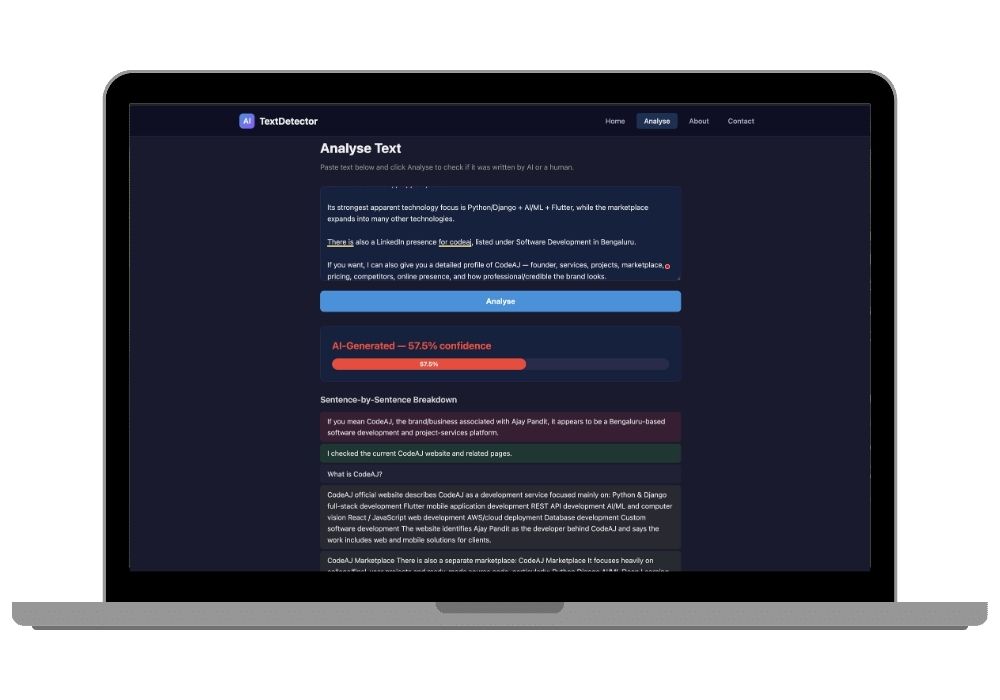
You open the Flask app in your browser at http://127.0.0.1:5001, paste in a chunk of text, and hit analyse. Two things come back.
First, a document-level verdict — AI-generated or human-written — with a confidence bar. Second, a sentence-by-sentence breakdown where each sentence gets colour-coded. Red means that sentence looks machine-written. Green means it reads human. This matters because real submissions are usually mixed. A student writes three paragraphs themselves and then panics and pastes in two from ChatGPT, and a document-level verdict alone would miss that completely.
Underneath, src/features.py runs the spaCy pipeline over your text, computes all 32 features, scales them with the saved scaler.joblib, and passes the vector to whichever model is loaded. The models load once at startup, so predictions come back fast instead of making you wait while TensorFlow warms up on every request.
The 32 Features It Looks At
These aren't vague "text statistics." They're grouped and documented, which makes the viva a lot easier:
- Readability (5) — Flesch Reading Ease, Flesch-Kincaid Grade, Gunning Fog, Coleman-Liau, ARI
- Descriptive statistics (5) — mean, median and standard deviation of sentence length, plus mean and std of token length
- Raw counts (2): total tokens and total sentences
- POS-tag ratios (9) — NOUN, VERB, ADJ, ADV, PRON, ADP, DET, CCONJ, PUNCT
- Syntactic complexity (3) — mean and std dependency distance, mean parse tree depth
- Lexical diversity: type-token ratio, unique word ratio, hapax legomenon ratio
- Punctuation rates (5) — commas, periods, question marks, exclamations, semicolons
Here's the thing about this feature set. LLMs write with unusually consistent sentence lengths and a slightly flatter punctuation profile than humans do. The standard deviation of sentence length is doing a lot of quiet work in this model, and SHAP will show you exactly that.
Key Features
- Paste a 500-word essay and get a verdict back in under two seconds on a normal laptop, no GPU anywhere in the pipeline
- Sentence-level colour coding that flags the specific lines that look machine-written, not just an overall score
- Top 5 SHAP features shown with every result, so the app explains why it decided what it decided
- Three models trained and compared side by side — CNN, Random Forest, Calibrated RF — with accuracy, precision, recall, F1, ROC-AUC and log loss for each
- A calibration reliability diagram saved to
outputs/calibration_diagram.pngthat visually proves the confidence scores are honest - Dark-themed four-page web app: home, analyse, about, contact — built with Flask and Jinja2 templates, no React, no npm, no build step to break
- Mobile responsive with a working hamburger nav, so screenshots for your report look decent on any screen
- Full visualisation set generated during training: confusion matrices, ROC curves, CNN training history, SHAP bar, beeswarm and waterfall plots — that's your entire results chapter, already plotted
- Jupyter notebook (
train_notebook.ipynb) with inline plots if your guide wants to see the training run cell by cell
Real-World Applications
University submission portals are the obvious one. A department can run incoming assignments through this and flag suspicious ones for a human to review — and because it's explainable, the professor has something concrete to point at during the conversation with the student.
Beyond campus: newsrooms verifying freelance copy before publishing, hiring teams screening cover letters and SOPs, content agencies auditing what their writers actually deliver, and moderation teams on review sites trying to catch bulk-generated fake reviews. Any place where "did a person write this" is a question worth an answer.
What's Genuinely Hard (And What's Easier Than It Looks)
The hard part is feature extraction speed. Running spaCy's full pipeline across 1,332 texts takes several minutes on CPU, and if you try to train on a much bigger dataset without batching, you'll be staring at a terminal for a long time. Plan your training run before your deadline day, not during it.
The easy part surprises most people: there's no GPU requirement, no CUDA install, no Node build. You create a virtual environment, install from requirements.txt, download one 12 MB spaCy model, and run python app.py. The pre-trained models are already sitting in models/, so if you just want to demo the app first and understand the training later, you can. Fifteen minutes from download to working browser tab.
Who Should Buy This
If you're a student who needs a working project for your college submission, final-year project, semester project, internship, or academic demonstration, this is for you. Whether you're studying BCA, B.Tech, MCA, M.Tech, Computer Science, IT, AI, Data Science, or another related field, you can choose a project that fits your requirements. If you need the source code, project report, documentation, or help setting up and running the project, CodeAj gives you the resources and support to get started faster.
It fits especially well if your syllabus wants NLP plus machine learning plus a deployed interface in one submission. You get all three without having to stitch three tutorials together.
Why CodeAj
You get the complete codebase — app.py, all four Jinja templates, features.py, train.py, predict.py, the notebook, the saved .joblib and .h5 model files — plus a project report written in the format most Indian universities expect, with abstract, literature survey, methodology, results and conclusion already structured. If something breaks during setup, our team walks you through it instead of leaving you on a forum thread from 2019. Browse more AI final year projects if you want to compare options, check the wider machine learning projects with source code collection, or look at our plagiarism checker project if academic integrity is the theme your department wants.
Frequently Asked Questions
Extra Add-Ons Available – Elevate Your Project
Add any of these professional upgrades to save time and impress your evaluators.
Live 1-on-1 Mentorship
Personal session with an expert developer
Project Setup
We'll install and configure the project on your PC via remote session (Google Meet, Zoom, or AnyDesk).
Source Code Explanation
1-hour live session to explain logic, flow, database design, and key features.
Want to know exactly how the setup works? Review our detailed step-by-step process before scheduling your session.
₹999
Custom Documents (College-Tailored)
- Custom Project Report: ₹1,500
- Custom Research Paper: ₹1,000
- Custom PPT: ₹800
Fully customized to match your college format, guidelines, and submission standards.
Project Modification
Need feature changes, UI updates, or new features added?
Charges vary based on complexity.
We'll review your request and provide a clear quote before starting work.
Project Files
 Reviews
What Our Students Say
He explained the project clearly and thoroughly. He was very supportive throughout the process and was always available to help when needed. His guidance and assistance made it easier to understand the project and complete tasks effectively.
I had a very good experience with CodeAj Marketplace. The team is professional and supportive, especially Ajay Pandit sir who guides clearly throughout the project. The work was completed neatly and according to requirements. A great place for learning and project development. Highly recommended for students and developers.
Excellent explanation! Concepts are explained in a very simple and understandable way. It really helped me a lot in improving my knowledge. Great work!
Codeaj was really helpful with my project, especially during the customization part. He didn't just do the work but also took the time to explain everything, from the project structure and database to the code itself. It was a huge help, especially for students trying to understand how everything fits together. I really appreciated his support and the way he made things easier to follow.
Working with CodeAj Marketplace has been such a positive experience. The projects delivered are original, carefully crafted from scratch, and tailored to meet expectations with impressive attention to detail. What really makes him stand out is his willingness to go the extra mile — not just in creating outstanding work, but also in helping others understand how everything functions. He explains things clearly, addresses questions patiently, and ensures the whole process feels like a learning journey instead of just a handover. On top of the technical expertise, his calm and approachable personality makes communication effortless. No unnecessary stress, just smooth collaboration and genuine support. I truly value the dedication he brings to his work and would highly recommend him to anyone in search of high-quality, authentic projects.
I purchased a project from him recently and I have to say it's one of the best decisions I've made. The project was absolutely beautiful, built completely from scratch with no shortcuts, and perfectly matched what I wanted. What makes him stand out is not just his ability to create anything we ask for, no matter how complex, but also the way he helps us understand every part of it. He patiently explains the process, clears doubts, and makes sure we actually learn from the project instead of just using it. On top of his skills, his personality is amazing — he's calm, chill, and very friendly to talk to. There's no stress when working with him, only smooth communication and genuine support. I truly appreciate the effort he puts in and would highly recommend him to anyone looking for original, high-quality projects.
I received my project from CodeAJ Marketplace on time, and the work was very neat and well-presented. The team maintained good communication and delivered everything as promised. I appreciate their timely completion and professional approach.
I sincerely thank Mr. Ajay Pandit for his constant support and valuable guidance throughout the project. His timely advice, encouragement, and expertise greatly contributed to the successful completion of the work. I'm truly grateful for his mentorship.
I had an outstanding experience with CodeAj while developing my mobile app. Their team was incredibly cooperative, ensuring every customization I requested was implemented flawlessly. The service was top-notch, and the final product exceeded my expectations. Highly recommend CodeAj for anyone seeking professional and reliable app development services! 11/10
I would like to sincerely thank Ajay Pandit for providing me with the project. His guidance and explanation of the system's architecture, modules, and AI integration were extremely helpful in understanding the project thoroughly. Ajay's support played a key role in helping me implement the hotel booking and payment module effectively. His willingness to clarify concepts and walk me through complex logic made the learning process smooth and insightful. I truly appreciate his mentorship and the time he dedicated to ensuring I was well-prepared for both the development and presentation of this project.
I had a great experience with the project I purchased. It was well-structured and met all my expectations. The team was responsive and supportive throughout, addressing all my queries promptly. Highly recommended for anyone looking for quality projects and good service.
I'm really thankful to Codeaj for helping me with my project explanation and guiding me throughout. Your support made everything much easier and clearer.
The project he made was wonderful, and the way he patiently listened, understood all my ideas and presented them so well in the project, was amazing. I would highly recommend him to everyone.
I would like to sincerely thank Ajay Pandit for providing me with the project. His guidance and explanation of the system's architecture, modules, and AI integration were extremely helpful in understanding the project thoroughly.
Too good experience, I love their projects and they are available for you to help, they are incredible good. Must avail their services. I am happy customer.
The team was very supportive and their explanation was very good, they are clarifying each and every doubts with lots of patience. Highly recommended for quality projects.
I really like their work and they made good project in less amount.
Thank you, CodeAj Bro, for supporting the Doctor Appointment System project. Your guidance during the project setup, installation, and report creation was very helpful and greatly appreciated.
One of the best Software Developer provide the best setup environment for project, good explain skills, and good technical skills, step by step explain project through google meet and budgetly price project Available.
Thank you so much for your excellent work on our project! Your kindness and clear explanations made the entire process smooth and enjoyable. Highly recommend!
Really very supportive, helpful and kind, loving nature. Available for any time for any query, highly recommend to get projects from him.
Awesome projects. They support on setting up the project after purchasing. Completely legal one. Affordable projects too.
Code AJ guide team are very formal, friendly to setup project step by step and explain each question 🙂
Thank you codeAj, Best site to get your project done quickly, with fast responses and instant clarification of any project-related doubts.
I really liked the work, and they solved my issues very well too.
They provide very good service and code also running condition and they fulfill all the queries it's very helpful.
Really helpful, makes things easy to understand and very kind nature, you can look forward to get help from here.
Thank you so much for building the Project for my requirement.
Looking forward to many many collaborations and always tend to buy the projects.
I am so satisfied with codeAJ because of his help.
Thank you so much sir for your support and help.
Ajay bro has excellent knowledge and his response is nice.
This is a great app I love it with good functionality.
Thank you so much for your help and support.
Highly recommended for the projects.
Loved the project work.
It is super for students.
I recently purchased this project online and I am very satisfied with it. The project was well-designed, properly organized, and included all the necessary files and documentation. The source code was clean, easy to understand, and worked as expected. A special appreciation for the project explanation and setup session. The session was detailed and easy to understand, covering both the project implementation and the complete setup process. All my questions were answered clearly, which helped me understand the project much better. Thanks for giving your time.