MahaTraffic: AI Traffic Prediction and Smart Signal System for Pune (Django + LightGBM + YOLOv8)
Predict tomorrow's traffic jams at 16 Pune junctions, auto-suggest signal timings and count vehicles from photos with YOLOv8. A Django AI final year project that actually runs.
Technology Used
Python | Django 5.2 | Django Channels | Daphne | LightGBM | scikit-learn | YOLOv8 | pandas | SQLite | Leaflet | Chart.js | OpenRouteService API | TomTom API | Docker | Nginx


Abstract
MahaTraffic is a full-stack Django application that predicts next-day traffic congestion and vehicle volume across 16 major intersections in Pune, Maharashtra. It's trained on a 66,913-row Maharashtra traffic dataset, turns 16 raw columns into 83 engineered features, and compares 31 machine learning models before picking the winners: a LightGBM classifier for congestion class and a RandomForest regressor for traffic volume. On top of the predictions, the app recommends adaptive signal green times, scores driving routes against forecasted bottlenecks, handles emergency vehicle alerts over WebSockets, and detects vehicles in uploaded road images using YOLOv8. Everything sits behind a saffron-accented dark dashboard with role-based login for Admins and Operators.
What This Project Actually Does
Think of it as a control room for Pune's traffic. Small, but real.
Every day, the system looks at the last few weeks of traffic history for places like Hinjawadi Phase 3, Swargate, Shivajinagar and Katraj, and answers two questions: how many vehicles will pass through tomorrow, and how bad will the congestion be? It sorts congestion into four buckets (Low, Moderate, High, Severe), and each bucket maps to a recommended signal green time, anywhere from 30 seconds up to 75.
Then it puts those predictions to work. The live map colours each junction green, amber, orange or red. The route planner checks whether your route passes within 500 metres of a junction that's predicted to choke up, and if it does, it inflates the ETA so you can pick a smarter path. And if you upload a photo of a road, YOLOv8 draws boxes around every car, bus, truck and bike and gives you a count. That's the whole thing, really. It's not a demo that shows one chart and calls it AI.
Key Features
Prediction and Machine Learning
- Next-day congestion class prediction with a tuned LightGBM model (73.08% test accuracy, 0.871 ROC AUC across 4 classes)
- Next-day vehicle volume prediction with RandomForest, landing at roughly 5,200 vehicles mean absolute error on the test set
- 83 engineered features including lag values, 3/7/14-day rolling stats, Indian holiday flags, weather encodings and neighbourhood congestion signals
- 31 trained models stored as
.pklfiles, loaded once at startup by aModelRegistrysingleton so predictions don't reload models on every request - Time-based train/validation/test split (70/15/15), so there's no data leakage from the future into training. Your examiner will probably ask about this. Now you have an answer.
Dashboard and Live Map
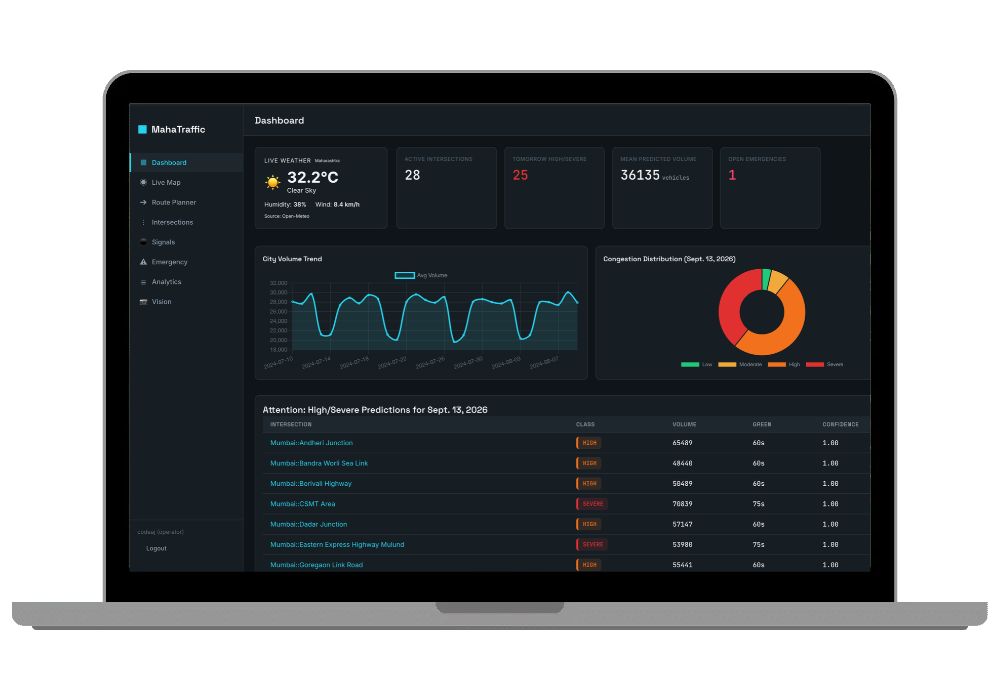
- Summary cards for active intersections, high/severe counts, mean volume and open emergencies
- 30-day volume trend line chart and a congestion doughnut chart built with Chart.js
- Leaflet map on CartoDB dark tiles, centred on Pune, with clickable colour-coded markers and a class filter legend
- WebSocket updates through Django Channels, with automatic reconnect and a 60-second polling fallback if the socket drops
Smart Routing and Signals
- Type a From and To location, get geocoded results via Nominatim and directions from OpenRouteService
- Route scoring that applies penalties of 1.0x, 1.15x, 1.4x and 1.8x depending on predicted congestion near each junction
- Signal control page comparing recommended vs actual green time, plus a manual override form that writes an audit entry to
SystemLog - Emergency vehicle reporting that overrides the signal, broadcasts to every connected screen instantly, and restores the signal once resolved
Computer Vision
- Drag-and-drop image upload on
/vision/with AJAX processing, so the page doesn't reload - YOLOv8n inference returns an annotated image plus separate counts for cars, trucks, buses and motorcycles
- A history table of recent detections and a simple heuristic to flag possible emergency vehicles
Transparency and Access Control
- An Analytics page with full model leaderboards, a confusion matrix heatmap, the top 25 feature importances and an "honesty panel" that shows where the model falls short
- Two roles: Admin gets everything including Django admin, Operator only sees the dashboard, map and intersection pages
- 8 pytest tests covering role permissions, the feature contract, registry loading, seed idempotency and route penalty logic
Model Performance (The Honest Numbers)
We're not going to tell you this predicts traffic with 99% accuracy. Nobody's traffic model does that, and if a project claims it, the examiner will smell it immediately.
| Task | Best Model | Key Test Metrics |
|---|---|---|
| Congestion class (4 classes) | LightGBM | Accuracy 73.08%, Macro F1 0.686, ROC AUC 0.871, Cohen's Kappa 0.595 |
| Traffic volume (regression) | RandomForest | MAE 5,200, RMSE 7,685, R-squared 0.588, MAPE 23.84% |
The models were picked from leaderboards that include XGBoost, HistGradientBoost, ExtraTrees, SVR, MLP and an LSTM. Test scores sit very close to validation scores, which tells you the models generalise rather than memorise. That's a good talking point for your viva.
Intersections Covered
Hinjawadi Phase 3, Pune Station, Shivajinagar, Deccan Gymkhana, Hadapsar Gadital, Swargate, Katraj, Chinchwad, Pimpri, Kothrud, Baner, Pashan, Kondhwa, Marketyard, Sangvi and Balewadi. IT corridors, bus terminals, wholesale markets, residential belts. A decent mix of how traffic actually behaves in a growing Indian city.
Tech Stack
- Backend: Django 5.2, Daphne 4.2 (ASGI), Django Channels, django-apscheduler, WhiteNoise
- Machine learning: LightGBM 4.6, scikit-learn 1.6, pandas 2.3, joblib, ultralytics YOLOv8n
- Database: SQLite in WAL mode
- Frontend: Django templates, Leaflet, Chart.js, a custom "Signal Grid" CSS design system
- External APIs: TomTom Traffic Flow, Open-Meteo, OpenRouteService, Overpass (OSM), Nominatim
- Deployment: Docker Compose with Nginx reverse proxy, or systemd + Nginx
Real-World Applications
- Pune Municipal Corporation or PCMC traffic cells planning signal timings a day ahead of expected rush, especially during Ganesh Chaturthi or monsoon weeks
- Ambulance and fire services getting signal priority through the emergency override
- IT parks in Hinjawadi or Baner advising employees on which routes to avoid tomorrow morning
- Logistics companies running delivery fleets around Marketyard and Chinchwad picking routes with lower congestion penalties
- Smart city research labs using the 83-feature pipeline as a baseline before testing their own models
What's Hard About This Project (and What Isn't)
Honestly, the hardest part is the ML artifacts folder. It's about 1 GB, holds 31 trained models plus encoders and metadata, and it has to sit in exactly the right place (ml/artifacts/) or the registry won't load. There's also a rule you can't break: the app has to run as a single Daphne process because SQLite and the in-memory channel layer don't support multiple workers. Run it with Gunicorn and four workers and you'll get weird behaviour.
But here's what makes it easier than it looks. You don't need a single API key to get it running. Without TomTom or ORS keys, the app switches to simulated mode, seeds 35 days of Maharashtra traffic data, runs predictions on command, shows everything on the map, and YOLOv8 detection works fully offline after the first model download. So your demo won't die because some API quota ran out the night before submission.
Who Should Buy This
If you're a student who needs a working project for your college submission, final-year project, semester project, internship, or academic demonstration, this is for you. Whether you're studying BCA, B.Tech, MCA, M.Tech, Computer Science, IT, AI, Data Science, or another related field, you can choose a project that fits your requirements. If you need the source code, project report, documentation, or help setting up and running the project, CodeAj gives you the resources and support to get started faster.
This one fits best if your guide wants "real ML, not just an API call," or if you want a project with three demo-able wow moments: the colour-coded map, the image detection, and the emergency broadcast hitting two browser windows at once. If you're looking around for more options first, browse our AI and ML final year projects or the full set of Django projects with source code.
Why CodeAj
You get the complete source code, the trained model artifacts, the Jupyter training notebook and a project report you can adapt for your college format, so you're not writing 60 pages from zero the week before submission. If setup goes sideways on your laptop, our team will help you get it running, whether that's a dependency mismatch on Windows or the artifacts folder sitting one level too deep. We've seen most of the ways this breaks. If you want to compare it with other model-heavy builds, our machine learning projects collection is a good place to look.
Frequently Asked Questions
Extra Add-Ons Available – Elevate Your Project
Add any of these professional upgrades to save time and impress your evaluators.
Live 1-on-1 Mentorship
Personal session with an expert developer
Project Setup
We'll install and configure the project on your PC via remote session (Google Meet, Zoom, or AnyDesk).
Source Code Explanation
1-hour live session to explain logic, flow, database design, and key features.
Want to know exactly how the setup works? Review our detailed step-by-step process before scheduling your session.
₹999
Custom Documents (College-Tailored)
- Custom Project Report: ₹1,500
- Custom Research Paper: ₹1,000
- Custom PPT: ₹800
Fully customized to match your college format, guidelines, and submission standards.
Project Modification
Need feature changes, UI updates, or new features added?
Charges vary based on complexity.
We'll review your request and provide a clear quote before starting work.