FitPulse Django Fitness Tracker with AI Coach | Final Year Project with Source Code
A full Django fitness platform with workout logging, nutrition tracking, progress charts and a live AI coach. 87 passing tests, seeded demo data, runs in about 20 minutes.
Technology Used
Django 5.2 | Python | Tailwind CSS | HTMX | Alpine.js | SQLite3 | Groq API | Chart.js


What This Project Actually Does
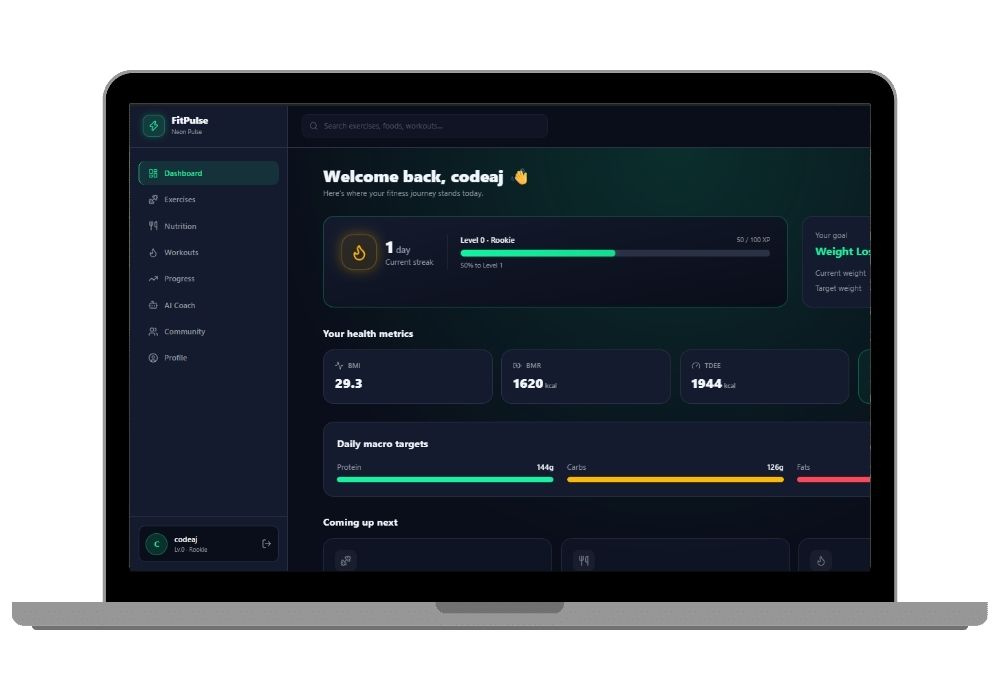
FitPulse is a fitness tracking website built entirely in Django. A user signs up, walks through a five-step onboarding wizard where they enter height, weight, goal and activity level, and the app calculates their BMI, BMR, TDEE and daily macro targets from that. After onboarding they land on a dashboard that pulls together everything else in the app.
From there they can browse a library of 150+ exercises, build a workout template, log an actual gym session set by set (weight, reps, RPE), track meals against a 96-food nutrition database, log water, upload progress photos, watch their body stats move on Chart.js graphs, export a PDF progress report, chat with an AI coach that knows their real workout history, and post to a social feed where other users can like and comment.
No React. No separate API frontend. It's Django templates with Tailwind, HTMX and Alpine.js doing the interactive bits, which means the whole thing is one codebase you can actually explain to an examiner in five minutes.
Key Features
Accounts and onboarding
- Custom user model that logs in with email instead of username — a genuinely nice thing to point at during viva
- Five-step onboarding wizard that computes BMI, BMR, TDEE and macro splits from the user's own numbers
- Streak, XP and level fields wired into the user model for gamification
- Email verification, password reset, and brute-force lockout via django-axes (five bad passwords and the account locks)
Exercises and workouts
- 150+ seeded exercises, searchable and filterable by muscle group and equipment
- Favoriting an exercise happens over HTMX — the heart icon flips without a page reload
- 12 pre-built workout templates plus a builder for custom ones
- Session logger records every single set, and the app auto-detects personal records the moment you beat one
Nutrition
- 96 foods seeded with real macro values, searchable live as you type
- Meal and water logging with macro totals that update against the user's TDEE target
- Eight recipes with one-click logging, plus custom food creation for stuff that isn't in the database
Progress and reporting
- Body-stat check-ins and progress photo uploads
- Chart.js line charts for weight and measurement trends over time
- PDF progress report export generated with WeasyPrint — the examiner will ask you to click this, guaranteed
AI Coach
- Streaming chat powered by the Groq API through
StreamingHttpResponse, so replies appear word by word instead of one frozen loading spinner - The system prompt is assembled from the logged-in user's live profile, recent workouts and PR history — ask it "am I progressing on bench press" and it answers from your actual data
- Quick-action prompt buttons, saved and pinned replies, rate-limited to 30 messages an hour
- If
GROQ_API_KEYisn't set, it degrades to a polite fallback message instead of crashing
Community
- Social feed with Following and Discover tabs, image and workout attachments
- HTMX likes and comments, follow, block and report
- Leaderboards for XP, streak and weekly workout count
- Official and user-created challenges with live per-participant progress
Real-World Applications
The obvious one is a gym. A local gym in your city could run this to give members a login, track their programs, and stop maintaining those laminated workout cards. Personal trainers can use the community and challenge modules to run a paid 30-day transformation batch and actually see who's logging sessions.
Corporate wellness teams use almost exactly this shape of app for step and workout challenges between departments. Physiotherapy clinics use the body-stat check-in and progress photo modules for recovery tracking. And the AI coach pattern — pulling a user's live database records into a system prompt before hitting an LLM — is the same technique behind most of the AI assistants you're seeing inside SaaS products right now, so it's worth understanding properly rather than just demoing.
Who Should Buy This
If you're a BCA or MCA student with a submission deadline in two weeks and a guide who keeps saying "add something with AI," this is your project. It's Django, so your syllabus already covers most of it. It has an LLM integration, so it clears the "AI component" box. And it has 87 passing tests, which almost nothing on the internet does, so when your examiner asks about testing you have an actual answer instead of a silence.
BTech CSE students building a major project will like that this isn't a single-feature CRUD app. Seven Django apps, custom user model, streaming responses, HTMX partials, PDF generation, background task setup with Celery. There's enough surface area here to write a real 60-page report without padding.
Honest bit — one thing here is genuinely annoying. WeasyPrint needs GTK libraries installed on Windows, and if you skip that step the PDF export view throws an import error that looks scarier than it is. Budget twenty minutes for it. The installation guide below walks through the fix.
And one thing that's much easier than it looks: python manage.py seed_demo_data. One command creates four fully onboarded users with roughly ten logged workout sessions each, a week of meal logs, eight weeks of body measurements, and cross-linked follows, posts and comments. So instead of spending your demo day manually clicking "log workout" forty times to make the charts look non-empty, you log in as demo@fitpulse.app and everything is already populated. That single command is the difference between a demo that looks finished and one that looks like a tutorial.
Why CodeAj
You get the complete source code — every app folder, every template, every migration, the seed commands, requirements.txt, .env.example, all of it. A documentation-ready project report comes along with it covering objective, literature survey, system design, ER diagram, module descriptions and testing, which is the part most students underestimate until the week before submission. If setup goes sideways on your machine we'll get on a call and fix it. If you want more Python-based options before deciding, browse the Python final year projects collection, or go straight to the wider Django projects with source code library where FitPulse sits alongside similar full-stack builds. Students who specifically want the LLM angle should also look at our AI chatbot solutions — the streaming pattern used in FitPulse's coach module shows up there too.
Frequently Asked Questions
Extra Add-Ons Available – Elevate Your Project
Add any of these professional upgrades to save time and impress your evaluators.
Live 1-on-1 Mentorship
Personal session with an expert developer
Project Setup
We'll install and configure the project on your PC via remote session (Google Meet, Zoom, or AnyDesk).
Source Code Explanation
1-hour live session to explain logic, flow, database design, and key features.
Want to know exactly how the setup works? Review our detailed step-by-step process before scheduling your session.
₹999
Custom Documents (College-Tailored)
- Custom Project Report: ₹1,500
- Custom Research Paper: ₹1,000
- Custom PPT: ₹800
Fully customized to match your college format, guidelines, and submission standards.
Project Modification
Need feature changes, UI updates, or new features added?
Charges vary based on complexity.
We'll review your request and provide a clear quote before starting work.