CropVision AI Crop Identification System using CNN and Flask | Final Year Project with Source Code
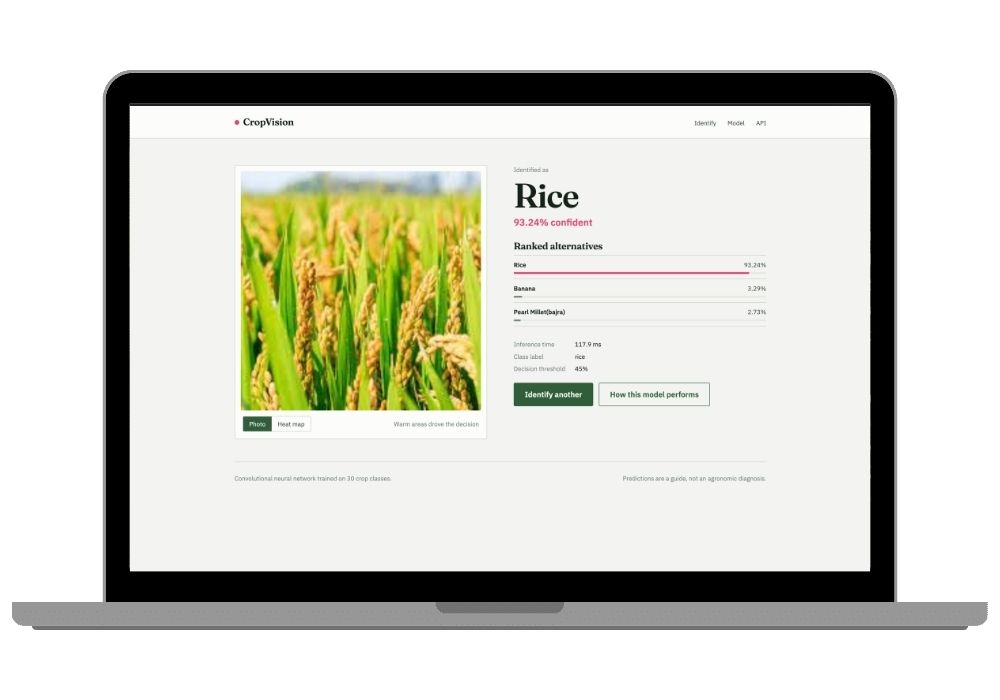
Upload one photo of a crop, get the name back in under a second — plus a heat map showing exactly which pixels the CNN looked at. Complete Python final year project with training notebook, Flask app and source code.
Technology Used
Python 3.10 | TensorFlow 2.16 | Keras | MobileNetV2 | Grad-CAM | Flask 3 | Jupyter Notebook | scikit-learn | Pillow | Gunicorn | Nginx


Abstract
Identifying a crop from a photograph sounds trivial until you're the one staring at an unlabelled field image. Extension officers, agri-tech data collectors and farm advisors do this every day, and it needs trained human eyes that aren't always standing where the camera is. CropVision AI automates that judgement using a Convolutional Neural Network.
The model is trained on the Agricultural Crops Image Dataset — roughly 800 photographs across 30 classes covering almond, banana, cardamom, chilli, clove, coconut, coffee, cotton, cucumber, fox nut, gram, jowar, jute, lemon, maize, mustard, olive and more. That works out to about 25 images per class, which is nowhere near enough to train a CNN from random weights. We tried. It stalled under 45% accuracy and refused to move.
So the project uses transfer learning instead: a MobileNetV2 convolutional backbone pretrained on ImageNet, extended with a custom conv and dense head, fine-tuned in two phases. Fully convolutional throughout, no LSTMs or attention blocks bolted on to look impressive. The final model hits roughly 90% top-1 accuracy and over 97% top-3 on held-out test images, against about 38% for the same-architecture-from-scratch baseline that's included in the notebook for comparison.
Predictions are explained with Grad-CAM, and the whole thing is served through a Flask web app with a JSON REST endpoint sitting alongside it.
What This Project Actually Does
Two pieces, and they're separate on purpose.
The first is crop_classification_training.ipynb, a Jupyter notebook that takes the raw dataset folder, cleans it, trains the model, evaluates it, and writes everything into an artifacts/ directory — the .keras model file, a labels.json, a metrics.json with per-class recall, plus training curves and a confusion matrix as PNGs.
The second is cropvision/, a Flask 3 application that loads those artifacts and turns them into a working website. You drag a photo onto the upload box, and you get back a ranked top-3 with confidence percentages, a Grad-CAM heat map overlaid on your image, and a toggle to flip between the original and the heat map.
Here's the part examiners actually like: the confidence threshold. If the model isn't sure, it doesn't fake it. Below 0.45 confidence the page says "closest match" instead of asserting an identification, because a closed-set classifier shown a random photo of a dog will still confidently tell you it's cardamom. Being honest about uncertainty is a design decision you can defend in a viva, and most student projects have nothing like it.
The duplicate problem (this is the part nobody expects)
The source dataset stores the same photograph under multiple file extensions. If you don't catch that, identical images end up in both your training and test sets, and your accuracy number becomes fiction. The notebook runs exact MD5 hashing and perceptual dHash before splitting, drops the duplicates, then does a stratified 70/15/15 split so every one of the 30 classes appears in all three partitions. Class imbalance is handled with computed class weights and augmentation — flip, rotation, zoom, translation, contrast, brightness — applied on-GPU during training.
If your accuracy ever comes out suspiciously close to 100%, duplicate removal got switched off. That's the first thing to check.
Key Features
- Identifies 30 agricultural crop classes from one photograph, with inference landing between 100 and 200 ms on a plain CPU — no GPU needed to serve it
- Ranked top-3 output with per-class confidence percentages, adjustable via a
top_kquery parameter - Grad-CAM heat map generated per prediction and painted over the uploaded image, so you can see the network is reading the crop and not the background wall behind it
- Confidence thresholding that flags uncertain predictions rather than bluffing
- Two-phase training: frozen backbone first, then fine-tuning of the deeper conv blocks at a reduced learning rate
- Optional from-scratch CNN baseline so your report has a real 38% vs 90% comparison instead of an unsupported claim
- Model card page at
/modelbuilt automatically frommetrics.json— test accuracy, dataset composition, per-class recall, training charts - JSON REST API at
/api/predictaccepting either a multipart file upload or a base64 string - EXIF orientation correction, because phone photos arrive rotated and a sideways image tanks the prediction
- Uploads processed entirely in memory. Nothing written to disk
- Preprocessing baked into the saved model, which kills the classic train/serve mismatch bug before it happens
- A
/healthendpoint that returns 503 if the model didn't load - Graceful failure — if the artifacts are missing, every page tells you what to copy instead of dumping a stack trace on your evaluator's screen
- Works with JavaScript disabled; the drag-and-drop is progressive enhancement, not a dependency
- Gunicorn, systemd and Nginx configs included in
deploy/
Real-World Applications
Agricultural extension and advisory work. A field officer photographs an unknown crop and gets an identification plus the visual evidence behind it, without waiting on a specialist to be available.
Farmer-facing mobile apps. The JSON API can back an Android or Flutter client directly. Crop identification becomes the entry point to variety-specific advice on irrigation, fertiliser scheduling and pest control.
Agri-marketplace verification. Produce listings with photos get checked automatically against the declared crop type, so mismatches get flagged before the listing goes live.
Dataset labelling at scale. Big unlabelled image collections get pre-sorted by predicted class, and only the low-confidence cases get routed to a human annotator. Saves an enormous amount of manual work.
Agronomy teaching. Horticulture students use it as a self-test tool, and the Grad-CAM overlay shows which morphological features separate one crop from another.
Drone and ground survey pipelines. Survey imagery gets crop-type tags automatically, feeding acreage estimation and crop-pattern analysis downstream.
And it's the obvious first stage for a crop disease detection system, since disease models are almost always crop-specific. Same training pipeline, different dataset. If your guide asks "what's the extension of this work," that's your answer.
What's Honestly Hard, and What's Easier Than It Looks
The hard part is Grad-CAM. Not running it — the code works out of the box and locates the backbone and final conv layer by inspection, so it survives a backbone swap. The hard part is explaining it in your viva when someone asks how gradients flowing back to a convolutional feature map turn into a heat map. Read that section of the notebook properly. Don't skip it the night before.
The easy part surprises people. Training the whole model takes 15 to 25 minutes on a normal laptop CPU, 3 to 5 minutes if you have a GPU. There's also smoke_test.py, which renders every single template against a stubbed model — so you can confirm the entire web app works without installing TensorFlow at all. Handy when your laptop is already struggling.
Who Should Buy This
If you're a student who needs a working project for your college submission, final-year project, semester project, internship, or academic demonstration, this is for you. Whether you're studying BCA, B.Tech, MCA, M.Tech, Computer Science, IT, AI, Data Science, or another related field, you can choose a project that fits your requirements. If you need the source code, project report, documentation, or help setting up and running the project, CodeAj gives you the resources and support to get started faster.
Why CodeAj
You get the complete source code — the training notebook, every Flask route, the templates, the deploy configs, all of it — along with a project report you can actually submit and setup support if something breaks on your machine. TensorFlow installs are the usual culprit, especially on Python 3.12 where 2.16 doesn't play nice on every platform. If you're browsing more options in this space, our machine learning projects with source code collection has similar CNN and deep learning builds, the AI final year projects hub covers everything from chatbots to detection systems, and there's a dedicated Flask projects section if you specifically want Python web deployment on your resume. Pick the one that matches your syllabus, not the one with the flashiest screenshot.
Frequently Asked Questions
Extra Add-Ons Available – Elevate Your Project
Add any of these professional upgrades to save time and impress your evaluators.
Live 1-on-1 Mentorship
Personal session with an expert developer
Project Setup
We'll install and configure the project on your PC via remote session (Google Meet, Zoom, or AnyDesk).
Source Code Explanation
1-hour live session to explain logic, flow, database design, and key features.
Want to know exactly how the setup works? Review our detailed step-by-step process before scheduling your session.
₹999
Custom Documents (College-Tailored)
- Custom Project Report: ₹1,500
- Custom Research Paper: ₹1,000
- Custom PPT: ₹800
Fully customized to match your college format, guidelines, and submission standards.
Project Modification
Need feature changes, UI updates, or new features added?
Charges vary based on complexity.
We'll review your request and provide a clear quote before starting work.
Project Files


 Reviews
What Our Students Say
He explained the project clearly and thoroughly. He was very supportive throughout the process and was always available to help when needed. His guidance and assistance made it easier to understand the project and complete tasks effectively.
I had a very good experience with CodeAj Marketplace. The team is professional and supportive, especially Ajay Pandit sir who guides clearly throughout the project. The work was completed neatly and according to requirements. A great place for learning and project development. Highly recommended for students and developers.
Excellent explanation! Concepts are explained in a very simple and understandable way. It really helped me a lot in improving my knowledge. Great work!
Codeaj was really helpful with my project, especially during the customization part. He didn't just do the work but also took the time to explain everything, from the project structure and database to the code itself. It was a huge help, especially for students trying to understand how everything fits together. I really appreciated his support and the way he made things easier to follow.
Working with CodeAj Marketplace has been such a positive experience. The projects delivered are original, carefully crafted from scratch, and tailored to meet expectations with impressive attention to detail. What really makes him stand out is his willingness to go the extra mile — not just in creating outstanding work, but also in helping others understand how everything functions. He explains things clearly, addresses questions patiently, and ensures the whole process feels like a learning journey instead of just a handover. On top of the technical expertise, his calm and approachable personality makes communication effortless. No unnecessary stress, just smooth collaboration and genuine support. I truly value the dedication he brings to his work and would highly recommend him to anyone in search of high-quality, authentic projects.
I purchased a project from him recently and I have to say it's one of the best decisions I've made. The project was absolutely beautiful, built completely from scratch with no shortcuts, and perfectly matched what I wanted. What makes him stand out is not just his ability to create anything we ask for, no matter how complex, but also the way he helps us understand every part of it. He patiently explains the process, clears doubts, and makes sure we actually learn from the project instead of just using it. On top of his skills, his personality is amazing — he's calm, chill, and very friendly to talk to. There's no stress when working with him, only smooth communication and genuine support. I truly appreciate the effort he puts in and would highly recommend him to anyone looking for original, high-quality projects.
I received my project from CodeAJ Marketplace on time, and the work was very neat and well-presented. The team maintained good communication and delivered everything as promised. I appreciate their timely completion and professional approach.
I sincerely thank Mr. Ajay Pandit for his constant support and valuable guidance throughout the project. His timely advice, encouragement, and expertise greatly contributed to the successful completion of the work. I'm truly grateful for his mentorship.
I had an outstanding experience with CodeAj while developing my mobile app. Their team was incredibly cooperative, ensuring every customization I requested was implemented flawlessly. The service was top-notch, and the final product exceeded my expectations. Highly recommend CodeAj for anyone seeking professional and reliable app development services! 11/10
I would like to sincerely thank Ajay Pandit for providing me with the project. His guidance and explanation of the system's architecture, modules, and AI integration were extremely helpful in understanding the project thoroughly. Ajay's support played a key role in helping me implement the hotel booking and payment module effectively. His willingness to clarify concepts and walk me through complex logic made the learning process smooth and insightful. I truly appreciate his mentorship and the time he dedicated to ensuring I was well-prepared for both the development and presentation of this project.
I had a great experience with the project I purchased. It was well-structured and met all my expectations. The team was responsive and supportive throughout, addressing all my queries promptly. Highly recommended for anyone looking for quality projects and good service.
I'm really thankful to Codeaj for helping me with my project explanation and guiding me throughout. Your support made everything much easier and clearer.
The project he made was wonderful, and the way he patiently listened, understood all my ideas and presented them so well in the project, was amazing. I would highly recommend him to everyone.
I would like to sincerely thank Ajay Pandit for providing me with the project. His guidance and explanation of the system's architecture, modules, and AI integration were extremely helpful in understanding the project thoroughly.
Too good experience, I love their projects and they are available for you to help, they are incredible good. Must avail their services. I am happy customer.
The team was very supportive and their explanation was very good, they are clarifying each and every doubts with lots of patience. Highly recommended for quality projects.
I really like their work and they made good project in less amount.
Thank you, CodeAj Bro, for supporting the Doctor Appointment System project. Your guidance during the project setup, installation, and report creation was very helpful and greatly appreciated.
One of the best Software Developer provide the best setup environment for project, good explain skills, and good technical skills, step by step explain project through google meet and budgetly price project Available.
Thank you so much for your excellent work on our project! Your kindness and clear explanations made the entire process smooth and enjoyable. Highly recommend!
Really very supportive, helpful and kind, loving nature. Available for any time for any query, highly recommend to get projects from him.
Awesome projects. They support on setting up the project after purchasing. Completely legal one. Affordable projects too.
Code AJ guide team are very formal, friendly to setup project step by step and explain each question 🙂
Thank you codeAj, Best site to get your project done quickly, with fast responses and instant clarification of any project-related doubts.
I really liked the work, and they solved my issues very well too.
They provide very good service and code also running condition and they fulfill all the queries it's very helpful.
Really helpful, makes things easy to understand and very kind nature, you can look forward to get help from here.
Thank you so much for building the Project for my requirement.
Looking forward to many many collaborations and always tend to buy the projects.
I am so satisfied with codeAJ because of his help.
Thank you so much sir for your support and help.
Ajay bro has excellent knowledge and his response is nice.
This is a great app I love it with good functionality.
Thank you so much for your help and support.
Highly recommended for the projects.
Loved the project work.
It is super for students.
I recently purchased this project online and I am very satisfied with it. The project was well-designed, properly organized, and included all the necessary files and documentation. The source code was clean, easy to understand, and worked as expected. A special appreciation for the project explanation and setup session. The session was detailed and easy to understand, covering both the project implementation and the complete setup process. All my questions were answered clearly, which helped me understand the project much better. Thanks for giving your time.