RansomShield AI Real-Time Ransomware Detection System
A working ransomware detection system that scores every running process 0-100 using RandomForest, XGBoost and IsolationForest with a SOC dashboard, incident timeline and zero real malware in the code. Full Python source included.
Technology Used
Python 3.10.11 | Django 5 | Django REST Framework | scikit-learn | XGBoost | SQLite3 | psutil | watchdog | Chart.js | Tailwind CSS


What This Project Actually Does
RansomShield AI watches processes running on a machine and decides, in near real time, whether one of them is behaving like ransomware. Not by matching virus signatures — by watching behaviour. How many files a process is touching per second, whether those files are suddenly getting more random (entropy going up, which is what encryption looks like from the outside), how much it's writing to disk, how old the process is, how many network connections it has open.
All of that gets turned into a feature vector and pushed through three machine learning models plus a bank of behavioural rules. Out comes a single number between 0 and 100. Below 30 is SAFE. Above 81 is CRITICAL, and that's when the dashboard lights up and an email goes out.
Here's the part that matters for your submission: this project contains no ransomware. Not a line of it. The agent only ever reads small samples of files that other processes already wrote, to estimate entropy. It never writes, encrypts, renames or deletes anything. To demo detection you run python manage.py replay, which streams pre-generated synthetic telemetry through the exact same pipeline a live agent would use. Your examiner sees a CRITICAL incident on screen. Your laptop's files stay exactly where they were.
Key Features
- 0-100 risk score with a real explanation. Click into any incident and you get a horizontal bar chart showing which features actually drove the score — z-score against a benign baseline, weighted by model feature importance. Nobody has to take the number on faith.
- Three models, blended on purpose. RandomForest and XGBoost handle supervised classification. IsolationForest catches anomalies it's never been trained on. The
/modelspage shows a side-by-side comparison table so you can explain why blending beats trusting any one of them. - A deliberate false-positive test built into the data. The training generator creates a "backup job" archetype — huge file throughput, near-zero entropy change. Legitimate software that looks scary. Watch
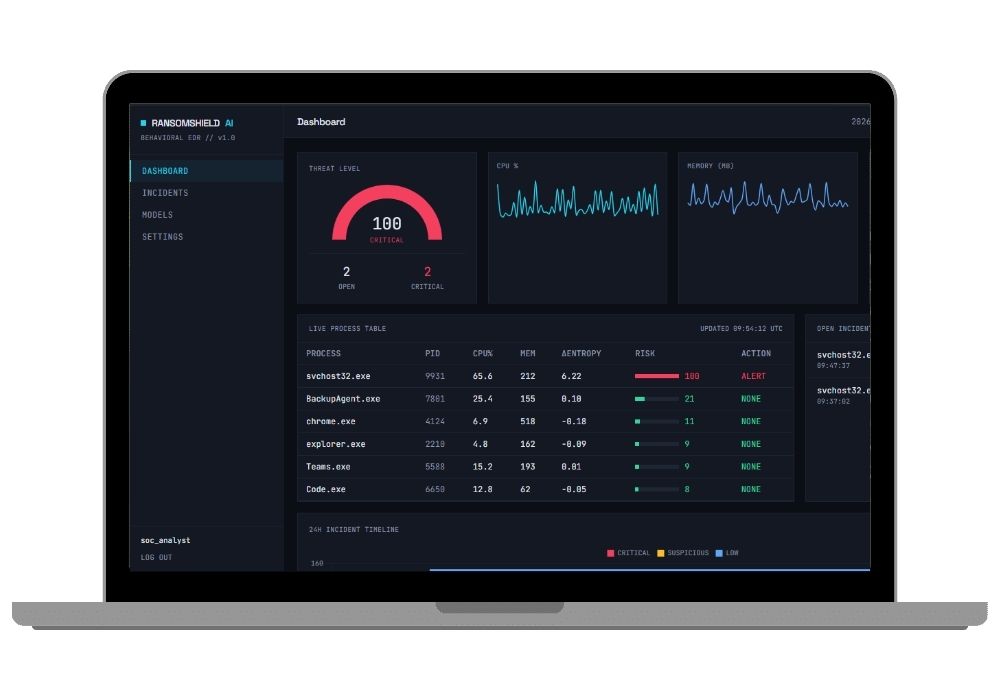
BackupAgent.exesit at LOW whilesvchost32.exehits 100, and you've just demonstrated the hardest problem in behavioural detection. - Standalone endpoint agent. The
agent/daemon needs only psutil, watchdog and requests — no Django, no scikit-learn. It auto-registers at/api/v1/agents/register/, stores its API key inagent_config.json, then POSTs telemetry to/api/v1/telemetry/every 2 seconds. - SOC-style dashboard. Live process table, incident list filterable by severity and status, per-process telemetry history charts at
/processes/9931/, full event timeline with rule hits and the synthetic file activity log. - Response actions that stay safe. ALERT and QUARANTINE only, gated behind a setting that defaults to alert-only. There's no auto-terminate anywhere in the codebase, which is a design decision you can defend in your viva.
- Email alerts that don't spam. A CRITICAL incident sends exactly one email, tracked via
Incident.alert_sent. SMTP failures get caught and logged — they never break the detection pipeline. - Real evaluation metrics. Accuracy, precision, recall, F1, ROC-AUC, false-positive rate, backup-job-specific FPR and mean detection latency, all written to
eval_results.jsonand rendered on screen. Deterministic perseed=42, so your report numbers match what your guide sees when they run it.
Why the Architecture Is Split Into Three Folders
This is the bit examiners tend to poke at, so it's worth knowing. The detection/ package has zero Django dependency — you can import it from the web app, from a script, from anything. The agent/ package has zero dependency on detection/ or Django, because in the real world you ship an agent to a thousand endpoints and you absolutely do not want scikit-learn on all of them. And backend/ ties it together with a shared ingest path in core/services.py that both the live API and the replay command go through, so the demo path and the production path are genuinely the same code.
Three folders, three responsibilities. It's the kind of thing that reads as "this person has actually thought about deployment" during a viva.
Real-World Applications
- Endpoint detection and response tooling — the category Sophos, CrowdStrike and SentinelOne compete in, at a scale you can actually explain
- Hospital and bank IT teams, where a single encrypted file server means patient records or transaction logs go offline
- Behavioural anomaly detection on file servers and NAS boxes, where signature-based antivirus is always one variant behind
- Security operations centre training material — the incident timeline and feature breakdown work well as a teaching artefact
- Research into false-positive reduction, which is the actual bottleneck in deployed detection systems, not raw accuracy
One Hard Thing and One Easy Thing
The hard part: file-to-process attribution. A userspace agent using psutil and watchdog can only make a best-effort guess about which PID caused a file event — it checks which running process currently holds the file handle. Exact attribution needs kernel-level hooks, ETW on Windows or fanotify on Linux, and that's out of scope here. The project handles this honestly by bucketing unattributed events under pid 0 instead of quietly dropping them. If your examiner asks about limitations, this is your answer, and admitting it will score better than pretending it's solved.
The easy part: you never have to generate training data yourself. detection/data_synth.py builds the whole dataset — benign desktop activity, backup jobs, ransomware-like behaviour including a chunk of samples that simulate encrypting already-compressed media where the entropy signal goes weak. Run python -m detection.train, wait a couple of minutes, models are on disk. No dataset hunting on Kaggle at midnight.
Who Should Buy This
If you're a student who needs a working project for your college submission, final-year project, semester project, internship, or academic demonstration, this is for you. Whether you're studying BCA, B.Tech, MCA, M.Tech, Computer Science, IT, AI, Data Science, or another related field, you can choose a project that fits your requirements. If you need the source code, project report, documentation, or help setting up and running the project, CodeAj gives you the resources and support to get started faster.
Honestly, this one suits you especially well if your department leans toward security or if you want something that doesn't look like the fifth CRUD app your guide reviewed that week. It's also a solid pick if you like ML but want an application of it rather than another accuracy-score notebook.
Why CodeAj
You get the complete codebase — every Python file, migrations, management commands, the scenario generator, the trained model artefacts. Plus the project report and documentation, written to match what the code actually does instead of some generic template. If setup breaks on your machine, we'll get on it with you rather than pointing at a README. Browse more cyber security final year projects if you want to compare, or dig through the wider machine learning projects with source code collection. Django-specific builds live over in the Django final year projects section.
Frequently Asked Questions
Extra Add-Ons Available – Elevate Your Project
Add any of these professional upgrades to save time and impress your evaluators.
Live 1-on-1 Mentorship
Personal session with an expert developer
Project Setup
We'll install and configure the project on your PC via remote session (Google Meet, Zoom, or AnyDesk).
Source Code Explanation
1-hour live session to explain logic, flow, database design, and key features.
Want to know exactly how the setup works? Review our detailed step-by-step process before scheduling your session.
₹999
Custom Documents (College-Tailored)
- Custom Project Report: ₹1,500
- Custom Research Paper: ₹1,000
- Custom PPT: ₹800
Fully customized to match your college format, guidelines, and submission standards.
Project Modification
Need feature changes, UI updates, or new features added?
Charges vary based on complexity.
We'll review your request and provide a clear quote before starting work.