BabyBloom AI – Pregnancy Health Risk Prediction Using Django
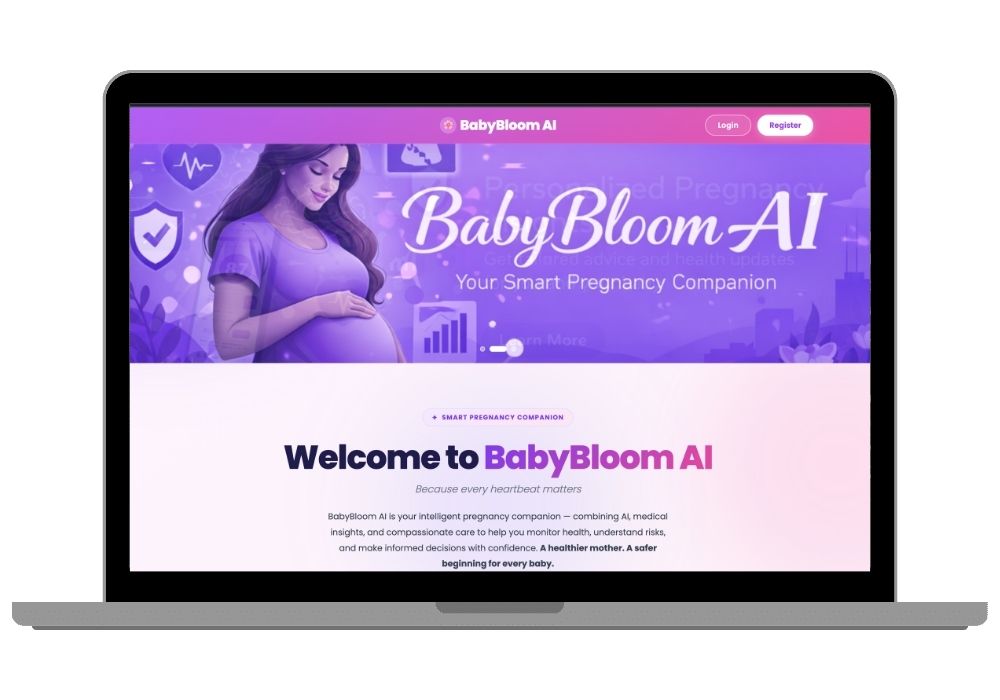
BabyBloom AI is a Django-based web application built to track pregnancy-related health information and explore machine-learning risk prediction. It includes health tracking with simple trend charts, medicine scheduling with email reminders, and an AI chat
Technology Used
Django | Python | TensorFlow | Keras | scikit-learn | Groq API | Llama 3.3 70B | SQLite | HTML5 | CSS3 | JavaScript | Explainable AI | Pillow


What is BabyBloom AI?
BabyBloom AI is a web application designed around pregnancy health tracking and machine learning. A user can enter health information, save it in the application, and use the prediction module to see the category returned by the trained model.
The project also contains other parts that make it feel more like a complete application instead of just a machine learning script. These include a personal dashboard, health records, medication information, journal entries, goals, charts, and an AI-assisted chat feature.
Each part has a different purpose, but together they demonstrate how a machine learning model can be connected to a normal Django application.
Why I Built This Project
Many machine learning projects stop after training a model and printing a prediction in a Python notebook. I wanted to take the idea a little further and connect the model to an actual web application.
That meant dealing with things that are normally part of a real software project: user accounts, database records, forms, dashboards, API requests, charts, and application logic.
BabyBloom AI was created around that idea. The machine learning model is one part of the application, while Django handles the rest of the user-facing system.
How the Prediction Part Works
The prediction module works with a small set of health measurements. The current project uses the following inputs:
- Systolic blood pressure
- Diastolic blood pressure
- Blood sugar level
- Body temperature
- Heart rate
These values are processed before being passed to the trained machine learning model. The model then returns one of the risk categories used by the project: low risk, medium risk, or high risk.
The purpose of this module is to demonstrate a complete machine learning workflow inside a Django application. The prediction should not be treated as a medical diagnosis or as a replacement for advice from a qualified healthcare professional.
Machine Learning Model
The project uses the Maternal Health Risk dataset for the machine learning experiment. The dataset contains health-related measurements along with maternal risk categories.
The training process includes preparing the input data, scaling numerical features, training the model, and testing its output. The trained model is then loaded by the Django application when a prediction is requested.
This separation makes the project easier to understand because the model-training code and the web application do not have to be tightly mixed together.
Health Dashboard
The dashboard is the main area of the application. Instead of keeping health records, predictions, and other information on separate pages, the dashboard brings the important parts together.
Depending on the installed version of the project, the dashboard can display information such as recent health measurements, prediction results, charts, medication details, goals, and journal entries.
The dashboard also makes it easier to see how the different Django models and application components work together.
Health Record Tracking
Users can save health measurements in the application and look back at previous records. Keeping the information in the database also makes it possible to display changes over time.
The chart section can be used to visualize values such as blood pressure, blood sugar, temperature, and heart rate. This is a useful example of turning database records into information that can be understood more easily from a dashboard.
AI Chat Feature
Another part of the project is an AI-assisted chat interface. The current implementation connects the application with the Groq API and a Llama model.
The purpose of this feature is to demonstrate how an external language model can be connected to a Django application. Depending on the configuration, selected information from the application can be provided as context for the conversation.
The chatbot is an experimental part of the project. AI-generated responses can contain mistakes, so the chatbot should not be used as a source of medical diagnosis, emergency guidance, or treatment decisions.
Medication Management
The application also contains a simple medication-management section. Users can store medicine-related information and schedule details inside their account.
This part of the project is mainly useful from a software development point of view. It demonstrates how forms, database models, user-specific records, and reminder functionality can be connected within Django.
Journal and Personal Goals
BabyBloom AI includes space for journal entries and personal goals. These features are separate from the machine learning model but make the application more complete.
A journal can be used to save personal notes, while the goals section can be used to keep track of simple activities or targets. Both features also provide examples of basic CRUD operations in Django.
Technologies Used
The project uses a combination of Python technologies and web development tools.
- Python – Main programming language
- Django – Web application framework
- TensorFlow – Machine learning framework
- Keras – Model development and training
- scikit-learn – Data preprocessing and machine learning utilities
- SQLite – Database for the project setup
- HTML and CSS – User interface
- JavaScript – Client-side functionality
- Groq API – AI chat integration
- Llama – Language model used by the chat feature
Project Architecture
The application follows a fairly straightforward architecture. Django handles requests from the user and communicates with the database. When a prediction is required, the relevant health values are prepared and passed to the machine learning component.
The prediction is then returned to the Django application and displayed on the appropriate page.
The AI chat feature follows a separate API flow. The Django application prepares the request, sends it to the configured AI service, and displays the returned response to the user.
In simple terms, the main flow looks like this:
User → Django → Database / ML Model / AI API → Django → User
Dataset
The machine learning portion of this project uses the Maternal Health Risk dataset available through the UCI Machine Learning Repository.
The dataset is used for experimentation with maternal health risk classification. It should not be confused with a clinical database or interpreted as evidence that the trained model is suitable for medical use.
Students using this project should keep the original dataset attribution and check the dataset's licensing and citation requirements before redistributing it.
What You Can Learn From This Project
This project is useful for understanding how different parts of a Python application fit together. Instead of learning Django, machine learning, and APIs as completely separate topics, the project gives an example where they are used together.
- Creating a Django project and application
- Working with Django models and databases
- Creating forms and user-specific records
- Connecting a trained machine learning model to Django
- Preprocessing numerical data
- Displaying prediction results
- Creating charts from stored data
- Working with external APIs
- Adding an AI chat feature to a web application
- Organizing a larger academic software project
Limitations
This is an academic and demonstration project. The prediction model has been developed around the available training dataset and should not be assumed to work equally well for every person or population.
The project has also not been presented as a clinically validated medical system. Its predictions are intended to demonstrate the technical process of machine learning and web integration.
The same applies to the AI chatbot. Language models can generate incorrect or incomplete information, even when the application provides them with additional context.
For any real pregnancy or health concern, users should speak with a qualified healthcare professional.
Who Can Use This Project?
BabyBloom AI can be useful for students who are looking for a practical project involving Python, Django and machine learning. It can also be used as a starting point for experimenting with healthcare applications, data visualization, explainable machine learning, and AI APIs.
Students can modify the existing model, change the interface, add new database fields, experiment with another dataset, or replace the prediction algorithm as part of their own learning.
Project Features at a Glance
- Django-based web application
- User authentication and profiles
- Pregnancy health information management
- Health measurement records
- Machine learning based risk classification
- Data visualization
- Explainable prediction experiments
- Medication management
- Journal entries
- Personal goals
- AI-assisted chat
- External API integration
Final Note
BabyBloom AI is mainly an example of bringing several technologies into one working application. The interesting part of the project is not only the prediction model, but also the work required to connect that model with Django, a database, charts, user accounts, and an external AI service.
For students, this makes the project a useful way to explore how a machine learning idea can move from a Python experiment into a complete web application.
Frequently Asked Questions
Extra Add-Ons Available – Elevate Your Project
Add any of these professional upgrades to save time and impress your evaluators.
Live 1-on-1 Mentorship
Personal session with an expert developer
Project Setup
We'll install and configure the project on your PC via remote session (Google Meet, Zoom, or AnyDesk).
Source Code Explanation
1-hour live session to explain logic, flow, database design, and key features.
Want to know exactly how the setup works? Review our detailed step-by-step process before scheduling your session.
₹999
Custom Documents (College-Tailored)
- Custom Project Report: ₹1,500
- Custom Research Paper: ₹1,000
- Custom PPT: ₹800
Fully customized to match your college format, guidelines, and submission standards.
Project Modification
Need feature changes, UI updates, or new features added?
Charges vary based on complexity.
We'll review your request and provide a clear quote before starting work.