RaktSetu — Hyperlocal Blood Donor Emergency App | Flutter + Django Final Year Project with Source Code
A blood emergency app that finds the nearest matching donor in seconds — Flutter app, Django + Celery backend, real geo-matching. Full source code and report included.
Technology Used
Flutter 3 | Django 4.2 + DRF | Celery + Redis | Firebase Cloud Messaging | PostgreSQL | Riverpod


What This Project Actually Does
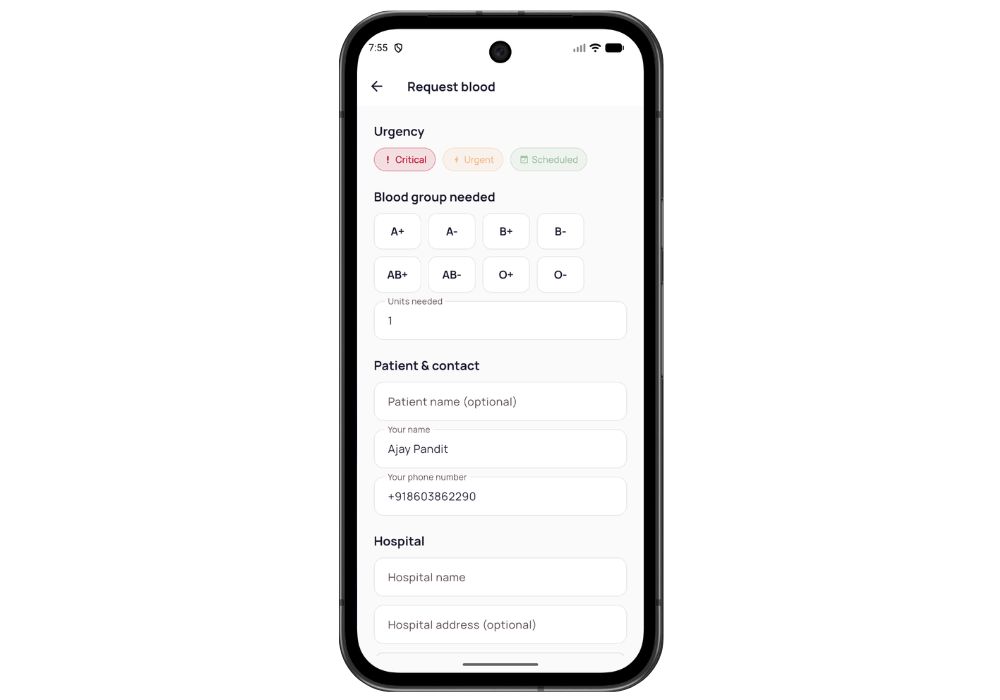
Someone's family member needs O-negative blood at 2 AM at a hospital in Jayanagar. They open RaktSetu, file a request with the blood group, the hospital location, and how urgent it is. That's it. The backend takes over from there — it runs a Haversine distance calculation against every registered donor, filters out the ones who aren't blood-group compatible, aren't verified, aren't marked available, or donated less than 90 days ago, sorts whoever survives that filter by distance, and fires a push notification to the closest ones first.
The donor gets a notification on their phone. They tap Accept right there. Request status moves from Open to Partially Fulfilled to Fulfilled.
And if nobody responds? A background job widens the search ring — 15 km, then 30, then 50 — on a timer that scales with urgency. Critical requests expire after 6 hours, Urgent after 24, Scheduled after 72. A Celery Beat job sweeps the dead ones out every 5 minutes so the donor feed never fills up with requests from last Tuesday.
Key Features
- Geo-matching that actually calculates distance. Haversine formula in
core/matching.py, not a fake "nearby donors" list sorted by ID. You can literally change a donor's lat/long in the admin and watch the match order flip. - Blood group compatibility logic. O-negative matches everyone. AB-positive receives from everyone. The compatibility matrix is coded in, so a request for A+ pulls A+, A-, O+ and O- donors — not just exact matches.
- 90-day eligibility tracking. A donor who donated 40 days ago is invisible to the matcher. Automatically. The countdown shows on their profile screen.
- Async notification pipeline. Celery + Redis handle the matching and the Firebase Cloud Messaging dispatch, so the requester's POST returns in milliseconds instead of blocking while the server pings 200 donors.
- Phone OTP login with JWT. No email, no password. Enter number, get OTP, you're in — which is how every Indian app works, and your examiner will notice you got that right.
- Expanding search radius.
widen_search_taskre-runs the match at the next radius ring if the wait window passes with no accepts. - Fraud guards and throttling. Request rate limits, verified-donor gating, so one person can't spam 50 fake emergencies.
- Accessibility built into the design system. Urgency and status are never shown as colour alone — always colour plus icon plus text. Small thing. Says a lot in a viva when you explain why.
- Seeded demo data.
python manage.py seed_datagives you donors spread across a city with different blood groups and donation dates, so the matching demo works two minutes after setup.
Real-World Applications
This isn't a made-up problem. Blood banks in India run on WhatsApp forwards and Facebook groups — someone posts "urgent B+ needed at St. John's", it gets shared 400 times, and the six people who could actually help never see it because they're not in that group.
Hospital blood banks could run this to maintain a standby donor pool. NGOs and college NSS units already keep donor registers in Excel sheets; this replaces that. Thalassemia support groups need recurring donors on a schedule, and the 90-day eligibility tracker is exactly the thing they track by hand right now. Corporate CSR blood drives, district-level Red Cross chapters, even a single large hospital covering a 30 km catchment — all of it maps onto what this thing does.
Who Should Buy This
Look — if you're a BCA or MCA student with a submission in three weeks and you need something that isn't the fifteenth "Student Management System" your guide has seen this semester, this is a good pick. Social impact angle, real algorithm inside, two-part architecture. Guides like all three of those things.
It's also right for BTech CSE students who need a major project with genuine backend depth. Celery task queues, Redis, push notification pipelines, geospatial matching — this is the stuff that comes up in interviews, not just in vivas.
Honest bit: if you've never touched Flutter or Django before and your submission is in four days, this will be tight. Doable with our setup session, but tight. If you have two weeks and you're willing to actually read the code, you'll be fine.
The one genuinely hard part
Firebase. The backend push pipeline is complete — it builds the payload, logs every dispatch to NotificationLog, handles retries. In dev mode it prints pushes to your console instead of sending them, which means the entire flow works and demos perfectly with zero Firebase account. But to make a real notification land on a real phone, you need your own Firebase project and a google-services.json. Same story for Google Maps — the app has google_maps_flutter wired into the Android manifest, the iOS AppDelegate and the web index, with an empty key slot waiting for your Google Cloud key. Location capture via geolocator works without any key at all.
Both are free to set up. Both take about twenty minutes. Both are covered in the setup session if you'd rather not fight with the Firebase console at midnight.
The part that's easier than it looks
Dev mode. SMS and FCM both run on console backends locally, and the OTP endpoint returns debug_otp straight in the response body. So the entire login flow — enter number, receive OTP, verify, get JWT — works on your laptop with no Twilio account, no SMS credits, no Firebase. Most students expect to lose a whole day on auth. You'll lose about ten minutes.
Why CodeAj
You get the complete monorepo — backend/ and raktsetu_app/, each with its own README covering setup commands, the full API endpoint table, and deploy notes. There are systemd units and an nginx config in backend/deploy/ from an actual VPS deployment, not templates someone copied off a blog. The college-format project report comes with it: abstract, literature survey, system design, ER and data flow diagrams, testing, the whole structure your department wants. If something breaks during setup, we get on a call and fix it — that's what the project setup service is for. Browse the rest of our Flutter final year projects with source code or the Django project collection if you want to compare before deciding.
Frequently Asked Questions
Extra Add-Ons Available – Elevate Your Project
Add any of these professional upgrades to save time and impress your evaluators.
Live 1-on-1 Mentorship
Personal session with an expert developer
Project Setup
We'll install and configure the project on your PC via remote session (Google Meet, Zoom, or AnyDesk).
Source Code Explanation
1-hour live session to explain logic, flow, database design, and key features.
Want to know exactly how the setup works? Review our detailed step-by-step process before scheduling your session.
₹999
Custom Documents (College-Tailored)
- Custom Project Report: ₹1,500
- Custom Research Paper: ₹1,000
- Custom PPT: ₹800
Fully customized to match your college format, guidelines, and submission standards.
Project Modification
Need feature changes, UI updates, or new features added?
Charges vary based on complexity.
We'll review your request and provide a clear quote before starting work.
Project Files
 Reviews
What Our Students Say
He explained the project clearly and thoroughly. He was very supportive throughout the process and was always available to help when needed. His guidance and assistance made it easier to understand the project and complete tasks effectively.
I had a very good experience with CodeAj Marketplace. The team is professional and supportive, especially Ajay Pandit sir who guides clearly throughout the project. The work was completed neatly and according to requirements. A great place for learning and project development. Highly recommended for students and developers.
Excellent explanation! Concepts are explained in a very simple and understandable way. It really helped me a lot in improving my knowledge. Great work!
Codeaj was really helpful with my project, especially during the customization part. He didn't just do the work but also took the time to explain everything, from the project structure and database to the code itself. It was a huge help, especially for students trying to understand how everything fits together. I really appreciated his support and the way he made things easier to follow.
Working with CodeAj Marketplace has been such a positive experience. The projects delivered are original, carefully crafted from scratch, and tailored to meet expectations with impressive attention to detail. What really makes him stand out is his willingness to go the extra mile — not just in creating outstanding work, but also in helping others understand how everything functions. He explains things clearly, addresses questions patiently, and ensures the whole process feels like a learning journey instead of just a handover. On top of the technical expertise, his calm and approachable personality makes communication effortless. No unnecessary stress, just smooth collaboration and genuine support. I truly value the dedication he brings to his work and would highly recommend him to anyone in search of high-quality, authentic projects.
I purchased a project from him recently and I have to say it's one of the best decisions I've made. The project was absolutely beautiful, built completely from scratch with no shortcuts, and perfectly matched what I wanted. What makes him stand out is not just his ability to create anything we ask for, no matter how complex, but also the way he helps us understand every part of it. He patiently explains the process, clears doubts, and makes sure we actually learn from the project instead of just using it. On top of his skills, his personality is amazing — he's calm, chill, and very friendly to talk to. There's no stress when working with him, only smooth communication and genuine support. I truly appreciate the effort he puts in and would highly recommend him to anyone looking for original, high-quality projects.
I received my project from CodeAJ Marketplace on time, and the work was very neat and well-presented. The team maintained good communication and delivered everything as promised. I appreciate their timely completion and professional approach.
I sincerely thank Mr. Ajay Pandit for his constant support and valuable guidance throughout the project. His timely advice, encouragement, and expertise greatly contributed to the successful completion of the work. I'm truly grateful for his mentorship.
I had an outstanding experience with CodeAj while developing my mobile app. Their team was incredibly cooperative, ensuring every customization I requested was implemented flawlessly. The service was top-notch, and the final product exceeded my expectations. Highly recommend CodeAj for anyone seeking professional and reliable app development services! 11/10
I would like to sincerely thank Ajay Pandit for providing me with the project. His guidance and explanation of the system's architecture, modules, and AI integration were extremely helpful in understanding the project thoroughly. Ajay's support played a key role in helping me implement the hotel booking and payment module effectively. His willingness to clarify concepts and walk me through complex logic made the learning process smooth and insightful. I truly appreciate his mentorship and the time he dedicated to ensuring I was well-prepared for both the development and presentation of this project.
I had a great experience with the project I purchased. It was well-structured and met all my expectations. The team was responsive and supportive throughout, addressing all my queries promptly. Highly recommended for anyone looking for quality projects and good service.
I'm really thankful to Codeaj for helping me with my project explanation and guiding me throughout. Your support made everything much easier and clearer.
The project he made was wonderful, and the way he patiently listened, understood all my ideas and presented them so well in the project, was amazing. I would highly recommend him to everyone.
I would like to sincerely thank Ajay Pandit for providing me with the project. His guidance and explanation of the system's architecture, modules, and AI integration were extremely helpful in understanding the project thoroughly.
Too good experience, I love their projects and they are available for you to help, they are incredible good. Must avail their services. I am happy customer.
The team was very supportive and their explanation was very good, they are clarifying each and every doubts with lots of patience. Highly recommended for quality projects.
I really like their work and they made good project in less amount.
Thank you, CodeAj Bro, for supporting the Doctor Appointment System project. Your guidance during the project setup, installation, and report creation was very helpful and greatly appreciated.
One of the best Software Developer provide the best setup environment for project, good explain skills, and good technical skills, step by step explain project through google meet and budgetly price project Available.
Thank you so much for your excellent work on our project! Your kindness and clear explanations made the entire process smooth and enjoyable. Highly recommend!
Really very supportive, helpful and kind, loving nature. Available for any time for any query, highly recommend to get projects from him.
Awesome projects. They support on setting up the project after purchasing. Completely legal one. Affordable projects too.
Code AJ guide team are very formal, friendly to setup project step by step and explain each question 🙂
Thank you codeAj, Best site to get your project done quickly, with fast responses and instant clarification of any project-related doubts.
I really liked the work, and they solved my issues very well too.
They provide very good service and code also running condition and they fulfill all the queries it's very helpful.
Really helpful, makes things easy to understand and very kind nature, you can look forward to get help from here.
Thank you so much for building the Project for my requirement.
Looking forward to many many collaborations and always tend to buy the projects.
I am so satisfied with codeAJ because of his help.
Thank you so much sir for your support and help.
Ajay bro has excellent knowledge and his response is nice.
This is a great app I love it with good functionality.
Thank you so much for your help and support.
Highly recommended for the projects.
Loved the project work.
It is super for students.
I recently purchased this project online and I am very satisfied with it. The project was well-designed, properly organized, and included all the necessary files and documentation. The source code was clean, easy to understand, and worked as expected. A special appreciation for the project explanation and setup session. The session was detailed and easy to understand, covering both the project implementation and the complete setup process. All my questions were answered clearly, which helped me understand the project much better. Thanks for giving your time.