QuishGuard – QR Code Scam Detection App | Cyber Security Final Year Project with Source Code
A Flutter app that scans a QR code and tells you in seconds whether it's safe, suspicious, or a scam backed by a Django risk-scoring engine. Full source code, report, and setup support included.
Technology Used
Flutter | Dart | Riverpod | go_router | Django 5 | Django REST Framework | Python 3.11 | SQLite | Celery | Redis | Groq LLaMA API | Google Safe Browsing API | RDAP/WHOIS | Nginx | Gunicorn | GitHub Actions


Abstract
Scan to pay. Scan to donate. Scan to check in. QR codes have quietly become the default way Indians move money, and scammers noticed that a long time ago. "Quishing" — QR phishing — works because nobody can look at a black-and-white square and tell what's inside it. A scammer pastes a sticker over the shop's real QR, and the money goes somewhere else entirely. You'd never click a random link from an SMS, but you'll happily point your camera at a sticker on a petrol pump.
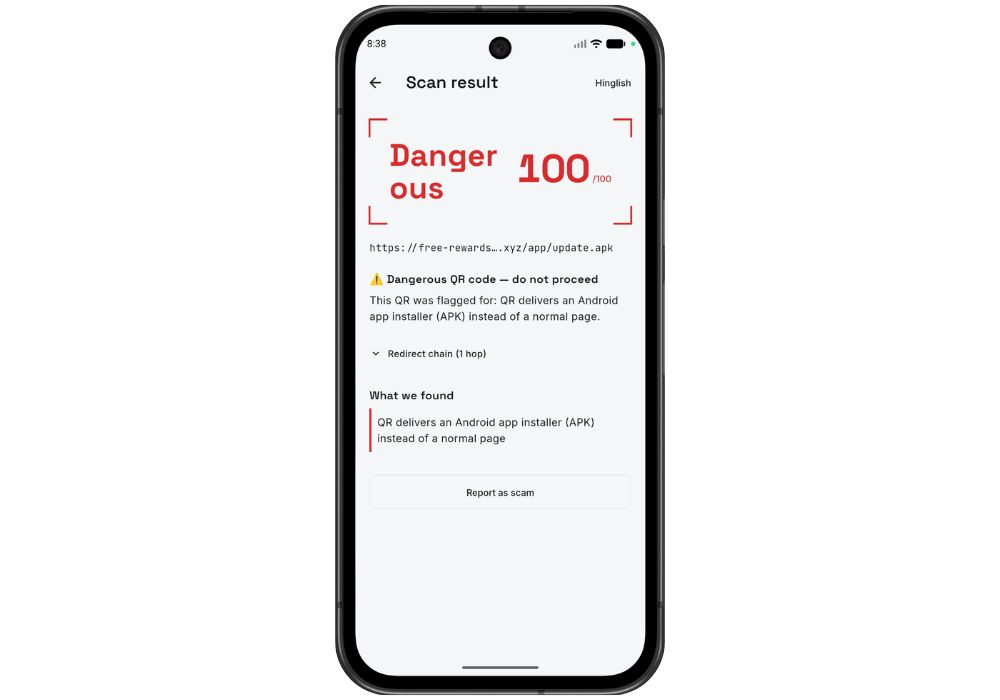
QuishGuard fixes that blind spot. The app decodes a QR on the device, sends the payload to a Django backend, and the backend actually investigates it — where the URL really redirects to, how old the domain is, whether the TLS certificate is valid, whether Google Safe Browsing has flagged it, whether the UPI handle belongs to a real payment service provider or a lookalike pretending to be one. Then it returns a verdict: safe, suspicious, or dangerous. In plain English or Hinglish. With every single rule that fired shown on screen, so it's never a mystery number.
What This Project Actually Does
Think of it as a background check for QR codes.
You open the app, point the camera at a QR, and it decodes on-device — no image ever leaves your phone, only the decoded text. That text goes to POST /api/v1/scan/ on the Django backend. The backend figures out what kind of payload it is (a URL or a UPI intent), runs it through a chain of analyzers, adds up weighted scores from a rule table stored in the database, and hands back a verdict plus a findings list.
A few rules skip the arithmetic entirely. If the link triggers an APK download, or Safe Browsing flags it, or the domain is already on the community blacklist — dangerous, immediately, no matter what the numeric score says. Because a 47/100 that ends in a malware install isn't "suspicious," it's just dangerous.
Then a Groq-hosted LLaMA model turns that findings list into two or three human sentences. If the LLM call fails or you haven't added an API key, a template fallback writes the explanation instead — so the app never shows a blank screen just because an external service was having a bad day.
The scoring pipeline, step by step
- Flutter decodes the QR (live camera or a gallery import, and it handles images containing more than one code).
- Payload is POSTed to the backend with an
X-Device-Idheader — no login, no account, no OTP. - Backend parses it as a URL or a UPI intent string.
- Analyzers run: RDAP/WHOIS domain age, TLS certificate check, Google Safe Browsing lookup, URL-shortener expansion, suspicious TLD check, lookalike-domain detection, PSP handle validation, brand-impersonation check.
- Each hit contributes a weighted score from an editable rule table. Critical rules override the total.
- The LLM writes the explanation. The verdict, score, and every individual finding go back as JSON.
- App renders it, caches it in local SQLite for offline history, and offers a "Report this QR" button.
Key Features
- Camera and gallery scanning with multi-code handling — point at a QR or import a screenshot; if a single image has three QR codes in it, you pick which one to check instead of the app silently grabbing the first.
- A verdict in seconds, not a raw score — safe, suspicious, or dangerous, colour-coded, with the reasoning underneath.
- Every rule that fired is visible — "domain registered 6 days ago," "not a recognized PSP handle," "certificate expired." Each with its own severity. Open the box and look inside.
- English or Hinglish explanations — generated by Groq/LLaMA, switchable in settings, with a template fallback if the API is unreachable.
- Works with no internet, partially — the app syncs the backend's blacklist to a local cache, so a known scam domain or VPA still gets flagged even when the scan request can't reach the server. Scan history is cached locally too.
- Community blacklist with moderation — a user reports a scam QR from the verdict screen, an admin approves it in the Django moderation queue, and it lands in the blacklist every other device syncs against.
- Zero-friction identity — a locally generated device id instead of accounts. Rate limiting is per device id, so there's no auth system to build, break, or explain to your examiner.
- Async enrichment via Celery — a brand-new domain is scored inline, but a stale cached one is served instantly while Celery refreshes it in the background, plus a nightly sweep. Live scans never sit there waiting on a slow WHOIS server.
- Accessibility done properly — screen-reader semantics throughout, a light/dark "Trust Grid" theme, and a non-gesture alternative to swipe-to-delete in history. Small thing. Examiners notice it.
- In-app Learn screen — short explainers on how quishing scams actually work, which makes this an awareness tool and not just a filter.
Real-World Applications
- Everyday UPI payments — the fake sticker slapped over the parking attendant's or fruit vendor's real QR. Catch it before the money moves.
- Donation drives — cloned charity QR codes spike around festivals and disaster relief. This flags the lookalike domain before someone donates to a scammer.
- Phishing and malware interception — QR codes that redirect to fake bank login pages or kick off an unsolicited APK download.
- Digital literacy programs — colleges, NGOs, and bank branches running awareness sessions can hand people something they can actually try.
- An embeddable safety layer — the scoring API is standalone and device-id based, so a payment app or bank could put its own scanner in front of the same verdict engine without touching QuishGuard's UI.
- Crowdsourced threat intel — a live user base surfaces new scam VPAs faster than any manual feed would.
What's Hard and What's Easier Than It Looks
The honest hard part: the domain intelligence layer. You're making network calls to RDAP, TLS endpoints, and the Safe Browsing API from your own server, which means you have to fetch untrusted URLs safely — the project ships an SSRF-safe fetcher for exactly this reason, and understanding why it exists takes a bit of reading. Layer Celery on top for background refresh and there's genuine engineering in there. Which is great for your viva, and slightly annoying on a Tuesday night.
The easier part will surprise you. The whole risk engine is a weighted rule table in the database. Want to make expired certificates count for more? Change one number in the Django admin and rescan. No code edit, no redeploy, nothing. And Redis is optional in development — Celery falls back to eager mode, so tasks just run inline and you can build the entire thing without ever installing Redis. If you've built a Django CRUD app before, you already know 60% of this backend.
Who Should Buy This
If you're a student who needs a working project for your college submission, final-year project, semester project, internship, or academic demonstration, this is for you. Whether you're studying BCA, B.Tech, MCA, M.Tech, Computer Science, IT, AI, Data Science, or another related field, you can choose a project that fits your requirements. If you need the source code, project report, documentation, or help setting up and running the project, CodeAj gives you the resources and support to get started faster.
Specifically worth it if your department wants a mobile app and a real backend, if "cyber security" is on your syllabus and you're tired of seeing the same keylogger and caesar-cipher submissions, or if you want something you can demo live in front of a panel by generating a QR pointing at a sketchy domain and watching the app light up red.
Why CodeAj
You get the complete monorepo — the Django backend and the Flutter app, both finished, both tested, with their own READMEs. Plus the project report and documentation written to match what Indian universities actually ask for: abstract, literature survey, system design, methodology, results, future scope. If it won't run on your machine, the setup support is real support, not a link to a generic FAQ. Browse more cyber security final year projects if you want to compare, or check the Flutter projects with source code collection for other mobile builds. The backend side sits comfortably alongside our other Django final year projects if your guide insisted on Python.
Frequently Asked Questions
Extra Add-Ons Available – Elevate Your Project
Add any of these professional upgrades to save time and impress your evaluators.
Live 1-on-1 Mentorship
Personal session with an expert developer
Project Setup
We'll install and configure the project on your PC via remote session (Google Meet, Zoom, or AnyDesk).
Source Code Explanation
1-hour live session to explain logic, flow, database design, and key features.
Want to know exactly how the setup works? Review our detailed step-by-step process before scheduling your session.
₹1999
Custom Documents (College-Tailored)
- Custom Project Report: ₹1,500
- Custom Research Paper: ₹1,000
- Custom PPT: ₹800
Fully customized to match your college format, guidelines, and submission standards.
Project Modification
Need feature changes, UI updates, or new features added?
Charges vary based on complexity.
We'll review your request and provide a clear quote before starting work.
Project Files
 Reviews
What Our Students Say
He explained the project clearly and thoroughly. He was very supportive throughout the process and was always available to help when needed. His guidance and assistance made it easier to understand the project and complete tasks effectively.
I had a very good experience with CodeAj Marketplace. The team is professional and supportive, especially Ajay Pandit sir who guides clearly throughout the project. The work was completed neatly and according to requirements. A great place for learning and project development. Highly recommended for students and developers.
Excellent explanation! Concepts are explained in a very simple and understandable way. It really helped me a lot in improving my knowledge. Great work!
Codeaj was really helpful with my project, especially during the customization part. He didn't just do the work but also took the time to explain everything, from the project structure and database to the code itself. It was a huge help, especially for students trying to understand how everything fits together. I really appreciated his support and the way he made things easier to follow.
Working with CodeAj Marketplace has been such a positive experience. The projects delivered are original, carefully crafted from scratch, and tailored to meet expectations with impressive attention to detail. What really makes him stand out is his willingness to go the extra mile — not just in creating outstanding work, but also in helping others understand how everything functions. He explains things clearly, addresses questions patiently, and ensures the whole process feels like a learning journey instead of just a handover. On top of the technical expertise, his calm and approachable personality makes communication effortless. No unnecessary stress, just smooth collaboration and genuine support. I truly value the dedication he brings to his work and would highly recommend him to anyone in search of high-quality, authentic projects.
I purchased a project from him recently and I have to say it's one of the best decisions I've made. The project was absolutely beautiful, built completely from scratch with no shortcuts, and perfectly matched what I wanted. What makes him stand out is not just his ability to create anything we ask for, no matter how complex, but also the way he helps us understand every part of it. He patiently explains the process, clears doubts, and makes sure we actually learn from the project instead of just using it. On top of his skills, his personality is amazing — he's calm, chill, and very friendly to talk to. There's no stress when working with him, only smooth communication and genuine support. I truly appreciate the effort he puts in and would highly recommend him to anyone looking for original, high-quality projects.
I received my project from CodeAJ Marketplace on time, and the work was very neat and well-presented. The team maintained good communication and delivered everything as promised. I appreciate their timely completion and professional approach.
I sincerely thank Mr. Ajay Pandit for his constant support and valuable guidance throughout the project. His timely advice, encouragement, and expertise greatly contributed to the successful completion of the work. I'm truly grateful for his mentorship.
I had an outstanding experience with CodeAj while developing my mobile app. Their team was incredibly cooperative, ensuring every customization I requested was implemented flawlessly. The service was top-notch, and the final product exceeded my expectations. Highly recommend CodeAj for anyone seeking professional and reliable app development services! 11/10
I would like to sincerely thank Ajay Pandit for providing me with the project. His guidance and explanation of the system's architecture, modules, and AI integration were extremely helpful in understanding the project thoroughly. Ajay's support played a key role in helping me implement the hotel booking and payment module effectively. His willingness to clarify concepts and walk me through complex logic made the learning process smooth and insightful. I truly appreciate his mentorship and the time he dedicated to ensuring I was well-prepared for both the development and presentation of this project.
I had a great experience with the project I purchased. It was well-structured and met all my expectations. The team was responsive and supportive throughout, addressing all my queries promptly. Highly recommended for anyone looking for quality projects and good service.
I'm really thankful to Codeaj for helping me with my project explanation and guiding me throughout. Your support made everything much easier and clearer.
The project he made was wonderful, and the way he patiently listened, understood all my ideas and presented them so well in the project, was amazing. I would highly recommend him to everyone.
I would like to sincerely thank Ajay Pandit for providing me with the project. His guidance and explanation of the system's architecture, modules, and AI integration were extremely helpful in understanding the project thoroughly.
Too good experience, I love their projects and they are available for you to help, they are incredible good. Must avail their services. I am happy customer.
The team was very supportive and their explanation was very good, they are clarifying each and every doubts with lots of patience. Highly recommended for quality projects.
I really like their work and they made good project in less amount.
Thank you, CodeAj Bro, for supporting the Doctor Appointment System project. Your guidance during the project setup, installation, and report creation was very helpful and greatly appreciated.
One of the best Software Developer provide the best setup environment for project, good explain skills, and good technical skills, step by step explain project through google meet and budgetly price project Available.
Thank you so much for your excellent work on our project! Your kindness and clear explanations made the entire process smooth and enjoyable. Highly recommend!
Really very supportive, helpful and kind, loving nature. Available for any time for any query, highly recommend to get projects from him.
Awesome projects. They support on setting up the project after purchasing. Completely legal one. Affordable projects too.
Code AJ guide team are very formal, friendly to setup project step by step and explain each question 🙂
Thank you codeAj, Best site to get your project done quickly, with fast responses and instant clarification of any project-related doubts.
I really liked the work, and they solved my issues very well too.
They provide very good service and code also running condition and they fulfill all the queries it's very helpful.
Really helpful, makes things easy to understand and very kind nature, you can look forward to get help from here.
Thank you so much for building the Project for my requirement.
Looking forward to many many collaborations and always tend to buy the projects.
I am so satisfied with codeAJ because of his help.
Thank you so much sir for your support and help.
Ajay bro has excellent knowledge and his response is nice.
This is a great app I love it with good functionality.
Thank you so much for your help and support.
Highly recommended for the projects.
Loved the project work.
It is super for students.
I recently purchased this project online and I am very satisfied with it. The project was well-designed, properly organized, and included all the necessary files and documentation. The source code was clean, easy to understand, and worked as expected. A special appreciation for the project explanation and setup session. The session was detailed and easy to understand, covering both the project implementation and the complete setup process. All my questions were answered clearly, which helped me understand the project much better. Thanks for giving your time.