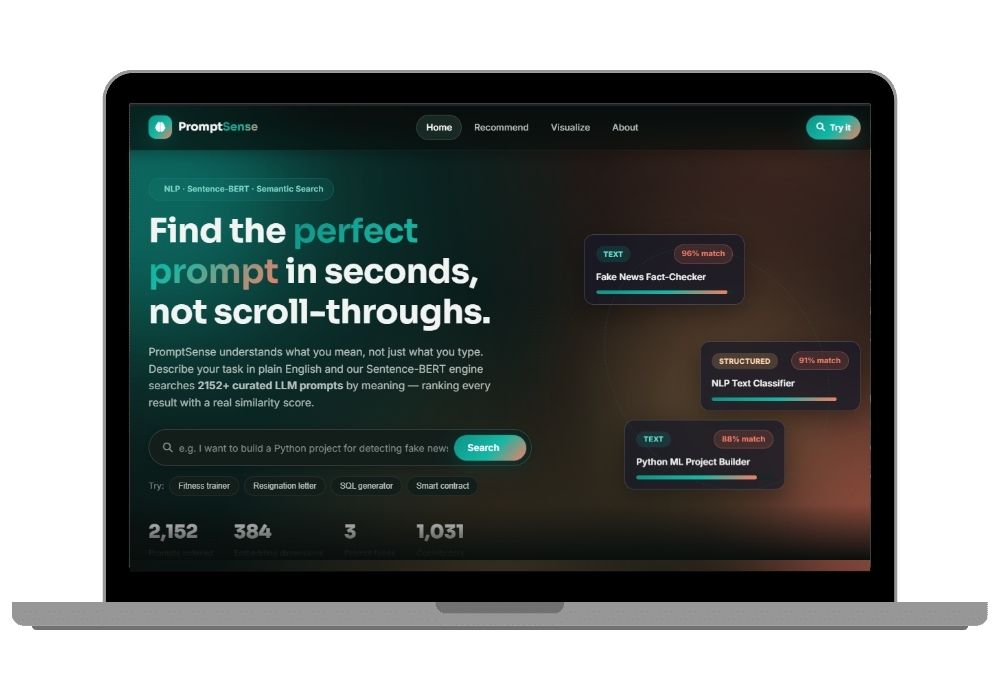
PromptSense - AI Prompt Recommendation & Semantic Search System | Python Final Year Project with Source Code
A Sentence-BERT search engine that understands what you mean, not what you typed. Search 2,152 LLM prompts by meaning, with a Flask UI, charts, and a REST API. Full source code included.
Technology Used
Python | Flask | Sentence-BERT | scikit-learn | Jupyter Notebook | JavaScript


Abstract
Prompt libraries like awesome-chatgpt-prompts have quietly turned into giant spreadsheets. Thousands of rows, no structure, and a search box that only matches exact words. Type "detect fake news" into a normal keyword search and a prompt literally titled "Factcheck" will never show up, even though it's exactly what you wanted.
PromptSense fixes that with semantic search. Every one of the 2,152 prompts in llm_prompts.csv gets converted into a 384-dimensional vector using Sentence-BERT (all-MiniLM-L6-v2). When you type a query, your sentence gets converted into a vector too, and cosine similarity ranks the entire corpus by how close the meanings are. Not the spellings. The meanings.
The whole thing ships as two halves that talk to each other: a Jupyter notebook that does the data analysis, trains the recommender, plots the embedding space, and saves the model artifacts to disk, plus a Flask app that loads those artifacts once at startup and serves a dark-themed search interface, a chart gallery, and a JSON API.
What This Project Actually Does
You type a sentence. It gives you back the prompts that mean the same thing, ranked with a percentage score next to each one.
That's the whole idea. The interesting part is how. Behind the search box, app.py loads a pre-computed NumPy array of embeddings (model/prompt_embeddings.npy) into memory. Your query hits POST /api/recommend, gets encoded by the same Sentence-BERT model that encoded the dataset, and scikit-learn computes cosine similarity against all 2,152 vectors at once. Sorted, sliced to your top-N, sent back as JSON. Takes under 100ms once the model is warm.
The frontend then animates similarity bars, lets you filter by prompt type, and copies any prompt to your clipboard in one click. It looks like a real product because it kind of is one.
How the Search Actually Works (the part your guide will ask about)
Three stages, and you should be able to explain all three in your viva:
- Encoding — every prompt's text is passed through Sentence-BERT once, offline, in the notebook. Output: a 384-number vector per prompt, stored as a
.npyfile so you never recompute it. - Query embedding — at runtime, only your one query gets encoded. That's why it's fast. You're not running the model over 2,152 rows every time somebody hits enter.
- Cosine similarity — the angle between your query vector and each prompt vector. Closer angle equals closer meaning. Multiply by 100 and you've got the percentage the UI displays.
Key Features
- Search "I want to build something that checks if news is real" and get back the Factcheck prompt at the top, even though not a single word overlaps.
- Every result shows a live similarity score from 0 to 100 percent with an animated bar, so your demo actually looks like something is being computed.
- Filter results by prompt type (TEXT, STRUCTURED, IMAGE) and by whether the prompt is developer-focused or general.
- Top-N slider from 1 to 25 results, so you can show the examiner how ranking depth changes the output.
- Sub-100ms responses on the full corpus after the model warms up — the API response itself returns an
elapsed_msfield you can point at. - Debounced live search on the Recommend page, meaning results update as you type without hammering the server on every keystroke.
- One-click copy-to-clipboard on every prompt card.
- A Visualize page with PCA and t-SNE projections of the embedding space, colored by prompt type, plus distribution plots and a word cloud of roles. Opens in a lightbox viewer.
- A working REST endpoint at
POST /api/recommendthat takes{"query": "...", "top_n": 5}and returns ranked JSON. Test it with curl in front of your panel. - Dark glassmorphism UI built on CSS custom properties, fully responsive down to phone width, with a scroll-aware sticky header.
- A reload sanity-check inside the notebook that confirms your saved artifacts deserialize correctly before you deploy anything.
Real-World Applications
- Internal documentation search — swap the prompt CSV for a company's help articles and the same embed-and-rank code becomes a support search engine. The logic doesn't change at all.
- IDE and CLI tooling — the
/api/recommendendpoint is designed to be called by something else. A VS Code extension that suggests prompt templates based on the file you have open is a genuinely reasonable extension of this. - Teaching embeddings — the t-SNE plot where image-generation prompts cluster in one corner and coding prompts in another is the single clearest way to explain vector space to somebody who has never seen it.
- Curriculum and content curation — an instructor searching "data analysis" and pulling every semantically related prompt without having tagged a single row manually.
- FAQ and ticket routing — same pattern, different corpus. Incoming ticket goes in, closest matching known issue comes out.
Frequently Asked Questions
Extra Add-Ons Available – Elevate Your Project
Add any of these professional upgrades to save time and impress your evaluators.
Live 1-on-1 Mentorship
Personal session with an expert developer
Project Setup
We'll install and configure the project on your PC via remote session (Google Meet, Zoom, or AnyDesk).
Source Code Explanation
1-hour live session to explain logic, flow, database design, and key features.
Want to know exactly how the setup works? Review our detailed step-by-step process before scheduling your session.
₹999
Custom Documents (College-Tailored)
- Custom Project Report: ₹1,500
- Custom Research Paper: ₹1,000
- Custom PPT: ₹800
Fully customized to match your college format, guidelines, and submission standards.
Project Modification
Need feature changes, UI updates, or new features added?
Charges vary based on complexity.
We'll review your request and provide a clear quote before starting work.
Project Files

 Reviews
What Our Students Say
He explained the project clearly and thoroughly. He was very supportive throughout the process and was always available to help when needed. His guidance and assistance made it easier to understand the project and complete tasks effectively.
I had a very good experience with CodeAj Marketplace. The team is professional and supportive, especially Ajay Pandit sir who guides clearly throughout the project. The work was completed neatly and according to requirements. A great place for learning and project development. Highly recommended for students and developers.
Excellent explanation! Concepts are explained in a very simple and understandable way. It really helped me a lot in improving my knowledge. Great work!
Codeaj was really helpful with my project, especially during the customization part. He didn't just do the work but also took the time to explain everything, from the project structure and database to the code itself. It was a huge help, especially for students trying to understand how everything fits together. I really appreciated his support and the way he made things easier to follow.
Working with CodeAj Marketplace has been such a positive experience. The projects delivered are original, carefully crafted from scratch, and tailored to meet expectations with impressive attention to detail. What really makes him stand out is his willingness to go the extra mile — not just in creating outstanding work, but also in helping others understand how everything functions. He explains things clearly, addresses questions patiently, and ensures the whole process feels like a learning journey instead of just a handover. On top of the technical expertise, his calm and approachable personality makes communication effortless. No unnecessary stress, just smooth collaboration and genuine support. I truly value the dedication he brings to his work and would highly recommend him to anyone in search of high-quality, authentic projects.
I purchased a project from him recently and I have to say it's one of the best decisions I've made. The project was absolutely beautiful, built completely from scratch with no shortcuts, and perfectly matched what I wanted. What makes him stand out is not just his ability to create anything we ask for, no matter how complex, but also the way he helps us understand every part of it. He patiently explains the process, clears doubts, and makes sure we actually learn from the project instead of just using it. On top of his skills, his personality is amazing — he's calm, chill, and very friendly to talk to. There's no stress when working with him, only smooth communication and genuine support. I truly appreciate the effort he puts in and would highly recommend him to anyone looking for original, high-quality projects.
I received my project from CodeAJ Marketplace on time, and the work was very neat and well-presented. The team maintained good communication and delivered everything as promised. I appreciate their timely completion and professional approach.
I sincerely thank Mr. Ajay Pandit for his constant support and valuable guidance throughout the project. His timely advice, encouragement, and expertise greatly contributed to the successful completion of the work. I'm truly grateful for his mentorship.
I had an outstanding experience with CodeAj while developing my mobile app. Their team was incredibly cooperative, ensuring every customization I requested was implemented flawlessly. The service was top-notch, and the final product exceeded my expectations. Highly recommend CodeAj for anyone seeking professional and reliable app development services! 11/10
I would like to sincerely thank Ajay Pandit for providing me with the project. His guidance and explanation of the system's architecture, modules, and AI integration were extremely helpful in understanding the project thoroughly. Ajay's support played a key role in helping me implement the hotel booking and payment module effectively. His willingness to clarify concepts and walk me through complex logic made the learning process smooth and insightful. I truly appreciate his mentorship and the time he dedicated to ensuring I was well-prepared for both the development and presentation of this project.
I had a great experience with the project I purchased. It was well-structured and met all my expectations. The team was responsive and supportive throughout, addressing all my queries promptly. Highly recommended for anyone looking for quality projects and good service.
I'm really thankful to Codeaj for helping me with my project explanation and guiding me throughout. Your support made everything much easier and clearer.
The project he made was wonderful, and the way he patiently listened, understood all my ideas and presented them so well in the project, was amazing. I would highly recommend him to everyone.
I would like to sincerely thank Ajay Pandit for providing me with the project. His guidance and explanation of the system's architecture, modules, and AI integration were extremely helpful in understanding the project thoroughly.
Too good experience, I love their projects and they are available for you to help, they are incredible good. Must avail their services. I am happy customer.
The team was very supportive and their explanation was very good, they are clarifying each and every doubts with lots of patience. Highly recommended for quality projects.
I really like their work and they made good project in less amount.
Thank you, CodeAj Bro, for supporting the Doctor Appointment System project. Your guidance during the project setup, installation, and report creation was very helpful and greatly appreciated.
One of the best Software Developer provide the best setup environment for project, good explain skills, and good technical skills, step by step explain project through google meet and budgetly price project Available.
Thank you so much for your excellent work on our project! Your kindness and clear explanations made the entire process smooth and enjoyable. Highly recommend!
Really very supportive, helpful and kind, loving nature. Available for any time for any query, highly recommend to get projects from him.
Awesome projects. They support on setting up the project after purchasing. Completely legal one. Affordable projects too.
Code AJ guide team are very formal, friendly to setup project step by step and explain each question 🙂
Thank you codeAj, Best site to get your project done quickly, with fast responses and instant clarification of any project-related doubts.
I really liked the work, and they solved my issues very well too.
They provide very good service and code also running condition and they fulfill all the queries it's very helpful.
Really helpful, makes things easy to understand and very kind nature, you can look forward to get help from here.
Thank you so much for building the Project for my requirement.
Looking forward to many many collaborations and always tend to buy the projects.
I am so satisfied with codeAJ because of his help.
Thank you so much sir for your support and help.
Ajay bro has excellent knowledge and his response is nice.
This is a great app I love it with good functionality.
Thank you so much for your help and support.
Highly recommended for the projects.
Loved the project work.
It is super for students.
I recently purchased this project online and I am very satisfied with it. The project was well-designed, properly organized, and included all the necessary files and documentation. The source code was clean, easy to understand, and worked as expected. A special appreciation for the project explanation and setup session. The session was detailed and easy to understand, covering both the project implementation and the complete setup process. All my questions were answered clearly, which helped me understand the project much better. Thanks for giving your time.