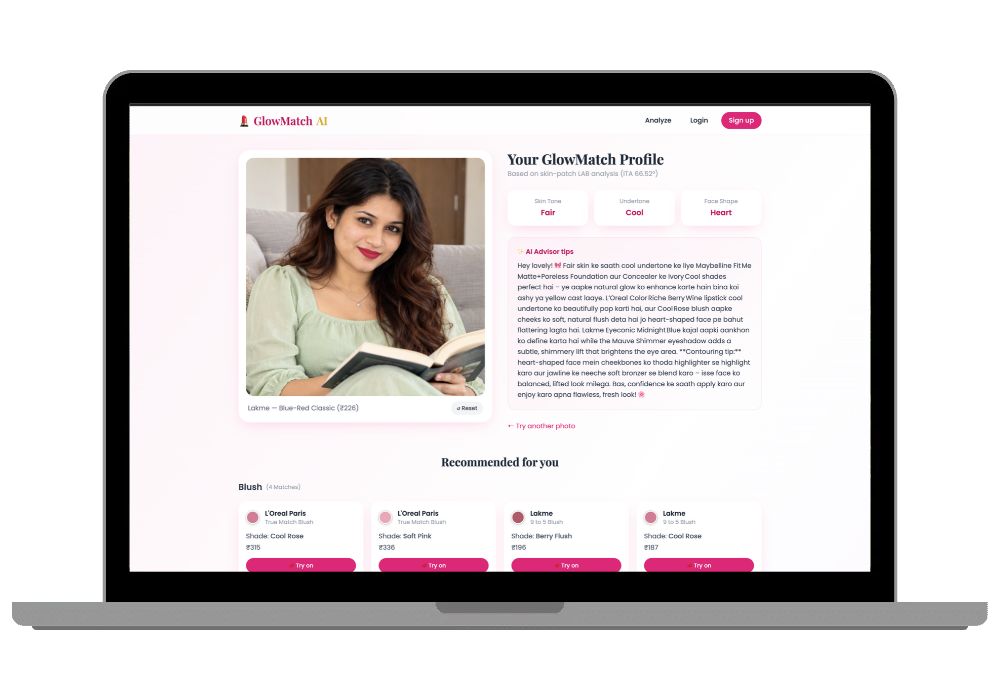
GlowMatch AI - Makeup Recommendation System Using Face Analysis (Django + MediaPipe Final Year Project)
Upload a selfie, get your skin tone, undertone and face shape, then matching Lakme, Maybelline and Sugar shades with a virtual lipstick try-on. A computer vision final year project that examiners actually want to play with.
Technology Used
Python | Django | SQLite | MediaPipe | OpenCV | NumPy | Groq API | HTML | CSS | JavaScript


Abstract
Buying foundation or lipstick online is mostly guesswork. Shade names don't match across brands, swatches look different on every phone, and bad lighting makes every selfie lie a little. GlowMatch AI replaces that guesswork with computer vision. The user gives the app one selfie, from a webcam or an upload, and Google's MediaPipe Face Mesh maps 468 landmarks on the face. The system then samples skin pixels from the cheeks, forehead and chin. It deliberately skips the eyes, lips and hair.
Before any classification happens, a gray-world white balance step corrects the lighting. The corrected colour is converted to LAB colour space. There, the Individual Typology Angle (ITA) sorts skin tone into six groups: Fair, Light, Medium, Wheatish, Tan and Deep. The a*/b* ratio decides whether the undertone is Warm, Cool or Neutral, and landmark distance ratios classify the face shape. All of that feeds a scoring engine that ranks around 180 Indian-brand cosmetics, a Groq-powered AI advisor that writes personal tips, and a virtual try-on that recolours your lips and cheeks right on the photo.
What This Project Actually Does
You take a selfie. The app tells you what your skin tone is, whether you're warm or cool toned, and what shape your face is. Then it shows you which foundation, lipstick, blush or kajal would suit you, sorted by your budget.
Then the fun part. Pick a lipstick from the results and the app paints that exact shade onto your lips in the photo, so you see it before you buy it. No AR headset, no special camera. Just a browser.
And if you log in, every analysis gets saved, so you can pull up two old results and compare them side by side. Useful when your friend swears the app gave her a different shade last week.
Key Features
Face Capture with Proper Validation
Grab a live webcam snapshot or upload a JPG/PNG. If there's no face in the photo, or three of your friends photobombed it, the app says so clearly instead of crashing or giving nonsense results.
Skin Tone and Undertone Detection
MediaPipe landmarks guide exactly which pixels get sampled. Gray-world white balance fixes yellow tubelight casts. Then ITA in LAB space gives one of 6 tone categories, and the a*/b* ratio gives one of 3 undertones. All of this logic lives in analyzer/cv_pipeline.py, so you can open the file and walk your examiner through it line by line.
Face Shape Detection
Oval, Round, Square, Heart or Long. It compares forehead width, cheekbone width and jaw width against face length, using the same landmarks the app already detected, so there's no second model to load.
Recommend for Men or Women
There's an explicit selector. A guy's photo gets foundation, concealer and kajal suggestions. It won't push lipstick and eyeshadow on someone who only wanted to cover a few dark spots before a wedding.
Budget-Aware Product Matching
The scoring engine in the recommender app matches your tone and undertone against about 180 products from Lakme, Maybelline, Nykaa, Sugar, MAC, L'Oreal Paris and Swiss Beauty. Filter by Under ₹500, ₹500 to ₹1500, Premium, or Any.
AI Beauty Advisor (Works Offline Too)
With a Groq API key, an LLM writes personal, Hinglish-friendly tips based on your results and top picks. Without a key, advisor/groq_client.py falls back to rule-based tips on its own. That means your demo still works when the college Wi-Fi dies five minutes before your viva. That happens more often than it should.
Virtual Try-On
An AJAX endpoint recolours your lips or cheeks with the chosen shade using HSV recolouring and alpha blending. The page doesn't reload. The code also handles hue wraparound, so red shades don't turn a weird green at the edges.
History, Compare and Admin Panel
Logged-in users can save every analysis and compare any two. Admins manage the full catalogue (shades, hex codes, prices, buy links, product photos) through Django admin.
How the Computer Vision Pipeline Works
- The image is decoded in the
captureapp and passed to the analyzer. - MediaPipe Face Mesh finds 468 facial landmarks.
- Skin patches are sampled from the cheeks, forehead and chin. Eyes, lips and hair are masked out.
- Gray-world white balance corrects the colour cast from the lighting.
- The average skin colour is converted to LAB. ITA classifies the tone, and the a*/b* ratio gives the undertone.
- Landmark distance ratios classify the face shape.
- The results go to the recommender, the advisor and the try-on module.
Here's the honest part. The hardest thing about this project is lighting. A selfie under a warm yellow bulb and one near a window can land in different tone buckets, and that's exactly where examiners poke. White balance fixes a lot of it, but you should understand why ITA works and where it fails. We explain that in the report. The thing that makes it easier than it looks: there's no model training. MediaPipe comes pre-trained, and everything else is colour maths you can explain on a whiteboard.
Tech Stack
- Backend: Python, Django, SQLite
- Computer vision: MediaPipe Face Mesh, OpenCV, NumPy
- AI tips: Groq LLM API, with a rule-based fallback
- Frontend: HTML, CSS, JavaScript (webcam capture and AJAX try-on)
- Django apps: accounts, capture, analyzer, recommender, advisor, tryon, history_app
Real-World Applications
- "Find my shade" widgets for beauty e-commerce stores, to cut down on wrong-shade returns, which are a huge cost for cosmetics sellers.
- D2C cosmetics brands that want something smarter on product pages than a static shade chart.
- In-store kiosks at mall beauty counters where customers preview a lipstick without opening a tester.
- Personalised tip sections inside beauty apps, newsletters or loyalty programs.
- A portfolio piece showing applied computer vision connected to a real full-stack product, not just a Jupyter notebook.
Who Should Buy This
If you're a student who needs a working project for your college submission, final-year project, semester project, internship, or academic demonstration, this is for you. Whether you're studying BCA, B.Tech, MCA, M.Tech, Computer Science, IT, AI, Data Science, or another related field, you can choose a project that fits your requirements. If you need the source code, project report, documentation, or help setting up and running the project, CodeAj gives you the resources and support to get started faster.
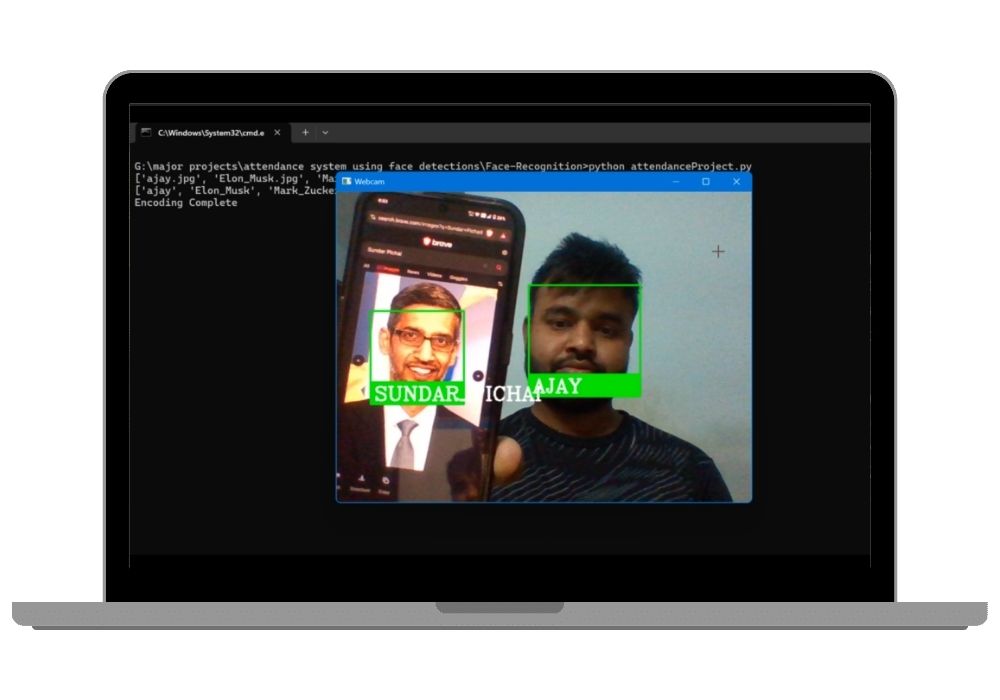
It's a particularly good pick if your guide keeps rejecting "yet another" attendance system. A project that analyses your examiner's own face live in the viva gets attention fast. If you're comparing options, browse our other computer vision final year projects or the full list of Django projects with source code.
Why CodeAj
You get the complete source code: every Django app, the seed command, the CV pipeline and the templates. You also get a project report that explains ITA, LAB colour space and the scoring logic in language your examiner will accept. If anything breaks on your laptop, our team helps you get it running through remote project setup support, so you aren't stuck fighting pip errors the night before submission. We've helped plenty of students through exactly that panic.
Frequently Asked Questions
Extra Add-Ons Available – Elevate Your Project
Add any of these professional upgrades to save time and impress your evaluators.
Live 1-on-1 Mentorship
Personal session with an expert developer
Project Setup
We'll install and configure the project on your PC via remote session (Google Meet, Zoom, or AnyDesk).
Source Code Explanation
1-hour live session to explain logic, flow, database design, and key features.
Want to know exactly how the setup works? Review our detailed step-by-step process before scheduling your session.
₹999
Custom Documents (College-Tailored)
- Custom Project Report: ₹1,500
- Custom Research Paper: ₹1,000
- Custom PPT: ₹800
Fully customized to match your college format, guidelines, and submission standards.
Project Modification
Need feature changes, UI updates, or new features added?
Charges vary based on complexity.
We'll review your request and provide a clear quote before starting work.
Project Files
 Reviews
What Our Students Say
He explained the project clearly and thoroughly. He was very supportive throughout the process and was always available to help when needed. His guidance and assistance made it easier to understand the project and complete tasks effectively.
I had a very good experience with CodeAj Marketplace. The team is professional and supportive, especially Ajay Pandit sir who guides clearly throughout the project. The work was completed neatly and according to requirements. A great place for learning and project development. Highly recommended for students and developers.
Excellent explanation! Concepts are explained in a very simple and understandable way. It really helped me a lot in improving my knowledge. Great work!
Codeaj was really helpful with my project, especially during the customization part. He didn't just do the work but also took the time to explain everything, from the project structure and database to the code itself. It was a huge help, especially for students trying to understand how everything fits together. I really appreciated his support and the way he made things easier to follow.
Working with CodeAj Marketplace has been such a positive experience. The projects delivered are original, carefully crafted from scratch, and tailored to meet expectations with impressive attention to detail. What really makes him stand out is his willingness to go the extra mile — not just in creating outstanding work, but also in helping others understand how everything functions. He explains things clearly, addresses questions patiently, and ensures the whole process feels like a learning journey instead of just a handover. On top of the technical expertise, his calm and approachable personality makes communication effortless. No unnecessary stress, just smooth collaboration and genuine support. I truly value the dedication he brings to his work and would highly recommend him to anyone in search of high-quality, authentic projects.
I purchased a project from him recently and I have to say it's one of the best decisions I've made. The project was absolutely beautiful, built completely from scratch with no shortcuts, and perfectly matched what I wanted. What makes him stand out is not just his ability to create anything we ask for, no matter how complex, but also the way he helps us understand every part of it. He patiently explains the process, clears doubts, and makes sure we actually learn from the project instead of just using it. On top of his skills, his personality is amazing — he's calm, chill, and very friendly to talk to. There's no stress when working with him, only smooth communication and genuine support. I truly appreciate the effort he puts in and would highly recommend him to anyone looking for original, high-quality projects.
I received my project from CodeAJ Marketplace on time, and the work was very neat and well-presented. The team maintained good communication and delivered everything as promised. I appreciate their timely completion and professional approach.
I sincerely thank Mr. Ajay Pandit for his constant support and valuable guidance throughout the project. His timely advice, encouragement, and expertise greatly contributed to the successful completion of the work. I'm truly grateful for his mentorship.
I had an outstanding experience with CodeAj while developing my mobile app. Their team was incredibly cooperative, ensuring every customization I requested was implemented flawlessly. The service was top-notch, and the final product exceeded my expectations. Highly recommend CodeAj for anyone seeking professional and reliable app development services! 11/10
I would like to sincerely thank Ajay Pandit for providing me with the project. His guidance and explanation of the system's architecture, modules, and AI integration were extremely helpful in understanding the project thoroughly. Ajay's support played a key role in helping me implement the hotel booking and payment module effectively. His willingness to clarify concepts and walk me through complex logic made the learning process smooth and insightful. I truly appreciate his mentorship and the time he dedicated to ensuring I was well-prepared for both the development and presentation of this project.
I had a great experience with the project I purchased. It was well-structured and met all my expectations. The team was responsive and supportive throughout, addressing all my queries promptly. Highly recommended for anyone looking for quality projects and good service.
I'm really thankful to Codeaj for helping me with my project explanation and guiding me throughout. Your support made everything much easier and clearer.
The project he made was wonderful, and the way he patiently listened, understood all my ideas and presented them so well in the project, was amazing. I would highly recommend him to everyone.
I would like to sincerely thank Ajay Pandit for providing me with the project. His guidance and explanation of the system's architecture, modules, and AI integration were extremely helpful in understanding the project thoroughly.
Too good experience, I love their projects and they are available for you to help, they are incredible good. Must avail their services. I am happy customer.
The team was very supportive and their explanation was very good, they are clarifying each and every doubts with lots of patience. Highly recommended for quality projects.
I really like their work and they made good project in less amount.
Thank you, CodeAj Bro, for supporting the Doctor Appointment System project. Your guidance during the project setup, installation, and report creation was very helpful and greatly appreciated.
One of the best Software Developer provide the best setup environment for project, good explain skills, and good technical skills, step by step explain project through google meet and budgetly price project Available.
Thank you so much for your excellent work on our project! Your kindness and clear explanations made the entire process smooth and enjoyable. Highly recommend!
Really very supportive, helpful and kind, loving nature. Available for any time for any query, highly recommend to get projects from him.
Awesome projects. They support on setting up the project after purchasing. Completely legal one. Affordable projects too.
Code AJ guide team are very formal, friendly to setup project step by step and explain each question 🙂
Thank you codeAj, Best site to get your project done quickly, with fast responses and instant clarification of any project-related doubts.
I really liked the work, and they solved my issues very well too.
They provide very good service and code also running condition and they fulfill all the queries it's very helpful.
Really helpful, makes things easy to understand and very kind nature, you can look forward to get help from here.
Thank you so much for building the Project for my requirement.
Looking forward to many many collaborations and always tend to buy the projects.
I am so satisfied with codeAJ because of his help.
Thank you so much sir for your support and help.
Ajay bro has excellent knowledge and his response is nice.
This is a great app I love it with good functionality.
Thank you so much for your help and support.
Highly recommended for the projects.
Loved the project work.
It is super for students.
I recently purchased this project online and I am very satisfied with it. The project was well-designed, properly organized, and included all the necessary files and documentation. The source code was clean, easy to understand, and worked as expected. A special appreciation for the project explanation and setup session. The session was detailed and easy to understand, covering both the project implementation and the complete setup process. All my questions were answered clearly, which helped me understand the project much better. Thanks for giving your time.