CodeGuard AI — Django Code Vulnerability Scanner with ML Severity Scoring | Final Year Project with Source Code
Paste your code, get a security report in seconds. A Django + machine learning vulnerability scanner that finds flaws, ranks them by severity, and writes plain-English fixes using the Groq LLaMA API.
Technology Used
Django 5.x | Python AST | scikit-learn RandomForest | Groq LLaMA API | WeasyPrint | SQLite


What This Project Actually Does
You paste a chunk of Python, JavaScript or PHP into a box. CodeGuard AI reads it — never runs it — and hands back a list of everything sketchy it found, ranked from Low to Critical, with an explanation of why each thing is a problem and how to fix it.
Under the hood there are three layers doing different jobs. Python files get parsed with the standard library's ast module, so the scanner is walking an actual syntax tree instead of guessing from string matches. JavaScript and PHP go through a regex rule engine instead, since writing a full JS parser for a college project is not a good use of your remaining semester. Every finding then goes to a RandomForest classifier trained on a synthetic labelled dataset, which decides how bad it really is. Finally the Groq LLaMA API (llama-3.3-70b-versatile) turns each finding into a human explanation and a suggested fix.
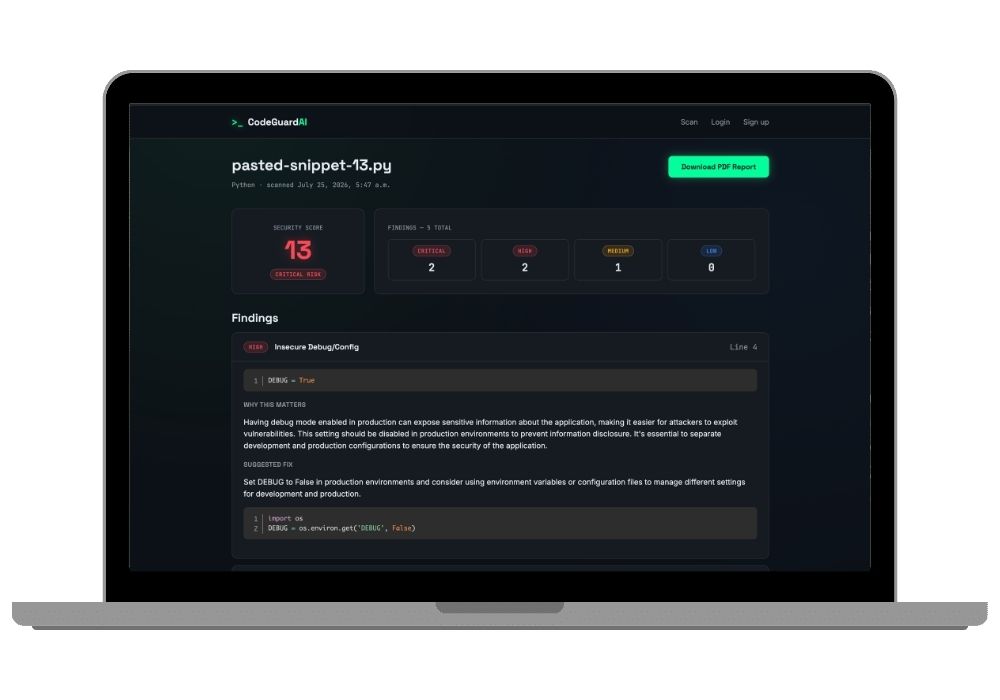
Results land on a dark terminal-style dashboard with a security score, a severity breakdown, and one expandable card per finding with syntax-highlighted code. There's a PDF export too, generated by WeasyPrint.
Key Features
- Scans Python, JavaScript and PHP — paste directly or upload a
.py,.jsor.phpfile up to 500KB. - Python analysis runs on a real AST walk (
scanner/analyzer.py), so it catches structural issues that plain keyword search misses. - RandomForestClassifier assigns Low / Medium / High / Critical to every finding. The training script prints a classification report and feature importances — around 90% test accuracy, which is a great slide for your viva.
- Groq LLaMA writes the explanation and the fix suggestion for each issue. Responses are batched and cached in the database, so re-opening an old scan costs you zero API calls.
- One-click PDF report with the score, the breakdown and every finding — the thing your external examiner will actually want to hold.
- Optional accounts. Sign up and every scan gets saved to
/history/where you can re-download old reports. Skip signup and the scanner still works, the scan just isn't saved. - "Try a sample" buttons load pre-written vulnerable snippets, so your demo works even if the wifi in the lab is being the usual disaster.
- The code is never executed. No
eval, noexec, no shelling out to an interpreter. Findings come purely from syntax tree inspection and pattern matching — say this line out loud in your viva, examiners love it.
Real-World Applications
This is basically a miniature version of what tools like Bandit, Semgrep and SonarQube do in real engineering teams. A junior dev pushes code, a scanner runs in CI, and anything Critical blocks the merge.
Places this pattern actually shows up: pre-commit hooks in a startup's repo, security review during a code audit, teaching tools in a college security lab where students need to see why their SQL string concatenation is a bad idea, and internal dashboards at agencies who inherit client codebases and need a quick risk read before quoting a maintenance contract.
You can also pitch it as a learning tool. That framing tends to go down well in a project report — the explanation layer is the whole point.
Who Should Buy This
If you're a BCA or MCA student in your final semester, your submission date is uncomfortably close, and you want something that isn't the fourteenth library management system your guide has seen this month — this one. Cyber security topics get attention because most of your batch will submit CRUD apps.
It also suits BTech CSE students who need a project with a defensible ML component. The RandomForest isn't decoration here; it does actual classification work, and you can explain the feature set in two minutes.
Honest warning: there is one genuinely annoying part. PDF generation needs the GTK3 runtime on Windows, and pip won't install it for you — you run a winget command instead. Takes five minutes, but if you've never touched system-level dependencies it feels scary the first time. The installation guide below walks through it exactly. And the easy part that looks hard? The AST parsing. That's Python's own standard library, about twenty lines of visitor methods. No parser to write, no external grammar to configure.
Skip this if you want something purely frontend or you have zero interest in defending an ML pipeline in front of an examiner.
Why CodeAj
You get the complete source code — every Django app file, every migration, the training script, the templates, the .env.example. Along with it comes a college-format project report you can adapt to your university's template instead of writing forty pages from a blank document at 3 AM. If setup goes sideways on your machine, our project setup and installation support gets it running on a screen share. Students who want more hand-holding through the submission process can look at full mentorship till submission.
Browsing around before deciding? The cyber security projects collection has related builds, and if you specifically want more Django work, the Django projects with source code section is worth ten minutes of your time. Plenty of Python final year projects there that pair well with this one for a mini-project plus major-project combo.
Frequently Asked Questions
Extra Add-Ons Available – Elevate Your Project
Add any of these professional upgrades to save time and impress your evaluators.
Live 1-on-1 Mentorship
Personal session with an expert developer
Project Setup
We'll install and configure the project on your PC via remote session (Google Meet, Zoom, or AnyDesk).
Source Code Explanation
1-hour live session to explain logic, flow, database design, and key features.
Want to know exactly how the setup works? Review our detailed step-by-step process before scheduling your session.
₹999
Custom Documents (College-Tailored)
- Custom Project Report: ₹1,500
- Custom Research Paper: ₹1,000
- Custom PPT: ₹800
Fully customized to match your college format, guidelines, and submission standards.
Project Modification
Need feature changes, UI updates, or new features added?
Charges vary based on complexity.
We'll review your request and provide a clear quote before starting work.
Project Files
 Reviews
What Our Students Say
He explained the project clearly and thoroughly. He was very supportive throughout the process and was always available to help when needed. His guidance and assistance made it easier to understand the project and complete tasks effectively.
I had a very good experience with CodeAj Marketplace. The team is professional and supportive, especially Ajay Pandit sir who guides clearly throughout the project. The work was completed neatly and according to requirements. A great place for learning and project development. Highly recommended for students and developers.
Excellent explanation! Concepts are explained in a very simple and understandable way. It really helped me a lot in improving my knowledge. Great work!
Codeaj was really helpful with my project, especially during the customization part. He didn't just do the work but also took the time to explain everything, from the project structure and database to the code itself. It was a huge help, especially for students trying to understand how everything fits together. I really appreciated his support and the way he made things easier to follow.
Working with CodeAj Marketplace has been such a positive experience. The projects delivered are original, carefully crafted from scratch, and tailored to meet expectations with impressive attention to detail. What really makes him stand out is his willingness to go the extra mile — not just in creating outstanding work, but also in helping others understand how everything functions. He explains things clearly, addresses questions patiently, and ensures the whole process feels like a learning journey instead of just a handover. On top of the technical expertise, his calm and approachable personality makes communication effortless. No unnecessary stress, just smooth collaboration and genuine support. I truly value the dedication he brings to his work and would highly recommend him to anyone in search of high-quality, authentic projects.
I purchased a project from him recently and I have to say it's one of the best decisions I've made. The project was absolutely beautiful, built completely from scratch with no shortcuts, and perfectly matched what I wanted. What makes him stand out is not just his ability to create anything we ask for, no matter how complex, but also the way he helps us understand every part of it. He patiently explains the process, clears doubts, and makes sure we actually learn from the project instead of just using it. On top of his skills, his personality is amazing — he's calm, chill, and very friendly to talk to. There's no stress when working with him, only smooth communication and genuine support. I truly appreciate the effort he puts in and would highly recommend him to anyone looking for original, high-quality projects.
I received my project from CodeAJ Marketplace on time, and the work was very neat and well-presented. The team maintained good communication and delivered everything as promised. I appreciate their timely completion and professional approach.
I sincerely thank Mr. Ajay Pandit for his constant support and valuable guidance throughout the project. His timely advice, encouragement, and expertise greatly contributed to the successful completion of the work. I'm truly grateful for his mentorship.
I had an outstanding experience with CodeAj while developing my mobile app. Their team was incredibly cooperative, ensuring every customization I requested was implemented flawlessly. The service was top-notch, and the final product exceeded my expectations. Highly recommend CodeAj for anyone seeking professional and reliable app development services! 11/10
I would like to sincerely thank Ajay Pandit for providing me with the project. His guidance and explanation of the system's architecture, modules, and AI integration were extremely helpful in understanding the project thoroughly. Ajay's support played a key role in helping me implement the hotel booking and payment module effectively. His willingness to clarify concepts and walk me through complex logic made the learning process smooth and insightful. I truly appreciate his mentorship and the time he dedicated to ensuring I was well-prepared for both the development and presentation of this project.
I had a great experience with the project I purchased. It was well-structured and met all my expectations. The team was responsive and supportive throughout, addressing all my queries promptly. Highly recommended for anyone looking for quality projects and good service.
I'm really thankful to Codeaj for helping me with my project explanation and guiding me throughout. Your support made everything much easier and clearer.
The project he made was wonderful, and the way he patiently listened, understood all my ideas and presented them so well in the project, was amazing. I would highly recommend him to everyone.
I would like to sincerely thank Ajay Pandit for providing me with the project. His guidance and explanation of the system's architecture, modules, and AI integration were extremely helpful in understanding the project thoroughly.
Too good experience, I love their projects and they are available for you to help, they are incredible good. Must avail their services. I am happy customer.
The team was very supportive and their explanation was very good, they are clarifying each and every doubts with lots of patience. Highly recommended for quality projects.
I really like their work and they made good project in less amount.
Thank you, CodeAj Bro, for supporting the Doctor Appointment System project. Your guidance during the project setup, installation, and report creation was very helpful and greatly appreciated.
One of the best Software Developer provide the best setup environment for project, good explain skills, and good technical skills, step by step explain project through google meet and budgetly price project Available.
Thank you so much for your excellent work on our project! Your kindness and clear explanations made the entire process smooth and enjoyable. Highly recommend!
Really very supportive, helpful and kind, loving nature. Available for any time for any query, highly recommend to get projects from him.
Awesome projects. They support on setting up the project after purchasing. Completely legal one. Affordable projects too.
Code AJ guide team are very formal, friendly to setup project step by step and explain each question 🙂
Thank you codeAj, Best site to get your project done quickly, with fast responses and instant clarification of any project-related doubts.
I really liked the work, and they solved my issues very well too.
They provide very good service and code also running condition and they fulfill all the queries it's very helpful.
Really helpful, makes things easy to understand and very kind nature, you can look forward to get help from here.
Thank you so much for building the Project for my requirement.
Looking forward to many many collaborations and always tend to buy the projects.
I am so satisfied with codeAJ because of his help.
Thank you so much sir for your support and help.
Ajay bro has excellent knowledge and his response is nice.
This is a great app I love it with good functionality.
Thank you so much for your help and support.
Highly recommended for the projects.
Loved the project work.
It is super for students.
I recently purchased this project online and I am very satisfied with it. The project was well-designed, properly organized, and included all the necessary files and documentation. The source code was clean, easy to understand, and worked as expected. A special appreciation for the project explanation and setup session. The session was detailed and easy to understand, covering both the project implementation and the complete setup process. All my questions were answered clearly, which helped me understand the project much better. Thanks for giving your time.