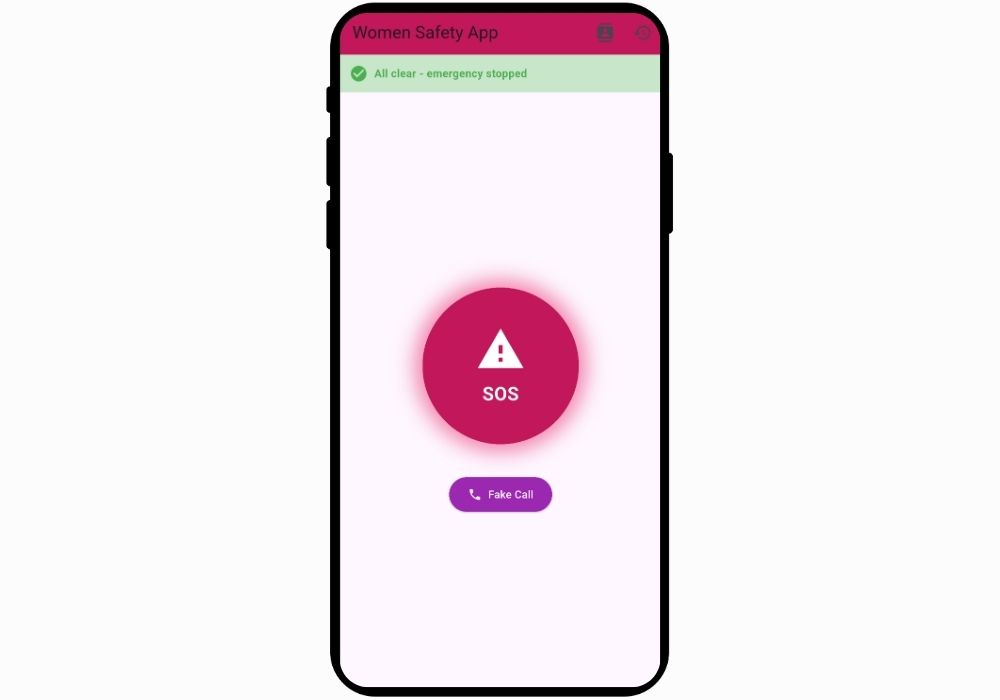
SafeGuard - Advanced Women Safety & Emergency Response App with Real-Time Location Tracking
A comprehensive personal safety application designed for women featuring one-tap SOS alerts, real-time location sharing, fake call simulation, audio/video recording, and emergency contact management. Built with Flutter for cross-platform deployment.
Technology Used
Flutter | Dart | SQLite (sqflite) | Geolocator | Geocoding | Permission Handler | URL Launcher | Flutter Local Notifications | Record | Camera | Flutter Contacts | Shared Preferences | Path Provider


Project Files
SafeGuard Overview
SafeGuard is a cutting-edge personal safety application specifically designed to provide women with instant access to emergency features and safety tools. This comprehensive final year project combines modern mobile technology with essential safety features to create a reliable emergency response system that works when you need it most.
Project Overview
This innovative women safety app serves as a complete personal security solution, offering multiple layers of protection through intelligent features. The application leverages Flutter's cross-platform capabilities to deliver a seamless experience on both Android and iOS devices, ensuring that safety tools are accessible to everyone regardless of their device preference.
Key Features & Functionality
Emergency SOS System
The cornerstone of SafeGuard is its one-tap emergency alert system that instantly notifies your trusted contacts during critical situations. When activated, the app automatically captures your current location, sends distress messages with precise GPS coordinates, and initiates audio recording to document the emergency. This feature works even in low network conditions, ensuring your alert reaches your emergency contacts when seconds matter most.
Real-Time Location Tracking
Advanced GPS integration provides accurate real-time location sharing with your trusted contacts. The app converts raw GPS coordinates into readable addresses, making it easy for your emergency contacts to locate you quickly. Location history tracking ensures a complete record of your movements during emergencies, providing valuable data for safety analysis and documentation.
Intelligent Fake Call Feature
Navigate uncomfortable situations safely with the realistic fake call simulator. This feature generates authentic-looking incoming calls with customizable caller names and numbers, providing a discreet exit strategy from potentially dangerous scenarios. The realistic call screen interface ensures believability while keeping you safe.
Emergency Contact Management
Easily add and manage your circle of trusted emergency contacts directly from your device's contact list. The app maintains quick access to important people, enabling instant communication during emergencies. Your emergency contacts receive detailed alerts including your location, timestamp, and emergency type.
Comprehensive Emergency History
Every emergency event is automatically logged with detailed information including timestamp, location data, contacts notified, and actions taken. This comprehensive history serves as valuable documentation and helps identify patterns for improved personal safety planning.
Audio & Video Recording Capabilities
Quick access to recording features during emergencies enables you to capture audio and video evidence. All recordings are securely stored on your device with encrypted storage options, ensuring your evidence remains protected and accessible when needed.
Technical Implementation
Built using Flutter framework with Dart programming language, this project demonstrates advanced mobile application development skills. The app utilizes SQLite for efficient local data storage, ensuring your information remains private and accessible offline. Integration with multiple Flutter packages including Geolocator for location services, Permission Handler for secure permission management, and Flutter Local Notifications for alert systems showcases comprehensive understanding of mobile development best practices.
Applications & Use Cases
- Personal Safety: Daily use for women commuting, traveling, or in unfamiliar areas
- Emergency Response: Quick access to help during threatening situations
- Safety Monitoring: Parents tracking their daughters' safety status
- Professional Settings: Employees working late hours or in isolated locations
- Students: College and university students ensuring campus safety
- Solo Travelers: Women traveling alone requiring safety backup
Why Choose This Project?
SafeGuard represents an ideal final year college project that combines social impact with technical excellence. This unique project demonstrates proficiency in mobile app development, database management, GPS integration, and user experience design. The application addresses a critical real-world problem while showcasing advanced programming skills that employers value. As a best Python-adjacent project (Flutter/Dart), it demonstrates versatility in modern development frameworks.
Learning Outcomes
Students working with this project will gain hands-on experience in Flutter development, state management, local database implementation, location services integration, permission handling, and cross-platform mobile development. The project covers essential concepts including asynchronous programming, API integration, secure data storage, and user interface design principles.
Future Enhancements
Potential upgrades include integration with police emergency services, AI-powered threat detection, wearable device connectivity, community safety alerts, and machine learning-based risk assessment. These enhancements make the project scalable and suitable for continued development beyond academic requirements. For related emergency response solutions, explore our AI emergency response system or online fire reporting system.
Perfect for Final Year Students
This project stands out as one of the best final year projects for computer science and IT students seeking unique, impactful solutions. It combines technical complexity with social relevance, making it an excellent choice for academic presentations and portfolio building. The comprehensive feature set and real-world applicability ensure high grades and recognition from academic evaluators.
Extra Add-Ons Available – Elevate Your Project
Add any of these professional upgrades to save time and impress your evaluators.
Project Setup
We'll install and configure the project on your PC via remote session (Google Meet, Zoom, or AnyDesk).
Source Code Explanation
1-hour live session to explain logic, flow, database design, and key features.
Want to know exactly how the setup works? Review our detailed step-by-step process before scheduling your session.
₹1499
Custom Documents (College-Tailored)
- Custom Project Report: ₹1,200
- Custom Research Paper: ₹1000
- Custom PPT: ₹500
Fully customized to match your college format, guidelines, and submission standards.
Project Modification
Need feature changes, UI updates, or new features added?
Charges vary based on complexity.
We'll review your request and provide a clear quote before starting work.