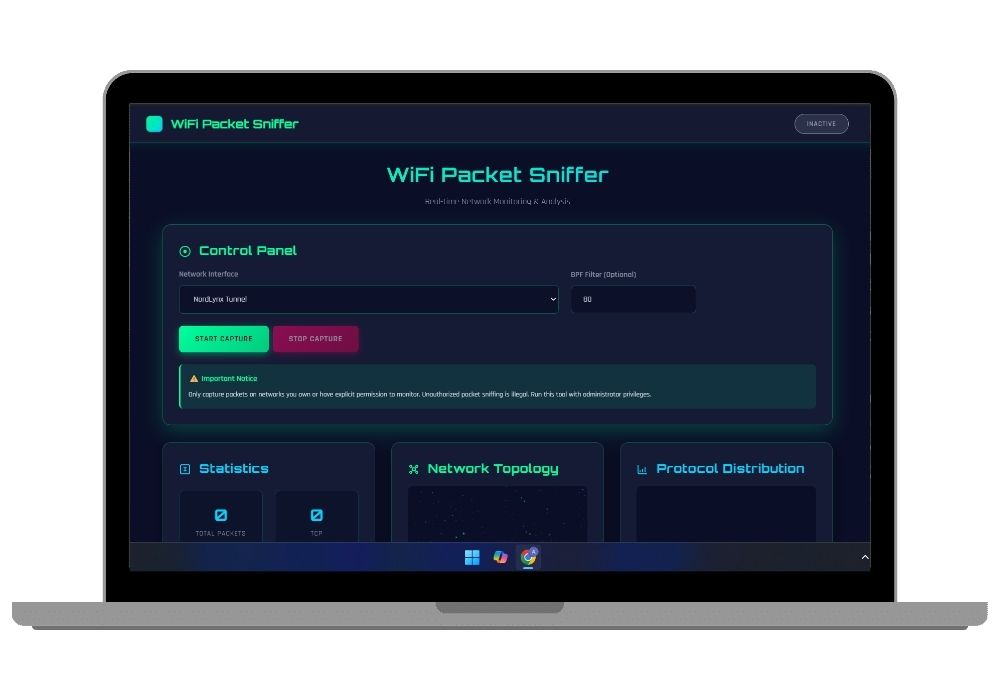
Advanced WiFi Packet Sniffer with Real-Time 3D Network Visualization - Django & Scapy Based Final Year Project
Professional WiFi packet analyzer with live 3D network topology visualization, real-time protocol analysis, and interactive dashboard. Complete Django-Scapy implementation with WebSocket streaming, ideal for cybersecurity final year project.
Technology Used
Django 4.2 | Python 3.8+ | Scapy 2.5 | Django Channels | Django REST Framework | Three.js | WebSocket | JavaScript ES6+ | HTML5 | CSS3 | SQLite | ASGI | OrbitControls | Glassmorphism UI | BPF Filters


Project Files
WiFi Packet Sniffer - Advanced Network Security Analysis Tool
This comprehensive WiFi packet sniffer represents a cutting-edge final year project that combines network security, real-time data visualization, and modern web technologies. Built with Django and Scapy, this professional-grade packet analyzer provides deep insights into network traffic patterns, protocol distributions, and security vulnerabilities through an intuitive 3D visualization interface.
Perfect for computer science and cybersecurity students seeking a challenging final year project, this implementation demonstrates advanced concepts in network programming, packet analysis, real-time communication, and 3D graphics rendering. The project includes complete source code, detailed documentation, and ready-to-deploy configurations.
Core Features and Capabilities
Real-Time Packet Capture Engine
The packet capture system leverages Scapy library to intercept and analyze network traffic across multiple wireless interfaces. The implementation supports monitor mode operation, enabling comprehensive packet collection including encrypted traffic metadata. Advanced Berkeley Packet Filter integration allows precise traffic filtering based on protocols, ports, IP addresses, and custom packet characteristics.
The capture engine operates asynchronously to ensure zero packet loss during high-traffic scenarios, processing thousands of packets per second while maintaining system stability. Each captured packet undergoes immediate classification, extracting critical information such as source-destination pairs, protocol types, payload sizes, and timing information.
Interactive 3D Network Topology Visualization
Experience network traffic like never before with the Three.js-powered 3D visualization engine. The network topology renderer displays active nodes as glowing spheres positioned in three-dimensional space, with animated particle streams representing packet flows between communicating devices. This visual representation helps identify traffic patterns, detect anomalies, and understand network behavior at a glance.
The visualization includes dynamic camera controls allowing users to orbit, zoom, and pan through the network graph. Auto-rotation features provide continuous monitoring perspectives, while protocol-specific color coding enables instant identification of different traffic types. Smooth animations and particle effects create an engaging, informative display of network activity.
Protocol Analysis and Statistics Dashboard
The comprehensive analytics dashboard provides real-time statistics across multiple protocol categories including TCP, UDP, ICMP, ARP, DNS, HTTP, and HTTPS. A 3D bar chart visualization dynamically updates to reflect protocol distribution, offering immediate insights into network composition and traffic patterns.
Statistical analysis includes packet count tracking, bandwidth utilization calculations, protocol percentage distributions, and temporal traffic analysis. The dashboard employs glassmorphism design principles with a cybersecurity-themed interface featuring cyber green, neon blue, and alert pink color schemes that enhance readability while maintaining professional aesthetics.
WebSocket-Based Live Streaming
Built on Django Channels, the WebSocket implementation ensures instantaneous packet data delivery from backend to frontend. As packets are captured, they are immediately serialized and transmitted through persistent WebSocket connections, enabling real-time dashboard updates without polling overhead or refresh delays.
The streaming architecture supports multiple concurrent client connections, allowing team collaboration and remote monitoring capabilities. Connection status indicators provide continuous feedback on stream health, while automatic reconnection logic ensures uninterrupted operation during network fluctuations.
Advanced Filtering and Search Capabilities
Implement sophisticated packet filtering using BPF syntax to isolate specific traffic types. Filter by protocol, port numbers, IP ranges, packet sizes, or combine multiple conditions for precise traffic analysis. The filtering system operates at kernel level for maximum performance, processing filter expressions before packet capture to minimize processing overhead.
Historical packet search functionality allows users to query captured data using protocol types, time ranges, source-destination pairs, and custom attributes. Results are displayed with full packet details including headers, payloads, and decoded protocol information.
Technical Architecture and Implementation
Backend Architecture
The Django-based backend implements a robust Model-View-Controller architecture with REST API endpoints for packet capture control, interface management, and data retrieval. Django Channels extends the framework with ASGI support, enabling WebSocket communication alongside traditional HTTP request handling.
Database models efficiently store packet metadata, capture sessions, and statistical summaries using optimized SQLite schemas. The capture module implements thread-safe packet processing with queuing mechanisms to handle high-throughput scenarios without blocking the web server.
Frontend Technologies
The responsive single-page application combines modern JavaScript ES6+ features with Three.js for 3D rendering. Custom modules handle WebSocket communication, real-time DOM updates, chart animations, and user interactions. CSS3 implements glassmorphism effects, gradient backgrounds, and smooth transitions that create a polished, professional interface.
Orbitron and Rajdhani fonts from Google Fonts provide a technical, futuristic aesthetic matching the cybersecurity theme. Responsive design ensures optimal viewing across desktop monitors, tablets, and mobile devices.
Real-World Applications and Use Cases
Network Security Auditing
Security professionals utilize packet sniffers to identify vulnerabilities, detect intrusions, and analyze suspicious traffic patterns. This tool enables comprehensive network monitoring for security assessments, penetration testing, and incident response scenarios.
Network Troubleshooting and Performance Analysis
Network administrators diagnose connectivity issues, identify bandwidth bottlenecks, and optimize traffic routing by analyzing packet flows. The visualization features help pinpoint communication failures and unusual traffic patterns affecting network performance.
Educational and Research Applications
Cybersecurity students and researchers use packet analysis tools to understand network protocols, study attack vectors, and develop defensive strategies. This project provides hands-on experience with professional-grade network analysis techniques and tools.
Protocol Development and Testing
Software developers creating network protocols or networked applications benefit from packet-level inspection capabilities. The tool helps verify correct protocol implementation, debug communication issues, and optimize data transmission strategies.
Learning Outcomes for Final Year Students
Implementing this project provides comprehensive knowledge across multiple domains:
- Network Programming: Deep understanding of TCP/IP stack, packet structures, protocol operations, and network interface programming
- Web Development: Full-stack development experience with Django framework, REST APIs, WebSocket programming, and modern frontend technologies
- Data Visualization: 3D graphics programming with Three.js, real-time data rendering, animation techniques, and interactive visualization design
- Cybersecurity Concepts: Packet analysis methodologies, network security principles, traffic filtering, and threat detection fundamentals
- Asynchronous Programming: Thread management, concurrent processing, event-driven architectures, and real-time system design
- Database Design: Efficient schema design for time-series data, query optimization, and data aggregation strategies
Complete Project Package Includes
- Full Django application source code with detailed inline comments
- Scapy-based packet capture engine with BPF filtering support
- Three.js visualization modules for network topology and protocol charts
- WebSocket implementation using Django Channels
- Responsive frontend with cybersecurity-themed UI design
- Database models and migrations for packet storage
- REST API endpoints for capture control and data retrieval
- Comprehensive documentation including setup instructions, architecture diagrams, and usage guides
- Requirements file with all Python dependencies
- Admin interface for system management
- Sample BPF filters and usage examples
- Troubleshooting guide and common issues resolution
System Requirements and Compatibility
The project runs on Windows, Linux, and macOS operating systems with Python 3.8 or higher. Administrator or root privileges are required for packet capture operations. Compatible wireless network interfaces supporting monitor mode are necessary for WiFi traffic capture.
Recommended hardware includes multi-core processor for handling high packet volumes, minimum 8GB RAM for smooth operation, and modern graphics card for optimal 3D visualization performance. The application supports both development and production deployment configurations.
Customization and Extension Opportunities
The modular architecture allows easy customization and feature additions. Students can extend functionality by implementing packet payload analysis, adding machine learning-based anomaly detection, integrating with threat intelligence feeds, developing custom protocol decoders, or creating additional visualization modes.
The codebase follows Django best practices and clean code principles, making it accessible for developers to understand, modify, and enhance according to specific requirements or research objectives.
Why Choose This Final Year Project
This WiFi packet sniffer project stands out as an exceptional final year project choice due to its combination of practical utility, technical depth, and visual appeal. The implementation demonstrates mastery of advanced programming concepts while producing a functional, professional-grade tool applicable to real-world scenarios.
The project showcases skills highly valued in the software industry including backend development, frontend engineering, network programming, real-time systems, and data visualization. The comprehensive documentation and clean codebase facilitate easy understanding and presentation during project demonstrations and vivas.
With complete source code, detailed setup instructions, and professional UI design, students can focus on understanding the core concepts and customizing features rather than struggling with basic implementation details. The project is fully documented and ready for immediate deployment and demonstration. For students interested in related security projects, explore our network security vulnerability scanner or phishing website detection systems.
Ethical and Legal Considerations
This project emphasizes responsible use of network monitoring tools. Students receive guidance on legal frameworks governing packet capture, ethical hacking principles, and proper authorization requirements. The project includes prominent disclaimers and educational content about lawful use cases including personal network monitoring, authorized security testing, and research applications.
Understanding these ethical dimensions is crucial for cybersecurity professionals and forms an important component of the learning experience. The project documentation explicitly covers legal boundaries and responsible disclosure practices.
Extra Add-Ons Available – Elevate Your Project
Add any of these professional upgrades to save time and impress your evaluators.
Project Setup
We'll install and configure the project on your PC via remote session (Google Meet, Zoom, or AnyDesk).
Source Code Explanation
1-hour live session to explain logic, flow, database design, and key features.
Want to know exactly how the setup works? Review our detailed step-by-step process before scheduling your session.
₹1999
Custom Documents (College-Tailored)
- Custom Project Report: ₹1,200
- Custom Research Paper: ₹1000
- Custom PPT: ₹500
Fully customized to match your college format, guidelines, and submission standards.
Project Modification
Need feature changes, UI updates, or new features added?
Charges vary based on complexity.
We'll review your request and provide a clear quote before starting work.