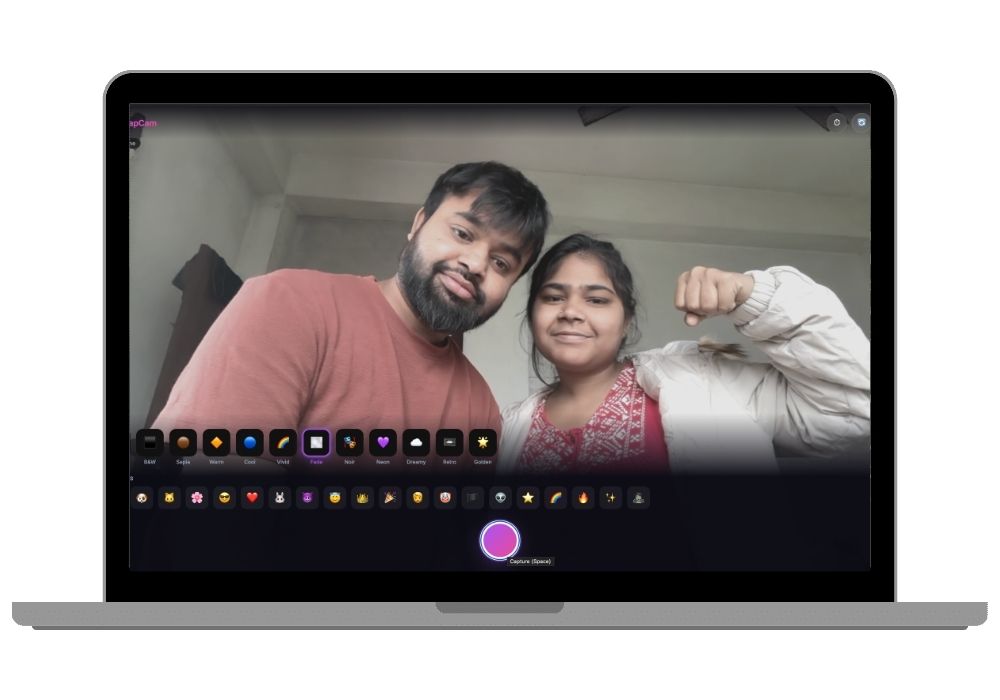
SnapCam - AI Face Detection Camera Web App with Real-Time AR Filters and Photo Gallery | Django Python Final Year Project
SnapCam – A Django + JS browser camera app with face-api.js facial detection, 12 filters, 20 AR stickers, timer modes & photo gallery. Perfect for BCA/MCA/BTech/BSc IT final year projects.
Technology Used
Python | Django 5.2 | SQLite3 | HTML5 | CSS3 | JavaScript ES6 | face-api.js | TensorFlow.js | Canvas API | Pillow


Project Files
What is SnapCam?
SnapCam is a full-featured camera web application that turns your browser into a selfie studio with real-time face detection and augmented reality effects. Built using Python Django on the backend and vanilla JavaScript on the frontend, it uses face-api.js (powered by TensorFlow.js) to detect 68 facial landmarks in real time. These landmarks drive the positioning and scaling of 20 AR stickers that follow your face as you move. On top of that, you get 12 artistic filters, a countdown timer, front/rear camera switching, and a complete photo gallery with search, filter chips, lightbox navigation, and download support.
This project covers a wide range of topics that matter in a final year submission: computer vision, real-time media streaming, Canvas API rendering, RESTful API design, and responsive frontend development. If your course is BCA, MCA, BTech CSE, or BSc IT and you need a project that combines AI-powered face detection with practical web development, SnapCam fits the bill.
How the Face Detection Works
The app loads three pre-trained models from face-api.js: a Tiny Face Detector for locating the face bounding box, a 68-point Face Landmark model for mapping eyes, nose, mouth, and jawline, and a Face Expression model. These run entirely in the browser using TensorFlow.js, so no server-side inference is needed. Detection runs in a loop at roughly 80ms intervals, giving smooth tracking even on mid-range hardware.
Each detected landmark feeds into the sticker rendering engine. For example, the Dog sticker positions floppy ears relative to the forehead landmarks and places a nose overlay at the tip-of-nose coordinates. If no face is detected, stickers fall back to an estimated center position so the app remains usable even when detection drops out.
Key Features
Camera and Capture
The camera interface provides live preview with whatever filter and sticker you have selected. You can capture a photo instantly by pressing the Capture button or hitting the Space key. Timer modes (3s, 5s, 10s) let you set up group shots or hands-free selfies. A flash animation gives visual feedback on capture, and you can toggle between front and rear cameras for different shooting angles. Once captured, you can download the photo locally or save it to the gallery.
12 Artistic Filters
Filters apply in real time on the Canvas before capture. The available filters are: Normal (no effect), B&W (grayscale), Sepia, Warm, Cool, Vivid (boosted saturation), Fade, Noir (high-contrast monochrome), Neon (saturated with hue shift), Dreamy (soft blur), Retro (vintage grain), and Golden. Each filter previews live, so you see the exact output before you press capture.
20 AR Stickers with Face Tracking
Stickers are drawn on a Canvas overlay layer and scale dynamically based on the detected face bounding box. The full sticker set includes Dog, Cat, Flower Crown, Sunglasses, Heart Eyes, Bunny, Devil, Angel Halo, Crown, Party Hat, Mustache, Clown, Pirate, Alien, Stars (animated), Rainbow, Fire (animated), Glitter (animated), and Zombie. Three of these (Stars, Fire, Glitter) include frame-based animation for added visual interest.
Photo Gallery
Saved photos land in a responsive grid gallery. You can search by filter name, click filter chips for quick browsing, open any photo in a full-size lightbox with previous/next navigation (including keyboard support with arrow keys and Escape), delete photos with a confirmation dialog, and download any saved image. The gallery header shows a live photo count pulled from the API.
Dark Theme with Glassmorphism UI
The entire interface uses a dark theme with glassmorphism card effects and purple-to-pink gradient accents. Toast notifications confirm save and delete actions. A face detection status indicator in the camera view shows whether a face is detected, not detected, or if the AI model is offline.
Tech Stack Breakdown
The backend runs on Python Django 5.2 with SQLite3 for storage. Photos are stored as base64-encoded strings in a TextField, with filter name and timestamp metadata. The frontend is pure HTML5, CSS3, and vanilla JavaScript with no framework dependencies. Face detection uses face-api.js v0.22.2 loaded from CDN. Image rendering and filter application happen through the HTML5 Canvas API. Pillow handles any server-side image processing.
The REST API exposes five endpoints: GET for the camera page and gallery, POST for saving captured photos, DELETE for removing photos, and GET for fetching the total photo count as JSON.
Who Should Use This Project
If you are a final year student looking for a project that spans computer vision, web development, and frontend UI design, SnapCam covers all three. It works well for BCA, MCA, BTech, and BSc IT submissions. The face-api.js integration gives you a solid AI/ML component to talk about in your viva, and the Django backend plus REST API give you server-side architecture to document in your project report.
You can also extend SnapCam in multiple directions: add user authentication, implement cloud storage for photos, add video recording support, or integrate more advanced face mesh models for 3D sticker effects.
What You Get
When you purchase SnapCam from CodeAj Marketplace, you receive the complete source code, a pre-built project report formatted for college submission, and full installation documentation. We also offer add-on services including project setup with source code explanation, mentorship until your final submission, and custom project report, research paper, or PPT creation.
Extra Add-Ons Available – Elevate Your Project
Add any of these professional upgrades to save time and impress your evaluators.
Project Setup
We'll install and configure the project on your PC via remote session (Google Meet, Zoom, or AnyDesk).
Source Code Explanation
1-hour live session to explain logic, flow, database design, and key features.
Want to know exactly how the setup works? Review our detailed step-by-step process before scheduling your session.
₹999
Custom Documents (College-Tailored)
- Custom Project Report: ₹1,200
- Custom Research Paper: ₹1000
- Custom PPT: ₹500
Fully customized to match your college format, guidelines, and submission standards.
Project Modification
Need feature changes, UI updates, or new features added?
Charges vary based on complexity.
We'll review your request and provide a clear quote before starting work.