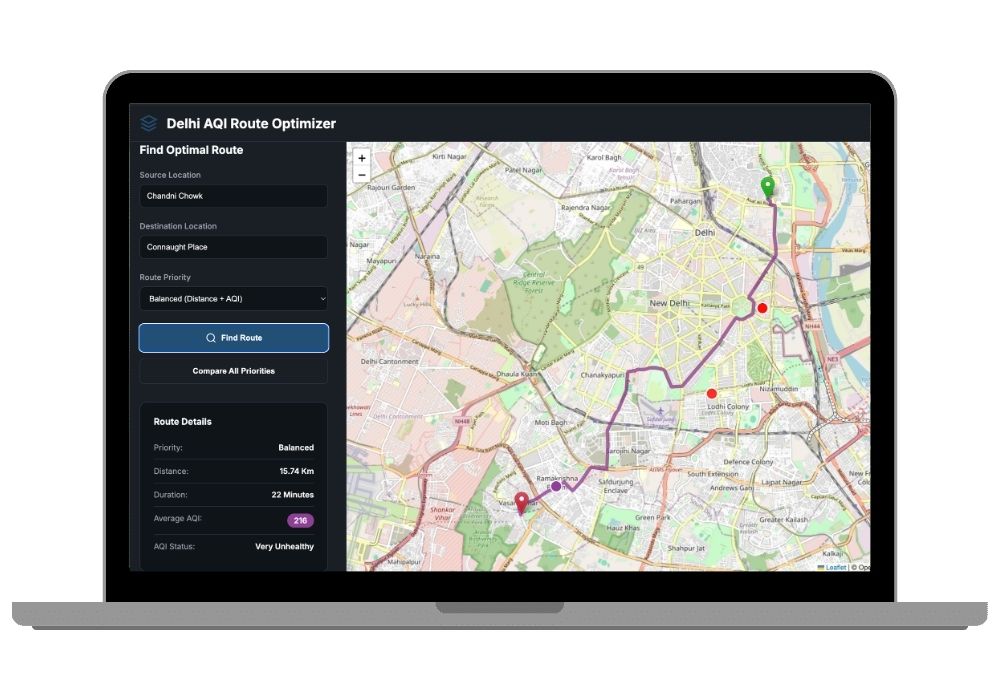
Smart Air Quality Route Planner - AI-Powered Healthy Travel Path Optimizer
An intelligent Django web application that optimizes travel routes by analyzing real-time air quality data, helping users find the healthiest and most efficient paths while avoiding pollution hotspots.
Technology Used
Django 5.0.1 | Python | OpenRouteService API | WAQI API | NumPy | Pandas | SciPy | Scikit-learn | Folium | Matplotlib | Seaborn | GeoPy | SQLite | HTML5 | CSS3 | JavaScript | Bootstrap


Project Files
Project Overview
The Smart Air Quality Route Planner is a cutting-edge web application designed for final year college students and developers seeking unique Python projects. This innovative system combines real-time air quality monitoring with advanced routing algorithms to help users make informed travel decisions based on both distance and air pollution levels.
Key Features
- Real-Time Air Quality Integration: Fetches live pollution data from WAQI API to provide accurate air quality information along routes
- Multi-Priority Route Optimization: Choose between shortest distance, cleanest air quality, or balanced routing based on your preferences
- Intelligent Dijkstra Algorithm: Uses advanced graph-based optimization to calculate optimal paths considering multiple factors
- Interactive Map Visualization: Beautiful, responsive maps powered by Folium library showing routes and air quality indicators
- AI-Powered Predictions: Machine learning models predict air quality in areas with missing data using scikit-learn
- User History Management: Track and save your favorite routes for quick access and pattern analysis
- Geocoding Support: Seamlessly converts addresses to coordinates for accurate route calculation
- Data Visualization: Comprehensive charts and graphs showing air quality trends using Matplotlib and Seaborn
Perfect For Final Year Students
This project is an excellent choice for final year college projects, combining multiple cutting-edge technologies including Django web development, machine learning, API integration, and geospatial analysis. It demonstrates practical applications of computer science concepts in solving real-world environmental challenges.
Real-World Applications
- Health-Conscious Navigation: Ideal for people with respiratory conditions who need to avoid high-pollution areas
- Urban Planning: City planners can analyze air quality patterns and optimize public transportation routes
- Delivery Services: Companies can optimize delivery routes considering both efficiency and driver health
- Fitness Enthusiasts: Runners and cyclists can find the cleanest routes for outdoor activities
- Environmental Research: Researchers can study pollution distribution patterns across urban areas
- Smart City Integration: Can be integrated into smart city initiatives for better urban mobility
Advanced Technology Stack
Built with Django 5.0.1 framework, this project leverages powerful APIs including OpenRouteService for routing and WAQI for air quality data. The machine learning component uses NumPy, Pandas, and scikit-learn for predictive analytics, while GeoPy handles geospatial operations. The interactive frontend features Folium-based maps with real-time data visualization.
Project Highlights
- Complete end-to-end web application with professional UI
- RESTful API integration for external data sources
- Machine learning models for air quality prediction
- Responsive design that works on all devices
- Secure user authentication and data management
- Scalable architecture for future enhancements
Technical Features
- Backend Architecture: Django MVC pattern with organized service layer
- Database: SQLite/PostgreSQL for efficient data storage
- API Integration: Multiple external APIs with error handling and fallback mechanisms
- ML Pipeline: Trained models with feature importance analysis and model comparison
- Data Processing: Advanced data manipulation using Pandas and NumPy
- Visualization: Interactive maps and statistical charts for data insights
Learning Outcomes
Students working with this project will gain expertise in:
- Full-stack web development using Django framework
- RESTful API design and third-party API integration
- Machine learning model training and deployment
- Geospatial data processing and visualization
- Algorithm implementation (Dijkstra's shortest path)
- Database design and ORM operations
- User authentication and session management
- Frontend-backend integration
Social Impact
This project addresses critical environmental and health concerns by empowering users to make informed decisions about their travel routes. By promoting awareness of air quality and providing tools to avoid pollution, it contributes to public health improvement and environmental consciousness.
Future Enhancement Possibilities
- Mobile app development for iOS and Android
- Real-time traffic integration for more accurate ETAs
- Advanced ML models using deep learning
- User preference learning and personalization
- Time-based air quality forecasting
- Social features for route sharing and community recommendations
- Integration with fitness tracking apps
- Voice-guided navigation
Why Choose This Project?
This is one of the best Python projects for final year students because it combines multiple trending technologies, solves a real-world problem, and demonstrates both technical expertise and social awareness. The project is unique, scalable, and impressive for academic presentations and job interviews.
Extra Add-Ons Available – Elevate Your Project
Add any of these professional upgrades to save time and impress your evaluators.
Project Setup
We'll install and configure the project on your PC via remote session (Google Meet, Zoom, or AnyDesk).
Source Code Explanation
1-hour live session to explain logic, flow, database design, and key features.
Want to know exactly how the setup works? Review our detailed step-by-step process before scheduling your session.
₹1499
Custom Documents (College-Tailored)
- Custom Project Report: ₹1,200
- Custom Research Paper: ₹1000
- Custom PPT: ₹500
Fully customized to match your college format, guidelines, and submission standards.
Project Modification
Need feature changes, UI updates, or new features added?
Charges vary based on complexity.
We'll review your request and provide a clear quote before starting work.