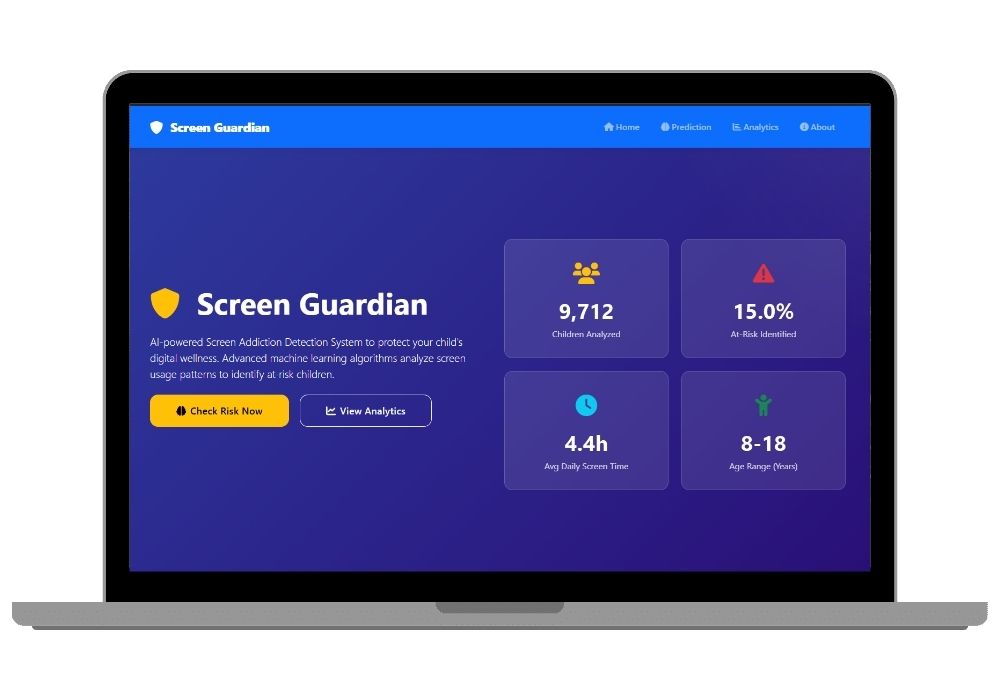
Screen Guardian: AI-Powered Child Screen Addiction Risk Detection System
AI-powered tool to detect screen addiction in kids (8–18) using K-Means, DBSCAN & Isolation Forest for real-time risk analysis and personalized recommendations.
Technology Used
Python | Flask | Scikit-learn | Pandas | NumPy | Plotly | Plotly.js | Chart.js | Bootstrap 5 | HTML5 | CSS3 | JavaScript ES6+ | Font Awesome | K-Means Clustering | DBSCAN | Isolation Forest | StandardScaler | LabelEncoder

Project Files
Screen Guardian: Revolutionizing Digital Wellness for Children
In today’s hyper-connected world, children aged 8–18 are spending more time than ever on digital devices. Screen Guardian is a cutting-edge web application powered by artificial intelligence that proactively identifies early signs of screen addiction using advanced machine learning algorithms.
🚀 Key Features
🤖 AI-Powered Risk Assessment
Utilizing K-Means Clustering, DBSCAN, and Isolation Forest, Screen Guardian analyzes behavioral patterns to detect anomalies and classify risk levels with high accuracy. Each prediction includes a confidence score and real-time insights.
📊 Interactive Analytics Dashboard
Built with Plotly.js and Chart.js, the dashboard delivers stunning visualizations of usage trends, risk distribution, and health impact metrics. Fully responsive design ensures seamless access across mobile and desktop devices.
🎯 Personalized Recommendations
Based on the risk level, the system generates tailored intervention strategies — from screen time reduction tips to mental health guidance and professional consultation alerts.
🔒 Secure & Production-Ready
Engineered with robust input validation, error handling, and API security practices. Easily integrable with parental control systems or school monitoring platforms.
🌐 Real-World Applications
- Schools & Educational Institutions: Monitor student digital habits and promote healthy tech use.
- Parents & Guardians: Get actionable insights to protect their child’s mental and physical well-being.
- Child Psychologists: Use data-driven reports for diagnosis and therapy planning.
- Healthcare Providers: Integrate into pediatric digital wellness programs.
💡 Why Choose This Project?
This project is not just a prototype — it's a fully functional, scalable solution built with industry-standard tools and best practices. Whether you're a developer, educator, or entrepreneur, Screen Guardian offers immense value for research, product development, or commercialization.
Perfect for those looking to build AI-powered health tech applications, understand ML model deployment, or create impactful EdTech solutions.
Extra Add-Ons Available – Elevate Your Project
Add any of these professional upgrades to save time and impress your evaluators.
Project Setup
We'll install and configure the project on your PC via remote session (Google Meet, Zoom, or AnyDesk).
Source Code Explanation
1-hour live session to explain logic, flow, database design, and key features.
Want to know exactly how the setup works? Review our detailed step-by-step process before scheduling your session.
₹999
Custom Documents (College-Tailored)
- Custom Project Report: ₹1,200
- Custom Research Paper: ₹1000
- Custom PPT: ₹500
Fully customized to match your college format, guidelines, and submission standards.
Project Modification
Need feature changes, UI updates, or new features added?
Charges vary based on complexity.
We'll review your request and provide a clear quote before starting work.