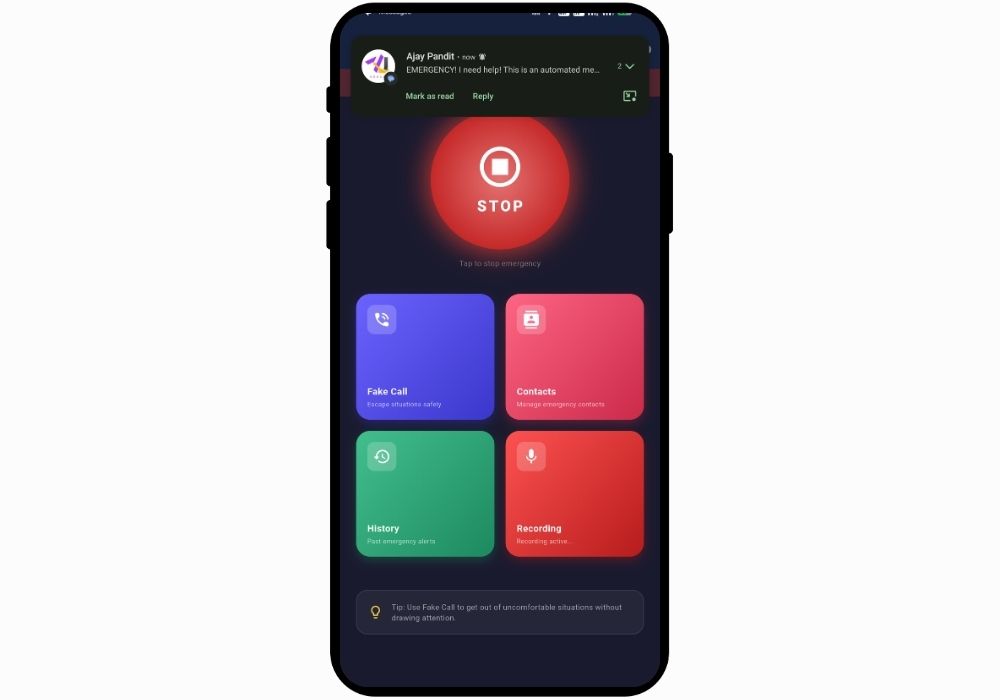
SafeHer - Women Safety SOS App with Fake Call, Audio Evidence and Live Location Sharing | Flutter Final Year Project
A full-featured women safety mobile application built with Flutter that combines one-tap SOS alerts, silent emergency SMS with GPS location, automatic audio recording, fake call simulation, and emergency history logging. Ready-to-submit final year project
Technology Used
Flutter | Dart | Geolocator | Geocoding | SharedPreferences | flutter_contacts | flutter_sound | permission_handler | url_launcher | Android SmsManager (Method Channel) | Google Maps Integration


Project Files
SafeHer is a personal safety application developed using Flutter and Dart, built specifically for women who want reliable, instant access to emergency tools on their smartphone. The app works without needing an internet connection for its core SOS feature, and every action is designed to happen silently so it can be used even in threatening situations where the user cannot draw attention to their phone.
This is not a concept app or prototype. It is a fully working mobile application with real SMS delivery, GPS tracking, audio recording, and a fake call system that looks and behaves like a genuine incoming phone call. If you are a BCA, MCA, BTech CSE, or BSc IT student searching for a mobile app project for your final year submission, this one covers multiple domains including mobile development, location services, native platform channels, and real-time media handling.
How the SOS System Works
When the user taps the SOS button on the home screen, the app runs a sequence of actions in the background without any further input needed. It fetches the phone's current GPS coordinates using the Geolocator package, then converts those coordinates into a readable street address through reverse geocoding. After that, it loads all saved emergency contacts from local storage and sends a silent emergency SMS to every single contact at the same time. Each SMS includes a direct Google Maps link pointing to the user's exact location. The entire process happens through Android's native SmsManager via a custom Method Channel, meaning the message goes out without opening the messaging app or requiring the user to press "send" again.
Alongside the SMS dispatch, the app automatically starts recording audio through the device microphone. This recording captures whatever is happening around the user and saves it as an AAC file with a timestamped filename. The idea is simple: if something goes wrong, there is audio evidence stored on the device.
Emergency Contacts Management
Users can add emergency contacts in two ways. They can type in a name and phone number manually, or they can pull contacts directly from the device's phonebook using the flutter_contacts package. There is no sign-up, no cloud account, and no internet dependency. All contact data stays on the phone using SharedPreferences with JSON serialization. Any contact can be marked as primary for quick identification. When an SOS alert fires, every saved contact receives the emergency SMS regardless of primary status.
Fake Call Feature
This is one of the most practical features in the app. Sometimes the safest way out of a bad situation is a believable excuse to leave. The fake call system lets the user set a custom caller name and phone number, then choose when the call should ring: immediately, after 30 seconds, 1 minute, 2 minutes, or 5 minutes. During the delay, a live countdown timer is displayed with a cancel option.
When the timer hits zero, the app opens a full-screen incoming call UI with a ringing animation, animated dots, and two buttons to accept or decline. If the user accepts, the screen switches to an active call view showing a running call timer along with Mute, Speaker, and Keypad controls. The entire experience is designed to look like a real phone call to anyone nearby. This kind of feature is difficult to find in most final year project source codes available online, which makes it a strong differentiator during your viva or project evaluation.
Location Services
The app uses the geolocator package to fetch high-accuracy GPS coordinates and the geocoding package for reverse geocoding. On the home screen, a location readiness indicator tells the user whether their GPS is active and locked. Every SOS SMS includes a Google Maps link formatted as https://maps.google.com/?q=lat,lon, so the recipient can open the exact location directly in their phone's map app.
Emergency History and Logging
Every time an SOS is triggered, the app logs the event with a timestamp, GPS coordinates, the resolved street address, and whether audio recording was active during that session. All past alerts are visible in a scrollable history screen. Users can tap the map icon on any entry to open that specific location in Google Maps. Each log entry also shows whether the emergency was still active or had been resolved.
Audio Recording Module
Besides automatic recording during SOS events, the audio recorder can be started and stopped manually from the home screen. A live microphone status card on the home screen shows whether recording is currently active. All recordings are saved in AAC format, which keeps file sizes manageable while maintaining decent audio quality. This module uses the flutter_sound package.
Platform Differences
On Android, the app sends SMS silently in the background using a native Kotlin Method Channel that calls SmsManager.sendMultipartTextMessage(). No user action is needed after granting the SMS permission once. On iOS, Apple does not allow apps to send SMS without user confirmation, so the app opens the Messages app with the emergency text pre-filled as a fallback. Location services and the fake call feature work on both platforms without restrictions.
Why This Project Stands Out for Academic Submission
Most women safety app projects available for final year submissions stop at a basic SOS button that sends an SMS. This project goes well beyond that. It includes native platform integration through Method Channels, real-time GPS with geocoding, automated audio evidence collection, and a polished fake call UI with timed scheduling. If your college expects you to demonstrate knowledge of Flutter app development with native Android integration, this project covers that ground thoroughly.
The codebase follows a clean feature-based architecture with separate directories for each module: home, contacts, history, fake_call, location, and recording. This makes it easy to explain during your viva and also easy for your guide to review. The project structure is something most evaluators appreciate because it shows you understand how production-grade apps are organized.
Who Should Buy This Project
This project is a good fit for students pursuing BCA, MCA, BTech Computer Science, or BSc IT who need a mobile application project with real-world functionality. It also works well for students looking for a project that touches multiple technical areas at once, including cross-platform mobile development, GPS and mapping, native OS integration, local data persistence, and media recording. If you need help setting it up on your machine or want a detailed walkthrough of the code, CodeAj offers one-on-one project setup and source code explanation sessions via Google Meet.
We also provide complete project mentorship that covers everything from code explanation to documentation, presentation coaching, and support until your final submission is done. If you need a project report, research paper, or PPT prepared in your college's format, that is available too.
Extra Add-Ons Available – Elevate Your Project
Add any of these professional upgrades to save time and impress your evaluators.
Project Setup
We'll install and configure the project on your PC via remote session (Google Meet, Zoom, or AnyDesk).
Source Code Explanation
1-hour live session to explain logic, flow, database design, and key features.
Want to know exactly how the setup works? Review our detailed step-by-step process before scheduling your session.
₹1999
Custom Documents (College-Tailored)
- Custom Project Report: ₹1,200
- Custom Research Paper: ₹1000
- Custom PPT: ₹500
Fully customized to match your college format, guidelines, and submission standards.
Project Modification
Need feature changes, UI updates, or new features added?
Charges vary based on complexity.
We'll review your request and provide a clear quote before starting work.