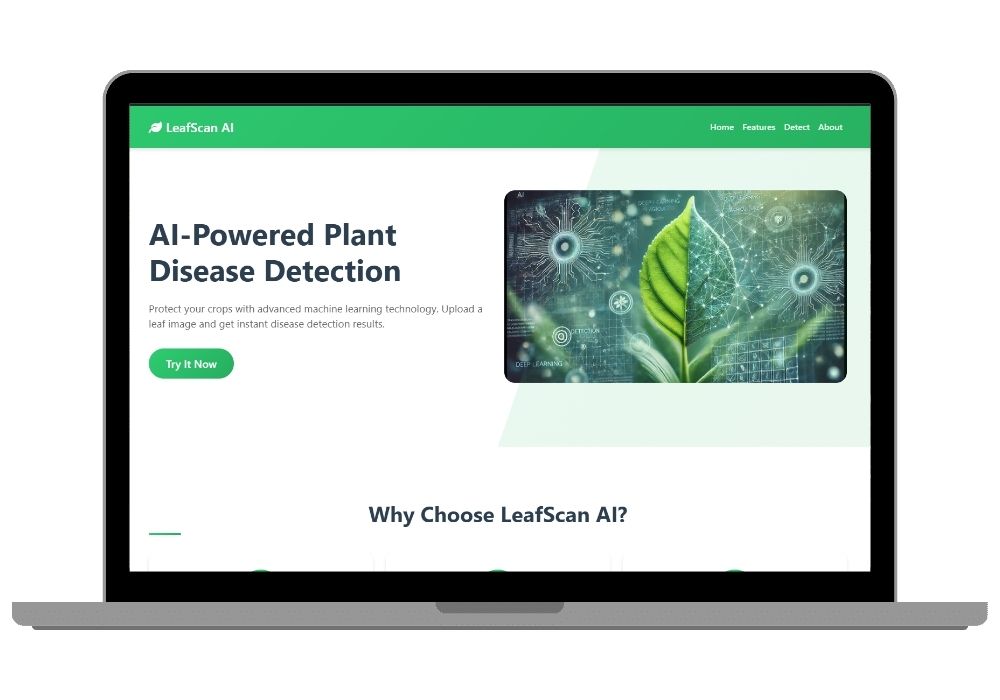
LeafScan AI - Plant Disease Detection System Using Deep Learning
LeafScan AI uses deep learning to detect 33 types of leaf diseases across 9 plant species with up to 96% accuracy. Ideal for agricultural professionals and farmers.
Technology Used
Flask | Python | TensorFlow | Keras | OpenCV | HTML5 | CSS3 | JavaScript | Bootstrap 5 | AOS


Project Files
Project Overview
LeafScan AI is a state-of-the-art plant disease detection system designed for agricultural professionals, researchers, and farming enthusiasts. Built using Flask, modern web technologies, and powered by deep learning models, this tool helps users identify and classify 33 different types of leaf diseases across 9 plant species.
🔍 Key Features
- Advanced Disease Detection: Leverages deep learning and transfer learning for accurate results.
- High Accuracy: Achieves up to 96% classification accuracy for plant diseases.
- Real-time Analysis: Instant detection with confidence scores displayed on the UI.
- Responsive Design: Works seamlessly on both desktop and mobile devices.
- Drag & Drop Interface: Easy image upload system for quick diagnosis.
- Detailed Results: Clear visualization of predictions including confidence percentages.
🌱 Supported Plants
LeafScan AI supports the following plant species:
- Apple
- Cherry
- Corn
- Grape
- Peach
- Pepper
- Potato
- Strawberry
- Tomato
⚡ Technology Stack
This powerful application is built using a robust combination of backend and frontend technologies:
- Backend: Flask (Python)
- Frontend: HTML5, CSS3, JavaScript
- AI/ML: TensorFlow, Keras
- Image Processing: OpenCV
- UI Framework: Bootstrap 5
- Animations: AOS (Animate On Scroll)
🧰 Installation Guide
To install and run LeafScan AI locally, follow these steps:
1. Extract the repository:
Extract the downloaded zip file
cd leaf-diseases-detect

2. Create a virtual environment (recommended):
python -m venv venv
source venv/bin/activate  # For Linux/Mac
venv\\Scripts\\activate     # For Windows

3. Install required dependencies:
pip install -r requirements.txt
🚀 Usage Instructions
1. Start the Flask application:
python app.py

2. Navigate to http://localhost:5000 in your browser.

3. Upload an image of a leaf using the drag & drop or file browser interface.

4. Wait for the AI model to analyze the image and display the result with confidence score.
🧠 Model Details
The core of LeafScan AI is a pre-trained deep learning model optimized for real-time inference. It has been trained on a comprehensive dataset of plant leaf images and provides:
- Support for 33 leaf diseases
- Confidence scores for each prediction
- Fast and accurate results
🔗 API Documentation
LeafScan AI also offers a RESTful API endpoint for integration into other systems:
POST /predict
Request Format:
- Method: POST
- Content-Type: multipart/form-data
- Body: file (image file)
Response Format:
{
    \"success\": true,
    \"prediction\": \"Disease Name\",
    \"confidence\": 95.5,
    \"image_path\": \"path/to/image\"
}
📷 Best Practices for Image Upload
To ensure optimal detection performance, follow these best practices when uploading images:
- Use clear, well-lit images
- Focus on a single leaf
- Ensure the leaf fills most of the frame
- Use supported file formats (JPG, JPEG, PNG)
- Keep file size under 16MB
Extra Add-Ons Available – Elevate Your Project
Add any of these professional upgrades to save time and impress your evaluators.
Project Setup
We'll install and configure the project on your PC via remote session (Google Meet, Zoom, or AnyDesk).
Source Code Explanation
1-hour live session to explain logic, flow, database design, and key features.
Want to know exactly how the setup works? Review our detailed step-by-step process before scheduling your session.
₹1499
Custom Documents (College-Tailored)
- Custom Project Report: ₹1,200
- Custom Research Paper: ₹1000
- Custom PPT: ₹500
Fully customized to match your college format, guidelines, and submission standards.
Project Modification
Need feature changes, UI updates, or new features added?
Charges vary based on complexity.
We'll review your request and provide a clear quote before starting work.