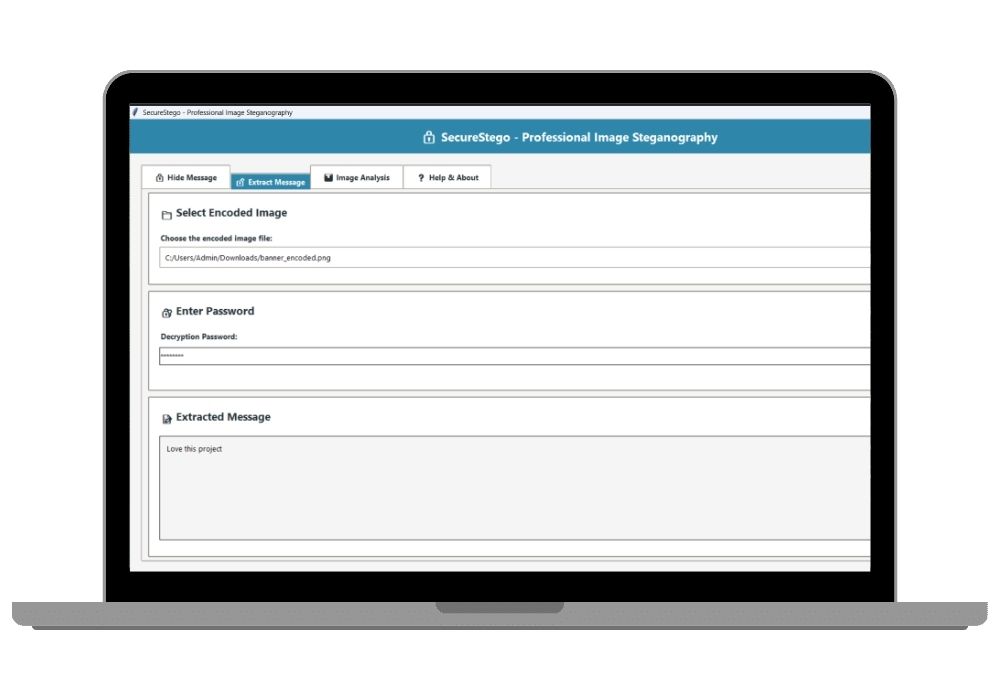
Secure Image Steganography with AES-256 Encryption – A Final Year Python Project for Cybersecurity Enthusiasts
Hide secret messages securely inside images using AES-256 encryption and LSB steganography. This advanced Python-based project is perfect for final year students seeking a unique, secure, and real-world applicable project with GUI & CLI support.
Technology Used
Python | AES-256 | LSB Steganography | Tkinter (GUI) | CLI | PIL/Pillow | PyCryptodome | Base64 | PSNR Analysis | Git


Project Files
Overview
Looking for a best Python project that combines cybersecurity, cryptography, and digital forensics? This Image Steganography with Encryption project is a cutting-edge solution designed for final year engineering and computer science students. It enables users to securely hide encrypted messages within image files using advanced AES-256 encryption and Least Significant Bit (LSB) steganography techniques.
Why This is the Best Final Year Project?
- Real-World Application: Used in secure data transmission, military communication, and digital watermarking.
- Highly Secure: Messages are encrypted using AES-256-CBC before embedding, making it nearly impossible to crack.
- Two Interfaces: Comes with both GUI (Graphical User Interface) and CLI (Command Line Interface) for flexibility.
- Perfect for Final Year College Projects: Well-documented, modular code, and supports full project report & explanation add-ons.
- Unique Project Idea: Stands out among typical college projects like chat apps or CRUD systems.
Key Features
- AES-256 Encryption: All messages are encrypted using industry-standard AES-256 with PBKDF2 key derivation.
- LSB Steganography: Data is hidden in the least significant bits of pixel values, making it invisible to the human eye.
- Supports Multiple Formats: Works with PNG, JPEG, BMP, and TIFF images (PNG recommended for lossless embedding).
- Capacity Checker: Automatically calculates how much data can be hidden in a given image.
- PSNR Analysis: Measures image quality after steganography to ensure minimal distortion.
- CLI & API Support: Ideal for automation, scripting, and integration into larger systems.
- Open-Source & Extensible: Easy to modify and enhance with new features like QR embedding or multi-layer encryption.
Applications & Use Cases
- Secure communication in defense and intelligence
- Digital watermarking for copyright protection
- Data hiding in cloud storage for privacy
- Academic research in cybersecurity and cryptography
- Ideal for final year projects in CSE, IT, and Cybersecurity
How It Works
- User inputs a secret message and password.
- The message is encrypted using AES-256 with a randomly generated salt and IV.
- The encrypted data is converted to Base64 and embedded into the image using LSB technique.
- The output image looks identical but contains hidden encrypted data.
- To extract, the user provides the correct password to decrypt and retrieve the original message.
Project Add-Ons (Optional)
When purchasing this project, you can also opt for:
- Project Setup Assistance – We help you install and run the project on your system.
- Source Code Explanation – 1-on-1 session to explain the complete code logic and architecture.
- Project Report & PPT – Professionally written report with diagrams, flowcharts, and presentation slides (ideal for submission).
Who Should Choose This Project?
This is one of the best Python projects for final year students who want to explore:
- Cryptography & Encryption
- Digital Image Processing
- Information Security
- Python GUI Development (Tkinter/PyQt)
- Real-world cybersecurity applications
Extra Add-Ons Available – Elevate Your Project
Add any of these professional upgrades to save time and impress your evaluators.
Project Setup
We'll install and configure the project on your PC via remote session (Google Meet, Zoom, or AnyDesk).
Source Code Explanation
1-hour live session to explain logic, flow, database design, and key features.
Want to know exactly how the setup works? Review our detailed step-by-step process before scheduling your session.
₹999
Custom Documents (College-Tailored)
- Custom Project Report: ₹1,200
- Custom Research Paper: ₹1000
- Custom PPT: ₹500
Fully customized to match your college format, guidelines, and submission standards.
Project Modification
Need feature changes, UI updates, or new features added?
Charges vary based on complexity.
We'll review your request and provide a clear quote before starting work.