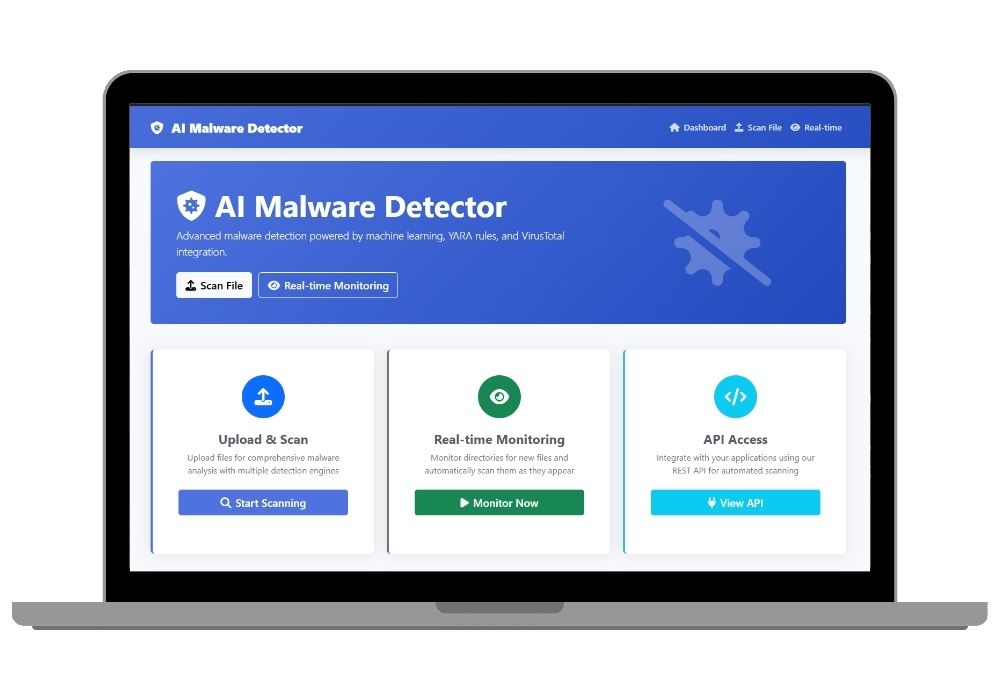
MalwareGuard AI: Real-Time AI-Powered Malware Detection with Flask & TensorFlow
MalwareGuard AI – A Flask-based malware detection system combining static analysis, YARA rules, VirusTotal API, and deep learning for accurate threat detection. Features a web dashboard, real-time monitoring, and REST API.
Technology Used
Flask | TensorFlow | YARA | VirusTotal API | pefile | python-magic | python-magic-bin | scikit-learn | numpy | pandas | requests | HTML | CSS | JavaScript | Jinja2


Project Files
Overview
MalwareGuard AI is a powerful, open-source AI-driven malware detection platform built using Flask, TensorFlow, YARA, and VirusTotal API. It delivers real-time threat analysis for executable files, documents, and compressed archives using a hybrid approach combining machine learning, signature-based scanning, and behavioral heuristics.
Why MalwareGuard AI?
Traditional antivirus tools often rely on outdated signature databases. MalwareGuard AI goes beyond by using deep learning models trained on synthetic yet realistic features, combined with static binary analysis, entropy checks, PE inspection, and dynamic threat intelligence from VirusTotal. This multi-layered approach ensures high detection rates even for zero-day threats.
Key Features
- File Upload & Scan – Upload files up to 100MB and receive instant risk analysis with a final verdict: Benign, Suspicious, or Malicious.
- Real-Time Directory Monitoring – Monitor any folder recursively; new files are automatically scanned upon arrival.
- Static Analysis Engine – Extracts MD5, SHA1, SHA256 hashes, entropy, strings, URLs, emails, and file type using
pefile,python-magic, and custom heuristics. - YARA Rule Scanning – Load custom YARA rules from
data/yara_rules/. Sample rules included for crypto-mining and malware indicators. - VirusTotal Integration – Automatically checks file reputation via hash lookup or upload. Supports API key injection via environment variables.
- AI-Powered Classification – A TensorFlow-based neural network classifies files using 20+ synthetic features. Model auto-trains if missing.
- Weighted Risk Scoring – Final risk score =
0.4*ML + 0.3*YARA + 0.3*VirusTotal, ensuring balanced, intelligent verdicts. - RESTful API – Integrate into CI/CD, SOC workflows, or third-party tools using
POST /api/scanwith multipart upload support. - Web Dashboard – Intuitive UI built with Jinja2 templates for upload, real-time monitoring, and result visualization.
Technology Stack
This project leverages cutting-edge technologies to deliver robust, scalable, and secure malware detection:
- Backend: Flask, Werkzeug
- Machine Learning: TensorFlow 2.13, scikit-learn, numpy, pandas
- Binary Analysis: pefile, python-magic (or python-magic-bin on Windows)
- Threat Intelligence: VirusTotal API v2
- Signature Detection: yara-python
- Frontend: HTML5, Jinja2, CSS, JavaScript
Real-World Applications
- Cybersecurity Firms: Use as a lightweight threat analyzer in SOC environments.
- Academic Research: Study ML-based malware detection and feature engineering.
- DevOps & CI/CD: Integrate into pipelines to scan build artifacts before deployment.
- Incident Response: Deploy in isolated VMs for forensic file analysis.
- Enterprises: Monitor shared folders or user uploads for suspicious content.
How It Works
- File Upload – User uploads a file via web UI or API.
- Static Feature Extraction – Extracts file size, entropy, imports, sections, strings, and hashes.
- YARA Scanning – Matches against active YARA rules; generates risk score.
- VirusTotal Check – Queries VT for existing reports or uploads the file.
- ML Prediction – Scales features and runs through a trained neural network.
- Final Verdict – Aggregates scores into a final risk score and classification.
- Result Display – Shows detailed report with confidence, matches, and hashes.
Security & Privacy
All uploaded files are automatically deleted after scanning. For API usage, files are not stored. However, VirusTotal may retain uploaded files—ensure compliance with your organization's data policies. Always run this tool in an isolated environment (e.g., VM or sandbox) when analyzing untrusted binaries.
Extensibility & Customization
MalwareGuard AI is designed for developers and security professionals:
- Add custom YARA rules to
data/yara_rules/. - Extend feature extraction in
models/feature_extractor.py. - Retrain the model with real-world datasets using
train_model.py. - Adjust risk weights in
app.pyfor your threat model.
Pro Tip:
Replace the synthetic dataset with real malware/benign samples for production use. Combine with sandboxing tools like Cuckoo for dynamic analysis.
Extra Add-Ons Available – Elevate Your Project
Add any of these professional upgrades to save time and impress your evaluators.
Project Setup
We'll install and configure the project on your PC via remote session (Google Meet, Zoom, or AnyDesk).
Source Code Explanation
1-hour live session to explain logic, flow, database design, and key features.
Want to know exactly how the setup works? Review our detailed step-by-step process before scheduling your session.
₹1299
Custom Documents (College-Tailored)
- Custom Project Report: ₹1,200
- Custom Research Paper: ₹1000
- Custom PPT: ₹500
Fully customized to match your college format, guidelines, and submission standards.
Project Modification
Need feature changes, UI updates, or new features added?
Charges vary based on complexity.
We'll review your request and provide a clear quote before starting work.